When switch-on the spot, the display makes an itself reset for few seconds. After the reset, it will be possible enter in the display
functions simply pushing in sequence the buttons ESC-DOWN-UP-ENTER ( the keys 1234).
All'accensione dell'apparecchio, i diplay faranno un ciclo di reset per poi posizionarsi nella configurazione di default, per accedere
al SET-UP inserire il codice 1234 toccando in sequenza i punti ESC-DOWN-UP-ENTER a questo punto si potrà effettuare il set-up
dell'apparecchio a mezzo degli stessi tasti.
eng
ita
CONTROL PANEL
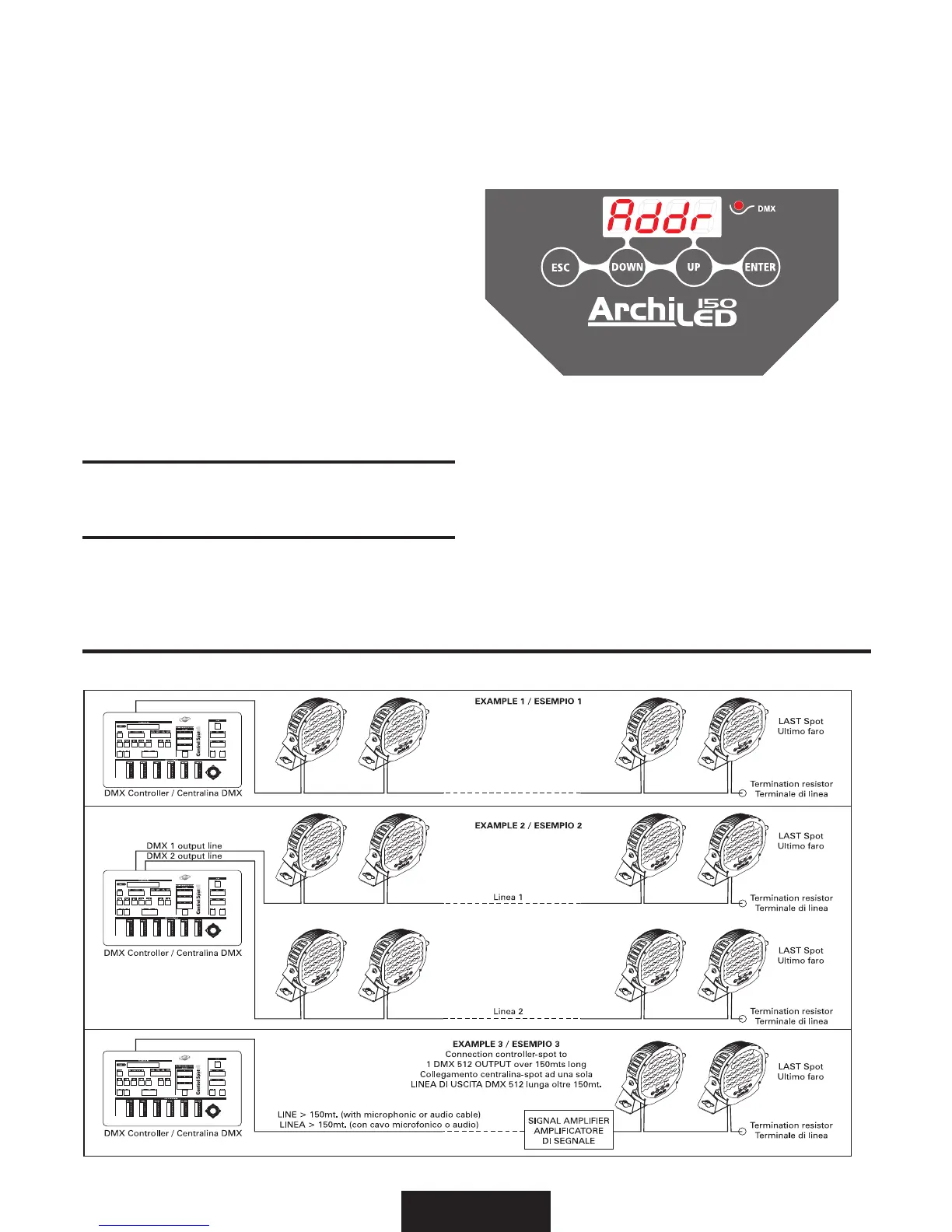
On the frontal glass of the Archiled you can find the control panel for Setup: it includes 4 touch-screen keys, one display, 4 leds
and also one monitor led to inform about the DMX signal.
Sul frontale in vetro dell’ArchiLed troverete il pannello dei comandi per il SetUp composto da 4 tasti touch-screen ed un display e 4
led inoltre un led di monitor per la presenza del segnale DMX.
LED
• “DMX” led -------------------- ashing: DMX input present / presenza del segnale DMX
off: no DMX input / DMX assente
BUTTONS
Four buttons are used to programme the spot:
Usare i quattro pulsanti per la programmazione:
• ESC - exit from menu and return to a previus menu level
- esce dal menu e torna ad un livello inferiore
• DOWN - to go backward in the selected options
- scorrimento indietro
• UP - to go forward in the selected options
- scorrimento avanti
• ENTER - to confirm the selected options
- conferma delle opzioni selezionate
• UP + DOWN = Fixture reset
reset dell’apparecchio
DISPLAY
Shows the various menus and the selected options.
Mostra i vari menu e le opzioni selezionate.
EXAMPLE OF CONNECTION DMX CONTROLLER-SPOT / ESEMPIO DI COLLEGAMENTO CENTRALINA-FARI


 To Next Page
 Loading...