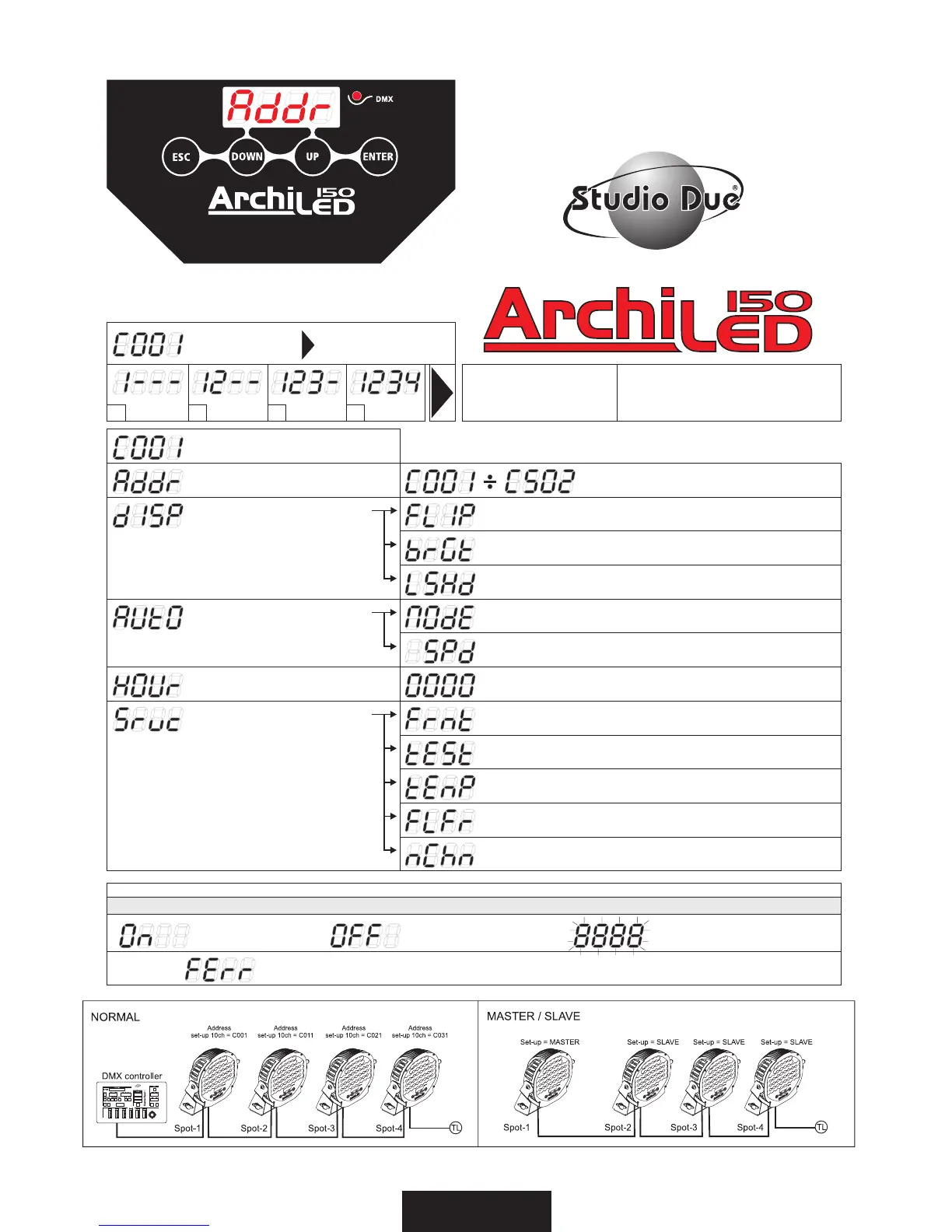
- Addr=Address/Indirizzo DMX
- C001=CH-Default
Press ESC to start
UNLOCK sequence
Premere ESC per iniziare
1---/-2--/--3-/---4
For enable menù functions
Per entrare nel menù
ESC/DOWN/UP/ENTER
ESC DOWN UP ENTER
- On=ON/Activated
- FErr=Format ERROR // // RESET OR CONTACT StudioDue DISTRIBUTOR // //
- OFF=OFF/Disarmed
- PULSE= To confirm ENTER
- MOdE=no (normal), SL (slave), PR01.. PR n° (games)
(enter)
- Spd= 1”0 (sec.)... 25”5 (sec.) (Enter)
- 0000=Fixture hours/ore di lavoro apparecchio
- FLIP=on/off for 180° rotation display/rotazione display
- brGt= brightness level/livello luminosità display
- LSHd=on/off Led shutdown/spegnimento led (30sec.)
- tEmP=°C-inside temperature/temperatura interna (enter)
- FLFr=F1/F2-TV camera Flicker Free /per uso TV camera
- MOD 1-MOD 2
-Frmt=restart factory default/config. di fabbrica (enter)
- tESt=auto test function (enter)
-AUtO=Automatic mode
- HOUr=times of job
- DISP=display function
- Srvc=service
1° 2° 3° 4°


 To Next Page