13
rel.1 - 07/16 - Studio Due
NFOV4FSWJDF4SWD4FSWJDFGVODUJPOT'VO[JPOJEJTFSWJ[JP
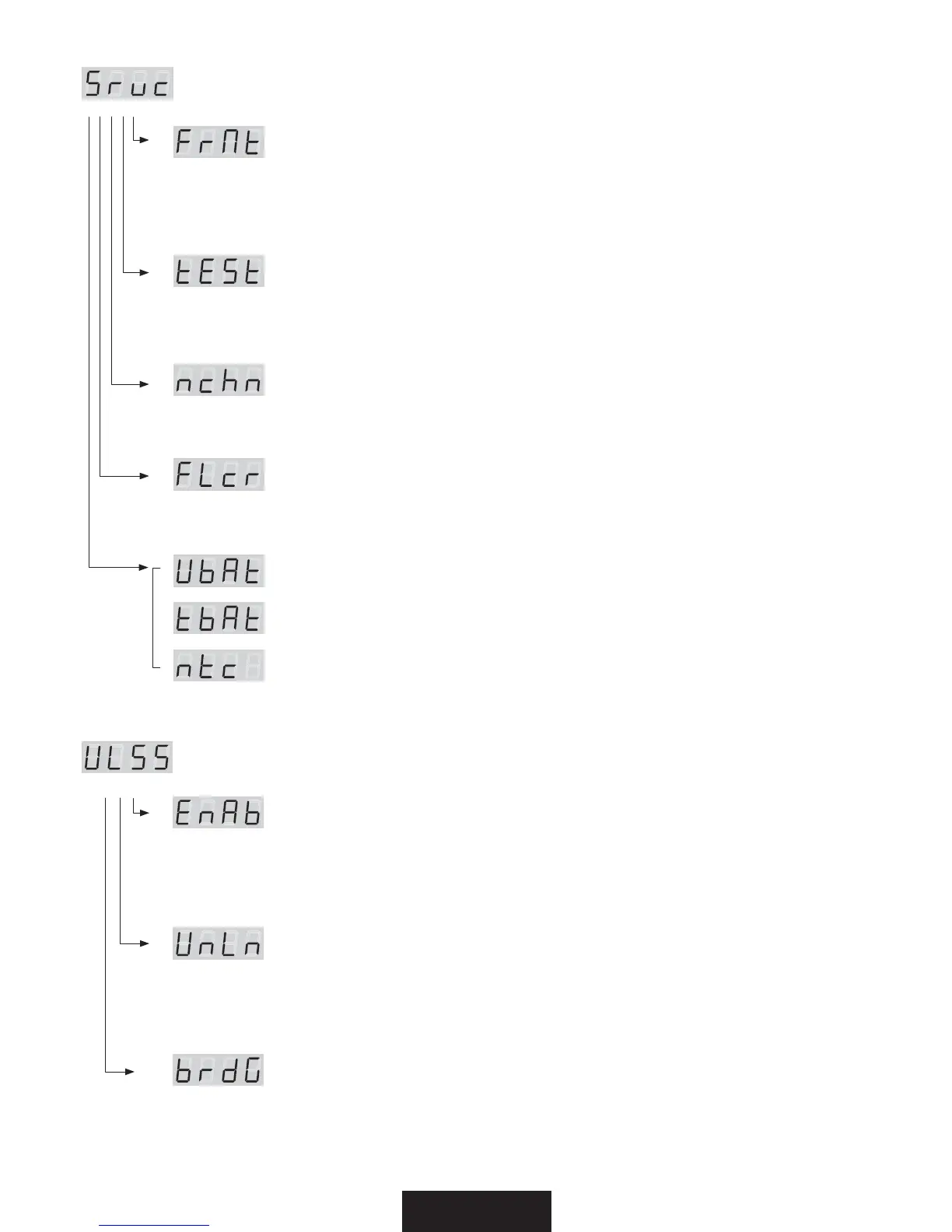
press ENTER for submenu / premere ENTER per i sottomenu
(FrMt)
Restore the factory setting (Require confirmation) '.
Ripristina le impostazioni di fabbrica (Viene chiesta conferma) '.
> Select the value off .. on with the UP/DOWN buttons. Press ENTER.
> Selezionate il valore desiderato off .. on con i tasti UP/DOWN. Premere ENTER.
(tESt)
Enables the fixture test and execute a factory program to check the right functioning.
Abilita il test dell’apparecchio ed esegue un programma di fabbrica per verificarne il funzionamento
> Select the value UPO with the UP/DOWN buttons. Press ENTER.
> Selezionate il valore desidarato UPO con i tasti UP/DOWN. Premere ENTER.
(nchn)
Set the DMX channels of the fixture / Imposta il numero di canali DMX dell’apparecchio
> Select the value 9 .. 5 .. 4 with the UP/DOWN buttons. Press ENTER. (see DMX channel page)
> Selezionate il valore desidarato 9 .. 5 .. 4 con i tasti UP/DOWN. Premere ENTER.
(vedere pag. canali DMX)
'-DSFlicker free function / Funzione flicker free
from 2.09 software version / dalla versione software 2.09
> Select the value f1 .. f2 with the UP/DOWN buttons. Press ENTER.
> Selezionate il valore desidarato f1 .. f2 con i tasti UP/DOWN. Premere ENTER.
Studio Due service parameters (service personnel only) /
Parametri di servizio Studio Due (solo personale di servizio)
NFOV8JSFMFTT8-448JSFMFTTGVODUJPOT'VO[JPOJXJSFMFTT
press ENTER for submenu / premere ENTER per i sottomenu
&O"C&OBCMFXJSFMFTT
Enable or disable the wireless reception / Consente o non consente la ricezione wireless
The cable reception is disabled / La ricezione via cavo viene disabilitata
> Select the value on .. off .. with the UP/DOWN buttons. Press ENTER.
> Selezionate il valore desidarato on .. off .. con i tasti UP/DOWN. Premere ENTER.
6O-O6OMJOLUSBOTNJTTJPO
Remove the link from the fixture to the associated transmitter / Elimina il link tra
l’ apparecchio e il trasmettitore al quale è stato associato
> Select the value on .. off .. with the UP/DOWN buttons. Press ENTER.
> Selezionate il valore desidarato on .. off .. con i tasti UP/DOWN. Premere ENTER.
CSE(#SJEHFGVODUJPO
If wireless is ON, enable the transmission of the received data by cable to the other fixtures /
Se il wireless è attivo, consente la trasmissione dati agli altri apprecchi collegati via cavo.
> Select the value on .. off .. with the UP/DOWN buttons. Press ENTER.
> Selezionate il valore desidarato on .. off .. con i tasti UP/DOWN. Premere ENTER.


 To Next Page
 Loading...