12
rel.1 - 07/16 - Studio Due
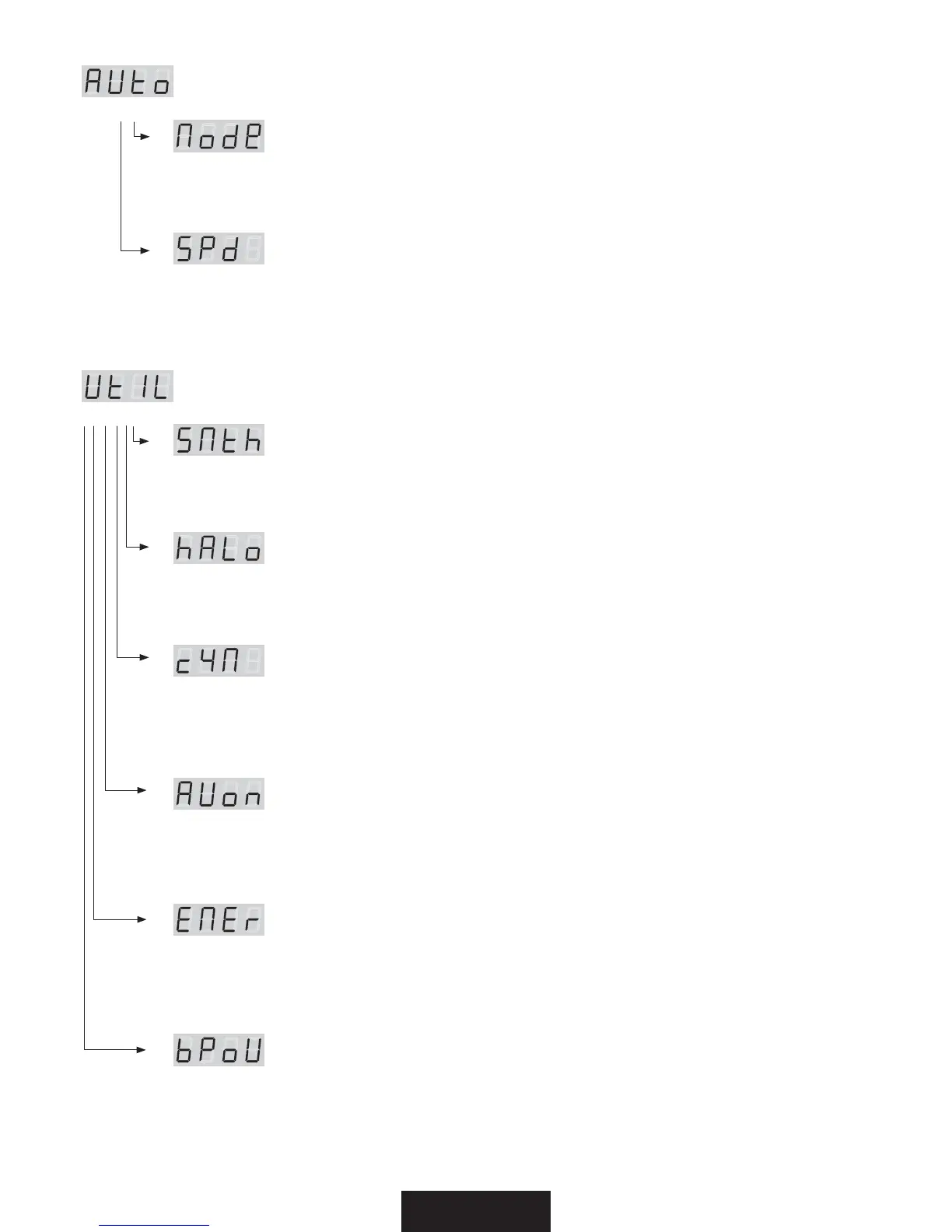
NFOV"VUP"6UP"VUPNPEFGVODUJPOT'VO[JPOJBVUPNPEF
press ENTER for submenu / premere ENTER per i sottomenu
(Mode)
Set the DMX/SLAVE/MASTER mode / Imposta la modalità DMX/SLAVE/MASTER
> Select the value no .. sl .. pr01 .. pr02 .. with the UP/DOWN buttons. Press ENTER.
> Selezionate il valore desidarato no .. sl .. pr01 .. pr02 .. con i tasti UP/DOWN. Premere ENTER.
(SPd)
Set the preset execution speed / Imposta la velocità di esecuzione dei giochi interni
> Select the value +400% .. with the UP/DOWN buttons. Press ENTER.
> Selezionate il valore desiderato +400% .. con i tasti UP/DOWN. Premere ENTER.
NFOV6UJMJUZ6U*-6UJMJUZGVODUJPOT'VO[JPOJEJVUJMJUµ
press ENTER for submenu / premere ENTER per i sottomenu
(SMth)
Set the interpolation type for the smooth dimming function
Imposta il tipo di interpolazione per la funzione smooth dimming
> Select the value oFF .. -P8 .. MId .. hIGh with the UP/DOWN buttons. Press ENTER.
> Selezionate il valore desidarato oFF .. -P8 .. MId .. hIGh con i tasti UP/DOWN. Premere ENTER.
I"-P
Set the alogen simulation function mode
Imposta il funzionamento della modalità simulazione lampada alogena
> Select the value oFF .. MId1 .. MId2 with the UP/DOWN buttons. Press ENTER.
> Selezionate il valore desiderato oFF .. MId1 .. MId2 con i tasti UP/DOWN. Premere ENTER.
DZ.
Set the fixture to work in CYM or RGB emulation system
Imposta l’apparecchio per funzionare come emulatore di sistema CYM o RGB
(see DMX channels page - vedere pag. canali DMX)
> Select the value off >> RGB or on >> $:. with the UP/DOWN buttons. Press ENTER.
> Selezionate il valore desiderato off >> RGB or on >> $:. con i tasti UP/DOWN. Premere ENTER.
"6POBVUPPOEFGBVMUJTPGG
Set the auto switch on when you connect the fixture to the Main Power.
L’apparecchio si accende automaticamente quando si collega alla rete elettrica.
> Select the value with the UP/DOWN buttons: off >> OPBVUPTXJUDIPO or on >> BVUPTXJUDIPO. Press ENTER.
> Selezionate il valore desiderato con i tasti UP/DOWN: con off >> non si accende automaticamente oppure
con on >> si accende automaticamente. Premere ENTER.
&.&SFNFSHFODZMBNQ
Set the auto switch on (white light) when the Main Power is lost and if not present the DMX signal.
Attiva la luce bianca se viene a mancare la tensione di rete e non è presente un segnale DMX.
> Select the value off >> OPTXJUDIPO or on >> TXJUDIPO with the UP/DOWN buttons. Press ENTER.
> Selezionate il valore desiderato off >> non si accende (led bianchi) o on >> si accende (led bianchi)
con i tasti UP/DOWN. Premere ENTER.
C1P8-&%QPXFSWBMVF
Set the LED power if the fixture is in battery operating (default High).
Imposta il livello di potenza dei LED se l’apparecchio lavora a batteria (default High).
> Select the value hIGh .. MId .. -P8 with the UP/DOWN buttons. Press ENTER.
> Selezionate il valore desiderato hIGh .. MId .. -P8 con i tasti UP/DOWN. Premere ENTER.
* Use this function to optimize the autonomy of the battery. / Usare questa funzione per ottimizzare la durata della batteria.


 To Next Page
 Loading...