11
rel.1 - 07/16 - Studio Due
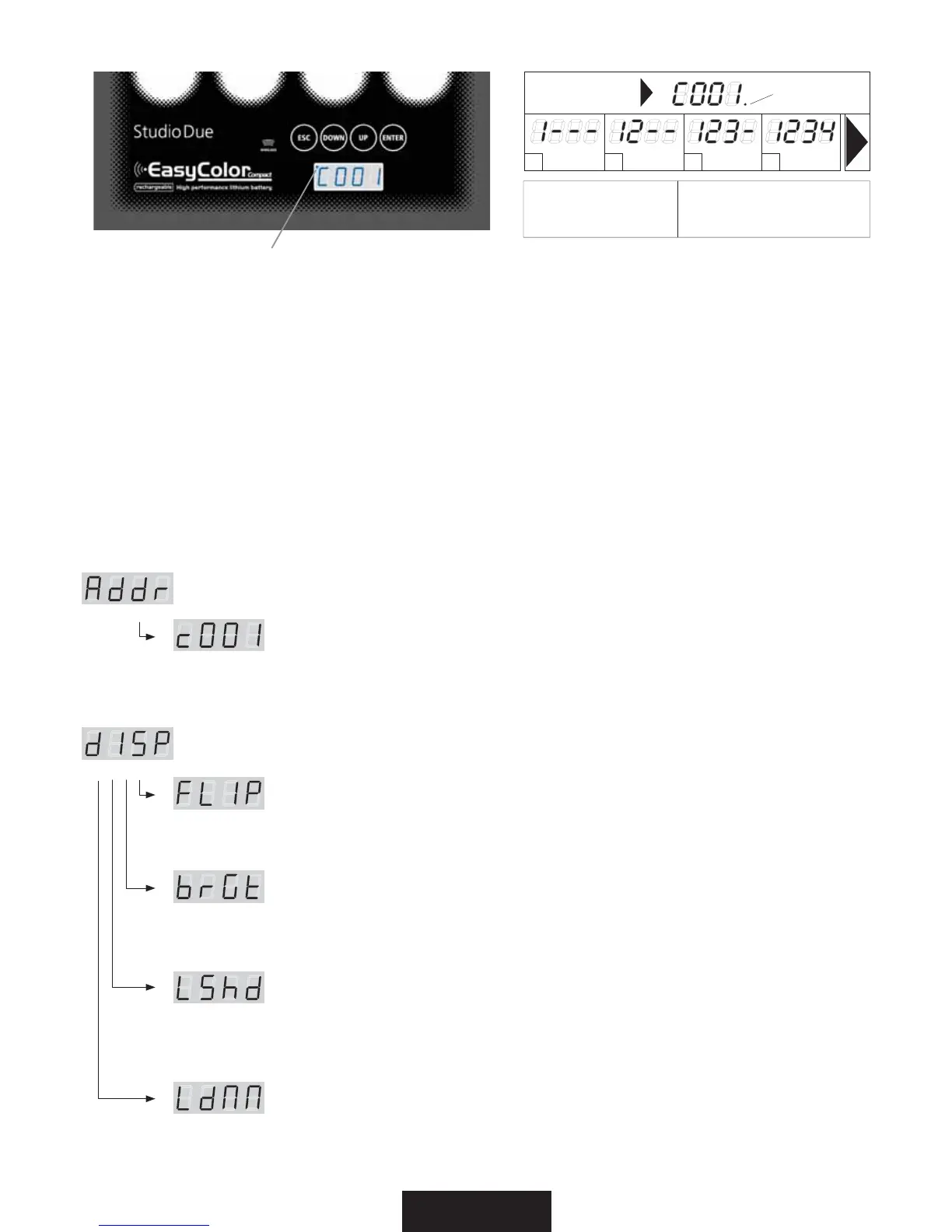
Switching on the fixture you can see the model and the software version. For example:
All’accensione, viene visualizzato il modello di apparecchio e la versione software. Per esempio:
--> dled arb bat --> 1_00 --> DMX channel --> C001
than it’s shown the first DMX channel. When you press any button it’s shown the first menu.
poi viene visualizzato il primo canale DMX. Quando si preme qualsiasi pulsante, viene visualizzato il primo menu.
t&4$: exit from the menu/submenu / esce dal menu/sottomenu
t%08/: scroll down into the menu / scorre in basso nel menu
t61: scroll up into the menu / scorre in alto nel menu
t&/5&3: enter into the menu/submenu (if present) / entra nel menu/sottomenu (se presente)
menu Address (Addr) > Set the DMX address*NQPTUBMJOEJSJ[[P%.9
press ENTER / premere ENTER
> Select the channel number .. c001 .. c002 .. with the UP/DOWN buttons. Press ENTER.
> Selezionate il canale desidarato .. c001 .. c002 .. con i tasti UP/DOWN. Premere ENTER.
NFOV%JTQMBZE*41%JTQMBZGVODUJPOT'VO[JPOJEFMEJTQMBZ
press ENTER for submenu / premere ENTER per i sottomenu
'-*1 180° display rotate / Ruota di 180° il display
> Select the value off .. on with the UP/DOWN buttons. Press ENTER.
> Selezionate il valore desiderato off .. on con i tasti UP/DOWN. Premere ENTER.
(brGt) Display brightness settings / Impostazioni luminosità del display
> Select the value 1 .. 7 with the UP/DOWN buttons. Press ENTER.
> Selezionate il valore desidarato 1 .. 7 con i tasti UP/DOWN. Premere ENTER.
-4IE Display shutdown after 30 sec. inactivity settings / Impostazioni spegnimento dopo
30 sec. di inattività del display (30 sec.)
> Select the value off .. on with the UP/DOWN buttons. Press ENTER.
> Selezionate il valore desidarato off .. on con i tasti UP/DOWN. Premere ENTER.
-E..Power LEDS dimmer (with active menu) / Dimmer potenza dei LEDS (con menu attivo)
> Select the value off .. on with the UP/DOWN buttons. Press ENTER.
> Selezionate il valore desidarato off .. on con i tasti UP/DOWN. Premere ENTER.
.&/6-*45BOE#6550/'6/$5*0/4&-&/$0.&/6F'6/;*0/*%&*16-4"/5*
8IFOUIFEJTQMBZnBTIJOHZPVBMXBZTNVTUQSFTTBOEIPMETFD&/5&3UPDPOmSNUIFTFMFDUFEPQUJPO
2VBOEPJMEJTQMBZMBNQFHHJB
EPWFUFTFNQSFUFOFSFQSFNVUPQFSTFD&/5&3QFSDPOGFSNBSFMPQ[JPOFTDFMUB
led DMX
UNLOCK sequence
1--- / -2-- / --3- / ---4
For enable menù functions
Per entrare nel menù
ESC / DOWN / UP / ENTER
ESC DOWN UP ENTER
1° 2° 3° 4°
DMX led


 To Next Page
 Loading...