SL Controllers by Studiologic®
7
E
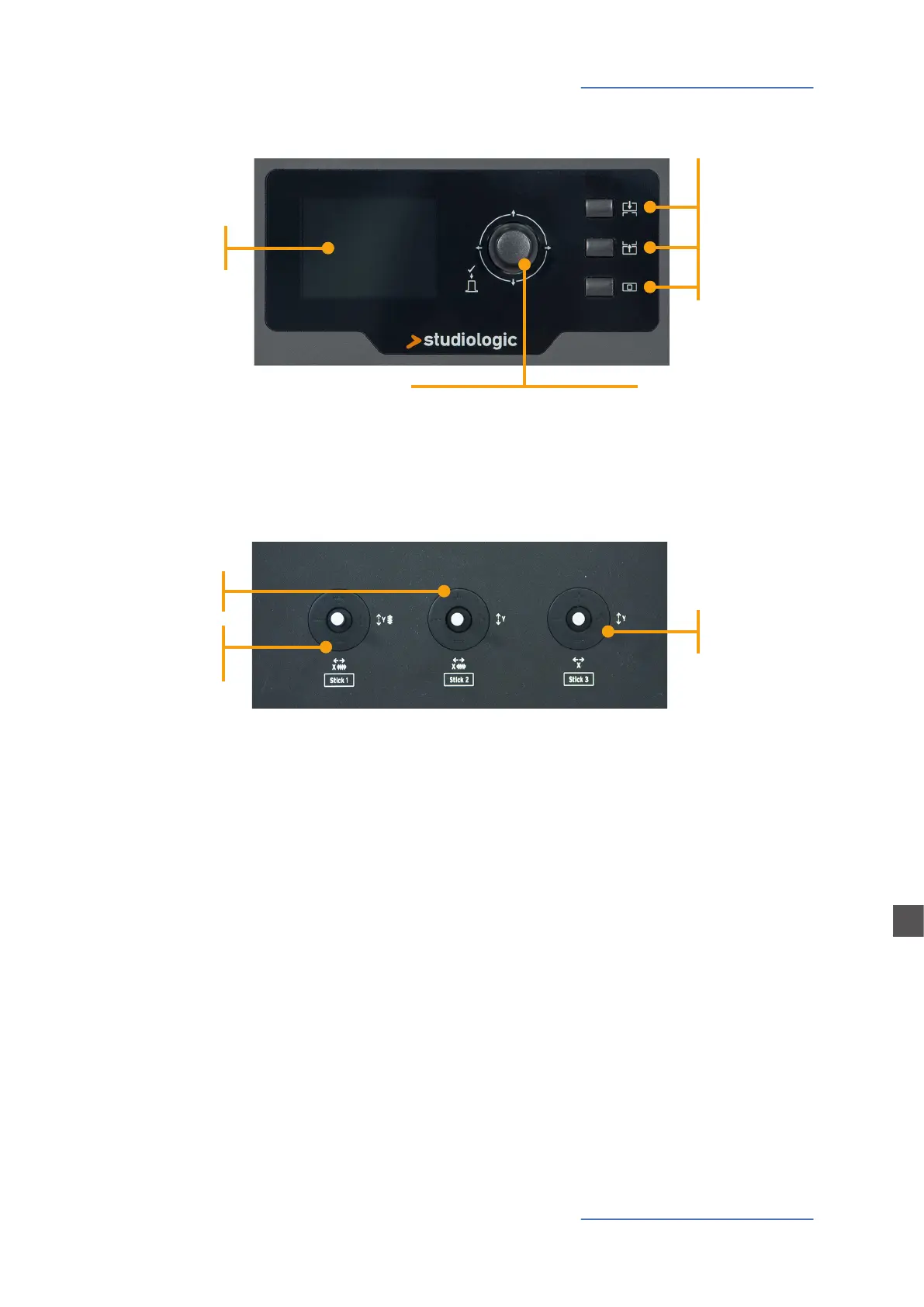
Control Panel
Encoder
Data input (rotating)
Navigation controls (left/right/up/down)
Click (ENTER)
Main buttons
Colour Display
Control Panel
The new SL Control Panel is a concentrate of technology and user‘s friendly layout; it consists of:
• 1 Large colour display (TFT - LCD 320 x 240);
• 1 Rotating encoder with 1 built in click (enter) and 4 positional switches (up/down/left/right);
• 3 Main buttons: Home (back to main view) - In & Out buttons (to navigate within all pages);
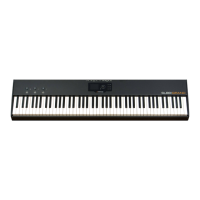
• 3 Programmable Sticks.
All Edit Pages can be selected in the same way (up/down with the Encoder‘s positional switches,
IN or OUT) you can use one hand to select all available pages and parameters, with instant access
to all features; ones the selected function is reached, you can change its value by rotating the En-
coder (to the left = decrease / to the right = increase).
OUT
HOME
IN
Stick 3
Free (not auto-
centering)
Stick 2
Auto-centering
on X axis
Stick 1
Auto-centering
on both X/Y
axes
Programmable Sticks



 To Next Page