EasyManua.ls Logo

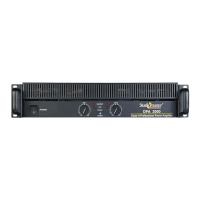
Studiomaster DPA 4500 - User Manual

Default Icon
24 pages
Print Icon
To Next Page IconTo Next Page
Loading...
DUAL CHANNEL
POWER AMPLIFIERS
Owner’s Manual
DPA 2000
DPA 3200
DPA 4500
DPA 5000
R
CLIP
SIGNAL
PROTECT
POWER
Class H Professional Power Amplifier
CH 2CH 1
-6
-10
-15
-30
-1
-3
-80 0dB
-6
-10
-15
-30
-1
-3
-80 0dB
POWER
I
I
I
I
O
O
O
O
CLIP
CLIP
CLIP
SIGNAL
SIGNAL
SIGNAL
PROTECT
PROTECT
PROTECT
POWER
POWER
POWER
Class H Professional Power Amplifier
CH 2
CH 2
CH 2
CH 1
CH 1
CH 1
-6
-10
-15
-30
-1
-3
-80 0dB
-6
-10
-15
-30
-1
-3
-80 0dB
-6
-10
-15
-30
-1
-3
-80 0dB
-6
-10
-15
-30
-1
-3
-80 0dB
-6
-10
-15
-30
-1
-3
-80 0dB
-6
-10
-15
-30
-1
-3
-80 0dB
POWER
POWER
POWER
Question and Answer IconNeed help?

Do you have a question about the Studiomaster DPA 4500 and is the answer not in the manual?

Summary

Safety Symbols and Instructions

Explanation of Graphical Symbols

Explains safety symbols used in the manual for user alerts and warnings.

Important Safety Instructions

Crucial guidelines for safe use, handling, and maintenance of the apparatus.

Operational Precautions

Installation Precautions

Guidelines for safe installation to prevent electrical hazards and ensure proper ventilation.

Safe Operation Precautions

Instructions for safe usage, including handling power cords and avoiding specific environmental conditions.

Safe Operation Tips

Tips for Safe Operation

Advice on AC mains cable termination, grounding, and input signal levels for safe operation.

Product Overview

Features and General Description

Overview of the amplifier's design, technology, and key features like toroidal transformer and protection circuitry.

Front Panel

Front Panel Controls and Features

Details on the Master Switch, Power ON indicator, Volume control, Signal, Clip, and Protect LEDs.

Rear Panel Connections

Rear Panel Controls and Features

Description of balanced XLR inputs, Link Out, SpeakON connectors, Binding Posts, power cable, and configuration switch.

Rear Panel Functions

Detailed Rear Panel Functions

Explains Sensitivity, Ground Lift, Low Cut filter, Fuse, Limiter, and HF Limiter functions on the rear panel.

Audio Connections

Input-Output Connections

Diagrams illustrating balanced/unbalanced input and stereo/bridge output connections via XLR, SpeakON, and Binding Posts.

Setup - Stereo Mode

Stereo Mode Configuration

Instructions for setting up and operating the amplifier in Stereo mode, including connections and volume adjustments.

Setup - Parallel Mode

Parallel Mode Configuration

Instructions for setting up and operating the amplifier in Parallel mode, connecting to channel 1 inputs.

Setup - Bridge Mode

Bridge Mode Configuration

Instructions for setting up and operating the amplifier in Bridge mode, connecting to channel 1 inputs.

Application Example 1

Stereo Mix Plus Subwoofers

Illustrates a setup using an active crossover and amplifiers in stereo and bridge modes for subwoofers.

Application Example 2

Stereo Mode - Cascade Configuration

Shows how to cascade amplifiers in stereo mode for increased output power.

Application Example 3

Parallel Mode - High Power Configuration

Demonstrates a high power dual channel configuration using multiple amplifiers in parallel mode.

Protections and Installation

Protections & Installations

Details on thermal, DC, overload, and short circuit protections, plus 19" rack and table top installation.

Troubleshooting Guide

Trouble Shooting - LED Indications

Explains LED symbols and common issues like no power or low output based on indicator status.

Troubleshooting Details

Troubleshooting Specific Issues

Addresses specific problems such as distorted sound, hum, and hiss, providing possible causes and solutions.

Technical Specifications

Specifications

Comprehensive technical data including output power, frequency response, damping factor, and dimensions for all models.

Recommended Products

Other Studiomaster Professional Products

Lists recommended wired microphones, wireless microphones, headphones, and mixers.

Complementary Equipment

Power Supply Stabilizers and Processors

Lists recommended power supply stabilizers and various audio processors like equalizers and crossovers.

User Notes

Notes

A blank page intended for users to record important information or observations.

Owners Records

For Your Records

A section to log unit details such as model number, serial number, dealer information, and purchase date.

Summary

Safety Symbols and Instructions

Explanation of Graphical Symbols

Explains safety symbols used in the manual for user alerts and warnings.

Important Safety Instructions

Crucial guidelines for safe use, handling, and maintenance of the apparatus.

Operational Precautions

Installation Precautions

Guidelines for safe installation to prevent electrical hazards and ensure proper ventilation.

Safe Operation Precautions

Instructions for safe usage, including handling power cords and avoiding specific environmental conditions.

Safe Operation Tips

Tips for Safe Operation

Advice on AC mains cable termination, grounding, and input signal levels for safe operation.

Product Overview

Features and General Description

Overview of the amplifier's design, technology, and key features like toroidal transformer and protection circuitry.

Front Panel

Front Panel Controls and Features

Details on the Master Switch, Power ON indicator, Volume control, Signal, Clip, and Protect LEDs.

Rear Panel Connections

Rear Panel Controls and Features

Description of balanced XLR inputs, Link Out, SpeakON connectors, Binding Posts, power cable, and configuration switch.

Rear Panel Functions

Detailed Rear Panel Functions

Explains Sensitivity, Ground Lift, Low Cut filter, Fuse, Limiter, and HF Limiter functions on the rear panel.

Audio Connections

Input-Output Connections

Diagrams illustrating balanced/unbalanced input and stereo/bridge output connections via XLR, SpeakON, and Binding Posts.

Setup - Stereo Mode

Stereo Mode Configuration

Instructions for setting up and operating the amplifier in Stereo mode, including connections and volume adjustments.

Setup - Parallel Mode

Parallel Mode Configuration

Instructions for setting up and operating the amplifier in Parallel mode, connecting to channel 1 inputs.

Setup - Bridge Mode

Bridge Mode Configuration

Instructions for setting up and operating the amplifier in Bridge mode, connecting to channel 1 inputs.

Application Example 1

Stereo Mix Plus Subwoofers

Illustrates a setup using an active crossover and amplifiers in stereo and bridge modes for subwoofers.

Application Example 2

Stereo Mode - Cascade Configuration

Shows how to cascade amplifiers in stereo mode for increased output power.

Application Example 3

Parallel Mode - High Power Configuration

Demonstrates a high power dual channel configuration using multiple amplifiers in parallel mode.

Protections and Installation

Protections & Installations

Details on thermal, DC, overload, and short circuit protections, plus 19" rack and table top installation.

Troubleshooting Guide

Trouble Shooting - LED Indications

Explains LED symbols and common issues like no power or low output based on indicator status.

Troubleshooting Details

Troubleshooting Specific Issues

Addresses specific problems such as distorted sound, hum, and hiss, providing possible causes and solutions.

Technical Specifications

Specifications

Comprehensive technical data including output power, frequency response, damping factor, and dimensions for all models.

Recommended Products

Other Studiomaster Professional Products

Lists recommended wired microphones, wireless microphones, headphones, and mixers.

Complementary Equipment

Power Supply Stabilizers and Processors

Lists recommended power supply stabilizers and various audio processors like equalizers and crossovers.

User Notes

Notes

A blank page intended for users to record important information or observations.

Owners Records

For Your Records

A section to log unit details such as model number, serial number, dealer information, and purchase date.

Studiomaster DPA 4500 Specifications

General IconGeneral
BrandStudiomaster
ModelDPA 4500
CategoryAmplifier
LanguageEnglish

Related product manuals