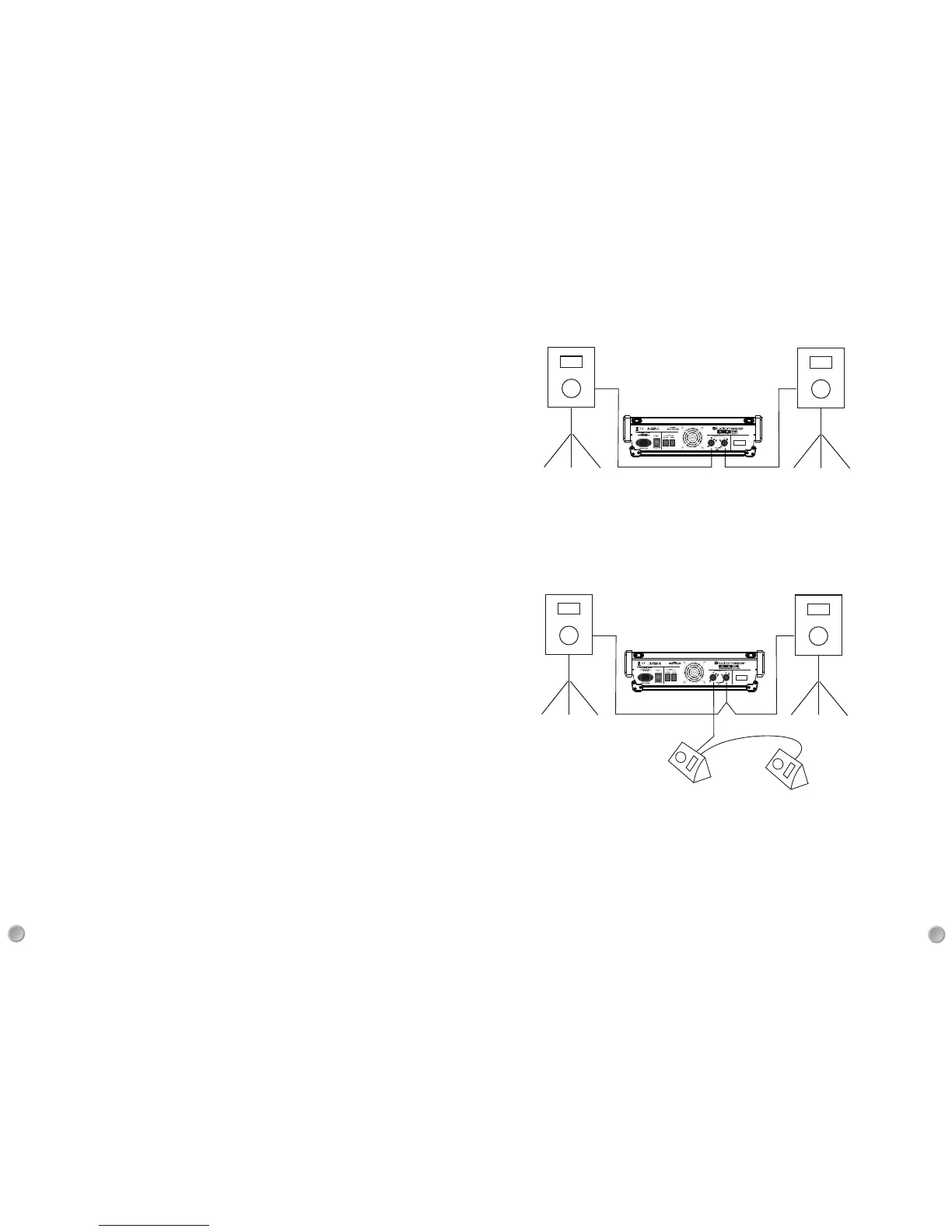
Two full range speakers are connected to the left and right speaker outputs,To use the full power capability
of the Horizon 4 ohm speakers of the correct power rating should be used.Depending on application,you
may want to adjust the AMP POWER switch to a lower setting,40% or 15% if used in small rooms or for
low level announcements/ music playback.
Suggested set-up diagrams
Compact stereo PA set up
SET the AMP ASSIGN switch (39) to the A1 L-R position,The right speaker output is connected to two 8 ohm,
speakers for the main PA, The left speaker output can be connected to two 8 ohm stage monitors with the
volume controlled from AUX 1 output,For this example if your speaker cabinets do not have linked connector
sockets,you will need a “Y” cable or splitter box to convert the single output of the Horizon into 2 speaker
sockets.
Compact Mono PA with Stage Monitors
9
18
41.PHANTOM POWER LEDs.
+48V phantom power is supplied to the input channels in two banks via the two switches located on the rear
panel (68). Bank 1 supplies all the mono channels and bank 2 supplies all the mic inputs on the stereo channels.
Caution: Before switching on or off the +48V, ensure all faders are at minimum travel to prevent loud clicks or
thumps getting to speakers as it may damage them. Only use the +48V on the channel banks that require it
(ie when using condenser microphones).
42.STANDBY switch
Mutes all input channels to the left & right MIX and also AUX 1& 2 send. This is useful at intervals/breaks
between sets as open mics or sound from performers instruments do not appear at the PA speakers or at stage
monitors. However, signals from the PLAYBACK (57) and USB (56) inputs are not muted so back ground music
can be played.The red LED illuminates when in Standby mode.
43.HEADPHONE SOCKET AND LEVEL CONTROL.
¼” TRS jack socket suitable for signal monitoring through headphones. In normal operation the signal from the
L-R MIX can be heard. If PFL or AFL switches are pressed the signal will automatically switch to that source.
This allows you to monitor any signal on the Horizon that has a PFL/AFL switch. For best results use 250-400
ohm impedance headphones, although most types can be used with varying results, 50 ohm impedance or
lower should be avoided.Any signal available at the headphones is also displayed on the L-R MIX bargraph.
44. MIX 2 LEVEL CONTROL
The rotary control adjusts the signal level at the MIX2 output. The signal is derived after the L-R MIX faders.
This means that the position of the L-R MIX faders also change the signal level at the MIX2 output.A typical
use for this control would be sending the main stereo signal to, maybe, another area or room where the volume
needs to be controlled. Or using the crossover feature (45) the MIX2 output could supply a sub bass speaker
system using additional amplifiers. The AFL switch monitors the signal after the MIX2 level control. The yellow
LED illuminates when the switch is pressed.
45.100Hz CROSSOVER.
This is a stereo 2 way crossover set at 100Hz. When activated the L-R MIX signal routes though the high pass
section so only signals above 100Hz feed the internal amplifiers. The MIX2 signal is routed through the low pass
section of the crossover so only signals below 100Hz are available at the MIX2 output.
This is the ideal way of expanding the power of the Horizon when a larger system is required. The internal amplifiers
will produce up to 1000W per channel of mid/high signals and the MIX2 output can connect to external sub bass
amplifiers/speakers of unlimited size.
The switch has an LED which illuminates when the crossover is active.
46.Left & Right MIX faders.
60mm travel faders that adjust the level of signals supplying the MIX output and both the internal amplifiers.
47.NINE BAND GRAPHIC EQUALISER (GEQ)
30mm travel faders that boost and cut signals by 9dB in the following frequency bands: 63Hz, 125Hz, 250Hz,
500Hz, 1kHz, 2kHz, 4kHz, 8kHz, 16kHz. Signals after the L & R MIX faders feed the GEQ so that level adjustments
can be made to compensate for excessive boost or cut.
Typically used for overall tone adjustment to compensate for room acoustics or non ideal speaker positioning.
When the GEQ switch is pressed the graphic equaliser is activated and the LEDs on the fader shafts illuminate.


 To Next Page
 Loading...