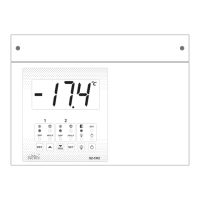
Press for 500 milliseconds to Mute Alarm.
Press for 2 seconds to Manual Reset (HP1, LP1, HP2, LP2) Faults.
This key is used to exit from Program Mode / Set Mode / Run Hours
and Fault Log Mode.
Press for 1 seconds to view High/ Low Temperature Logging.
Used to increment parameter values in Set Mode and Program Mode
and scroll through parameters.
Press for 2 seconds to enter in Program Mode.
Used to decrement parameter values in Set Mode and Program Mode
and scroll through parameters.
Press for 2 seconds to enter in Set Mode.
To set and save parameters values in Set Mode and Program Mode.
In High/Low Temperature Logging Mode press for 2 seconds to reset
high / low Temperature logged values.
Press for 1 second to ON / OFF Light.
Press for 2 seconds to Power ON / OFF the Controller.
Press for 2 seconds to enter in Run Hours and Fault Log Mode.
Press for 2 seconds to Start / Stop Manual Defrost of Compressor1.
Press for 2 seconds to Start / Stop Manual Defrost of Compressor2.
Press and hold to see control probe Temperature if default display
(nd) is other than Pr1.
Note: If controller is in Set Mode/Program Mode/Run Hour and Fault Log Mode, in case
of inactivity of keys, it will return to parameter view mode in 30 seconds and will return
to Main screen in next 30 seconds.


 To Next Page
 Loading...