ͻ Check that the clock on the CID screen is correct
No Perform the following countermeasure and check MOTA again
ͻ When setting the clock with automatic setting: Move to an area where GPS can be received,
and wait for the clock to update.
ͻ When setting the clock manually: Set the clock according to the actual time. (with a time gap
within 10 seconds)
* : Auto/Manual Check Method: Transition from "Setting," to "General," and then to "Clock."
Yes Proceed to the next step
ͻ Is the screen recognized on the CID screen from the GUI screen after pressing "Setting,"
"Navigation,“ "Map Update," and then the "Wi-Fi" button?
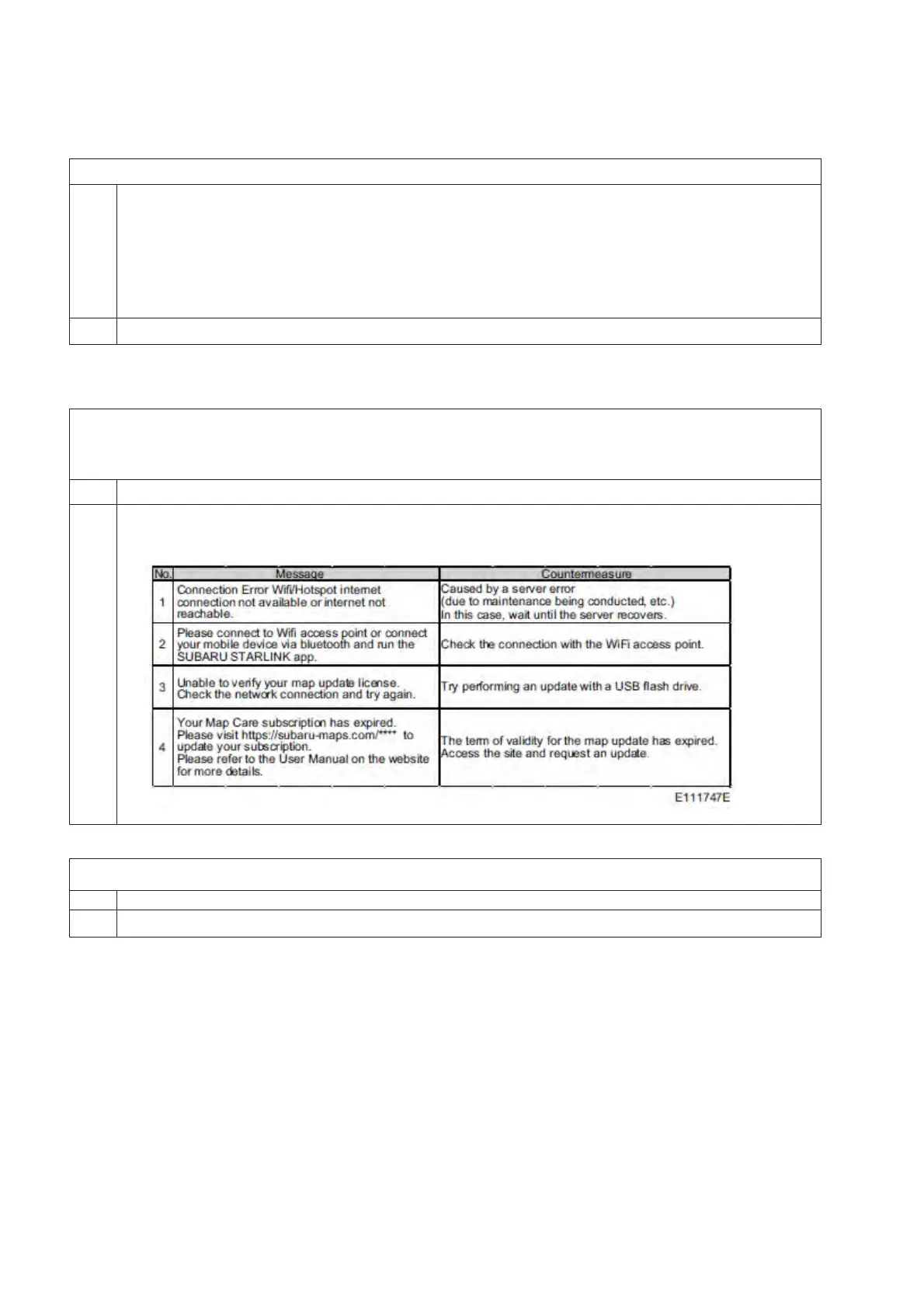
Do any one of the following screens display?
No Proceed to the next step
Yes If any message of 1 through 4 are displayed, perform the following countermeasures,
and check MOTA again
ͻ Reprogram using a USB flash drive, and check if the update can be performed normally.
No CCU abnormality
Yes Nothing abnormal


 To Next Page
 Loading...