3
Pro4 wired Controller for PS4 / PS3 – Firmware Update Instructions
To update the Pro4 wired controller, please read these instructions in full before you start, so that you
are familiar with the short process. The update has to be done from a computer.
STEP 1 : Use the link provided to download the .exe file for driver’s update. Click here to download
the .exe file.
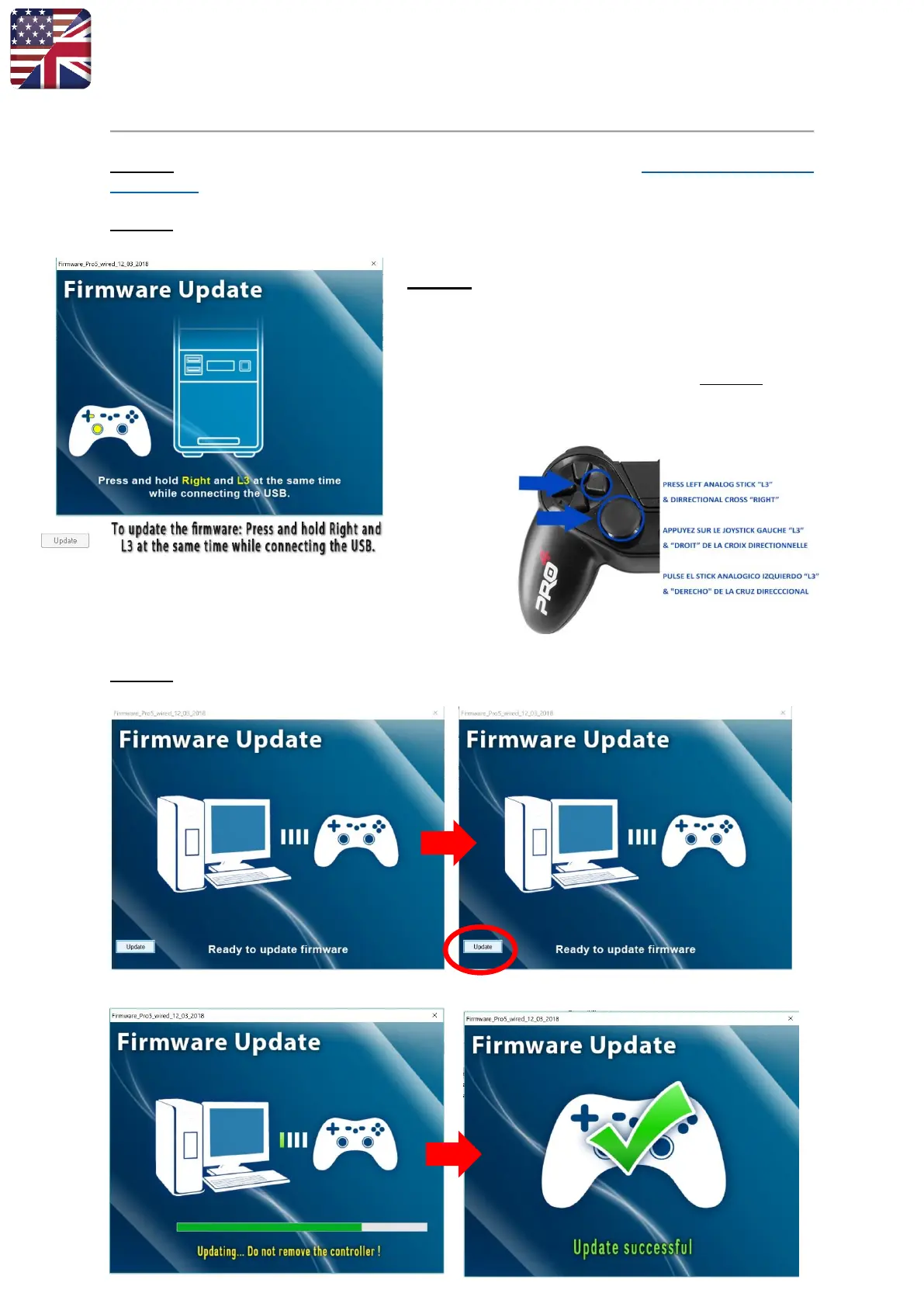
STEP 2 : Once the .exe is run, this screen will appear.
BEFORE plugging your controller into the USB port of your
laptop/PC, you should place your controller on a hard
surface. With one hand, press the “L3” analog stick &
directional cross “Right”
While holding the L3 & right button down, only then should
you plug your controller in to the USB port. NB. If the
buttons aren’t pressed before plugging the controller
in, the update will fail.
STEP 3 : Once your controller is plugged in, this screen will appear with the message “Ready to
update firmware”. Click on “Update” button.
If successful, the following screens will appear.



 To Next Page