12
USA
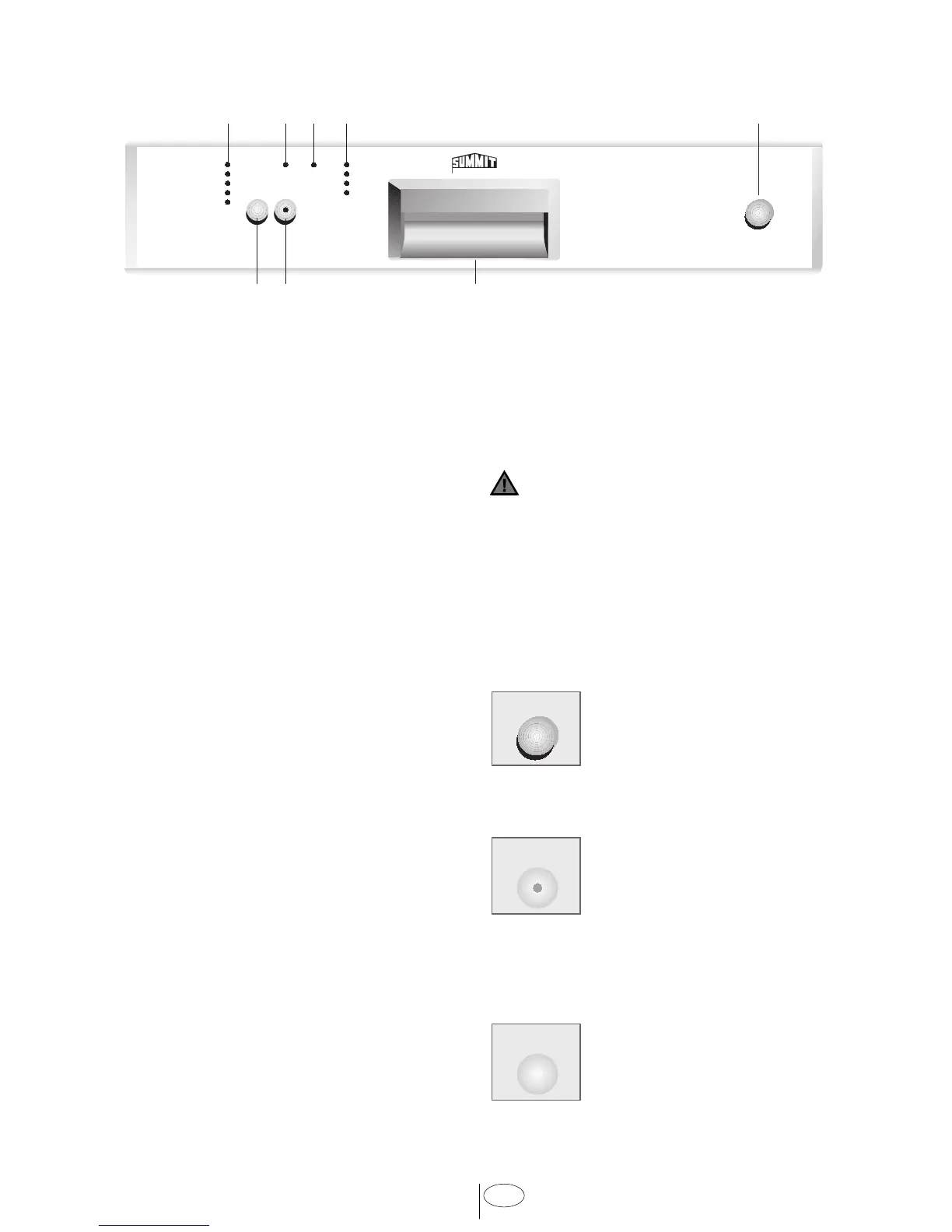
56 7
84321
P R O F E S S I O N A L
6. OPERATING THE DISHWASHER
1. Program lights
2. Rinse aid level indicator light *
3. Salt level indicator light *
4. Program follow up lights
5. Cycle Select button
6. Start/Pause button
7. Door handle
8. On/Off button
(* Depending on model)
HOW TO USE YOUR DISHWASHER:
1. Open the door by pulling the door handle
7.
2. Load the dishwasher.
3. Check that both upper and lower spray
arms move freely.
4. Fill enough detergent into the detergent
dispenser and close the lid.
5. Use the On/Off button 8 to turn the
dishwasher on.
6. Check the rinse aid level indicator
light 2. If necessary, refill rinse aid.
(depending on model)
7. Check the salt level indicator light 3 If
necessary, refill salt. (depending on
model)
8. Use the Cycle Select button 5 to choose
your washing program.
9. Start the program with the Start/Pause
button 6.
10. When the progress indicator light
“End” 4 lights up , the wash cycle is
completed. Use the On/Off button 8 to
turn the dishwasher off.
11. Allow your dishes to cool for 20
minutes, with the door open.
12. Unload the dishes. Begin with the
lower rack.
CAUTION
Avoid opening the door during the
washing process. This interrupts the
washing process, and hot steam will
escape. Hot steam can cause burns and
other serious injuries. When the door is
closed, the program will continue.
FUNCTION BUTTONS
On/Off button
Turn your dishwasher on
with the On/Off button. When
turning on, the icon on the
display module of the last used
program will light up.
Start/Pause button
Use this button to start the
selected program; the light on
the button lights up. Stop the
program with the Start/Pause
button if you would like to open the door
once the dishwasher’s washing program is
running.
Cycle Select button
Use the Cycle Select button
to select the desired program.
The diode of the corresponding
program will light up.
On / Off
Start /
Pause
Cycle
Select



 To Next Page