22
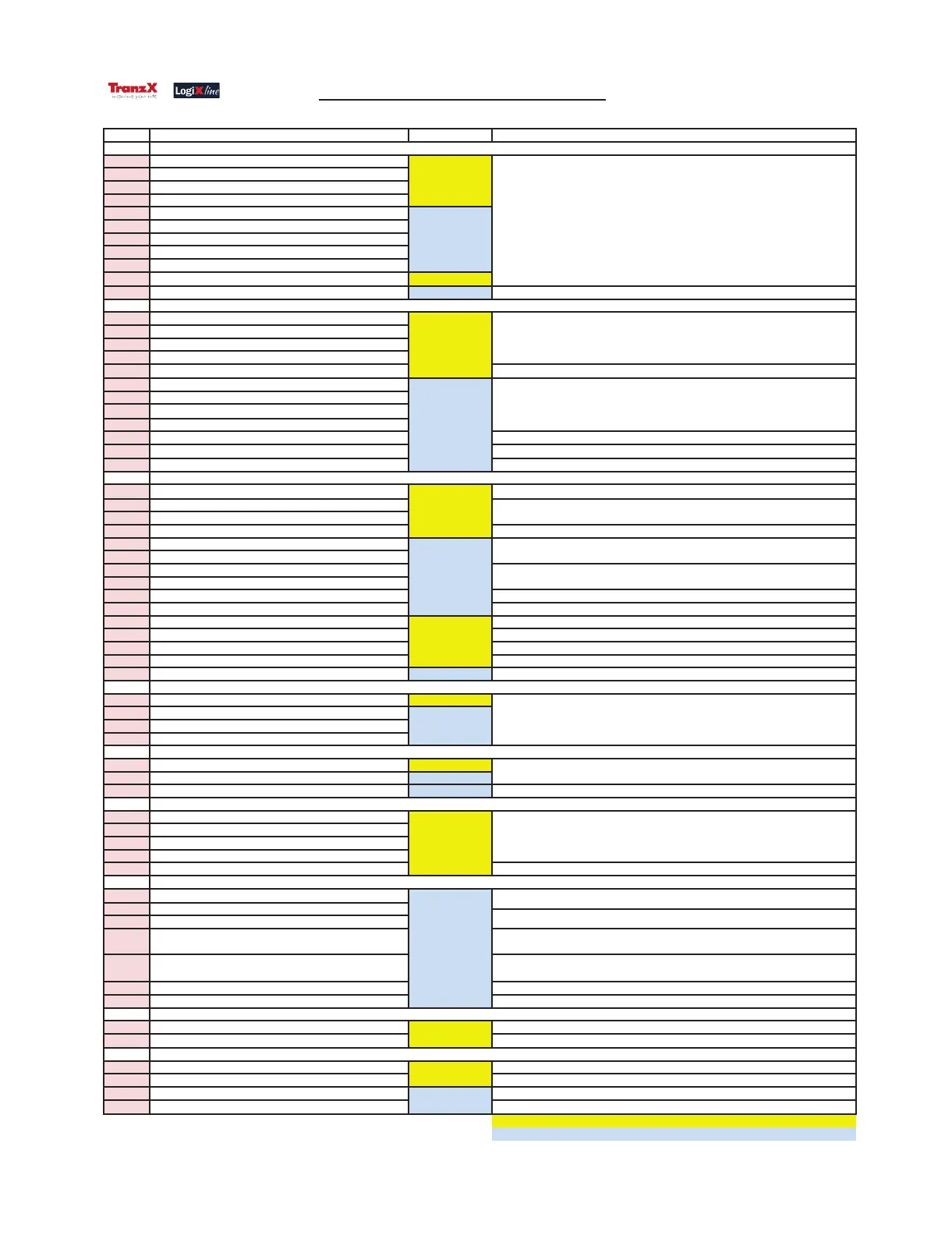
Error code Descripon Detecon method Repair
E0000 Voltage detecon error of the Display (5V)
E0001 Voltage detecon error of the Display (5V_SW)
E0002 Voltage detecon error of the Display (5V_SW2)
E0003 LCD backlighng error
E0004 Voltage detecon error of the Display (5V)
E0005 Voltage detecon error of the Display (5V_SW)
E0006 Voltage detecon error of the Display (5V_SW2)
E0007 Display EEPROM read/write error
E0008 Display LCD driver IC defect
E0009 Light Sensor defect LogiX test
E0055 Soware update incomplete E-bike system
Soware update
E0100 Voltage detecon error of the Controller (5V)
E0101 Voltage detecon error of the Controller (5V_SW)
E0102 Voltage detecon error of the Controller (12V)
E0103 Light voltage output error of the Controller (6V)
E0104 Motor control circuit defect 1.Check motor cable, 2 . Check Controller, 3 . Check Motor
E0105 Voltage detecon error of the Controller (5V)
E0106 Voltage detecon error of the Controller (5V_SW)
E0107 Voltage detecon error of the Controller (12V)
E0108 Light voltage output error of the Controller (6V)
E0109 Slope sensor detecon error Check AGT unit
E0110 Motor blocked 1.Check motor cable, 2 . Check Controller, 3 . Check Motor
E0155 Soware update incomplete
Soware update
E0300 Crank dead point sensor defect 1. Check crank assemble posion, 2. Check motor cable connecon, 3 . Check Motor
E0301 Crank direcon sensor defect
E0302 Crank RPM sensor defect
E0303 Coaster brake sensor defect 1. Check display cable connecon, 2 . Check Motor
E0304 Crank dead point sensor defect
E0305 Crank RPM sensor defect
E0306 Coaster brake sensor defect
E0307 Motor temperature sensor defect
E0308 Motor Hall sensor defect 1. Check motor cable connecon, 2 . Check Motor
E0309 Torque sensor defect 1. Check display cable connecon, 2 . Check Motor
E0310 Torque sensor out of range 1. Check the ghten torque value of the 9 screws on the motor, 2. Check Motor
E0311 Torque sensor reverse 1. Check the torque value. It should increase when pressing the right pedal, 2. Check Motor
E0312 Soware & Motor SPEC not match 1. Check the soware SPEC, 2. Check if the Motor SPEC is correct(Coaster/Free wheel)
E0313 Torque sensor calibraon out of range Change motor
E0355 Soware update incomplete E-bike system Soware update
E0400 Voltage detecon error of the Baery (36V) LogiX test
E0401 Voltage detecon error of the Baery (36V)
E0402 Baery I2C Communicaon error
E0403 Baery voltage out of range
E0500 Wheel speed sensor error LogiX test
E0501 Wheel speed sensor error E-bike system
E0502 An-tempering error E-bike system 1. Check if speed sensor has been modified, 2. Check speed sensor & magnet
E0603 "Power" buon defect
E0604 Brake cut-off sensor defect 1. Check the remote control, 2. Check the display
E0800 Display MCU <> Power MCU communicaon error
E0801 Display MCU <> Motor MCU communicaon error
E0802 Display MCU <> AGT MCU communicaon error 1. Check display cable connecon with AGT unit, 2. . Check AGT unit
E0803
Display MCU <> Torque MCU communicaon error 1. Disconnect USB cable before switch on bike, 2. Check display cable connecon,
3. Check Motor
E0804
Display MCU <> All MCU communicaon error 1. Check display cable connecon, 2 . Check motor cable connecon,
3. Check Display, 4. Check Controller
E0805
Firmware compable problem 1. Check Firmware SPEC between display, controller, sensor and motor
E0806
Display <> Cradle communicaon error 1. Check the contact between display & cradle, 2 . Check cradle, 3 . Check display
E0900 Front light system error 1. Check front light, 2. Check light cable
E0901 Rear light system error 1. Check rear light, 2. Check light cable
E1000 Voltage detecon error of the Baery (36V) from Display 1. Check display cable connecon, 2 . Check Display
E1001 Voltage detecon error of the Baery (36V) from AGT 1. Check display cable connecon with AGT unit, 2 . Check AGT unit
E1002 Voltage detecon error of the Baery (36V) from Display 1. Check display cable, 2. Check Display
E1003 Voltage detecon error of the Baery (36V) from AGT 1. Check display cable connecon with AGT unit, 2 . Check AGT unit
Note: 1. "LogiX test" error codes require dealer assistance to.
Note: 2. "E-bike system" error codes display on your handlebar display unit.
Note: 3. Bold font as an important error message.
LogiX test
E-bike system
1. Check display cable connecon, 2 . Check Controller,
Light system
LogiX test
E-bike system
Display remote control buon system
1.Check connecon between remote control and Display, 2.Check remote control,
3.Check display
LogiX test
1. Check Controller, 2. Check Baery
E-bike system
Wheel speed sensor system
1.Check magnet posion, 2. Check display cable connecon, 3 . Check speed sensor
Motor system
LogiX test
LogiX test
Check Controller
Check Controller
E-bike system
LogiX test
1. Check motor cable connecon, 2 . Check Motor
E-bike system
1. Check motor cable connecon, 2 . Check Motor
1. Check display cable connecon, 2 . Check Motor
V1.10
LogiX test
Check Display
E-bike system
TranzX Logix line Error code list
ERROR CODE LIST


 To Next Page
 Loading...