8
9
preparing The hand-sTand Mixer for Use
The Sunbeam
®
Hand-Stand Mixer has been designed to assist you in
preparing delicious foods.
Beforeusingyourmixerforthersttime,washtheattachmentsinhot,
soapy water. Rinse and dry thoroughly. NOTE: All attachments are
dishwasher safe.
Make sure the speed control is in the “0”
position and mixer is unplugged from an
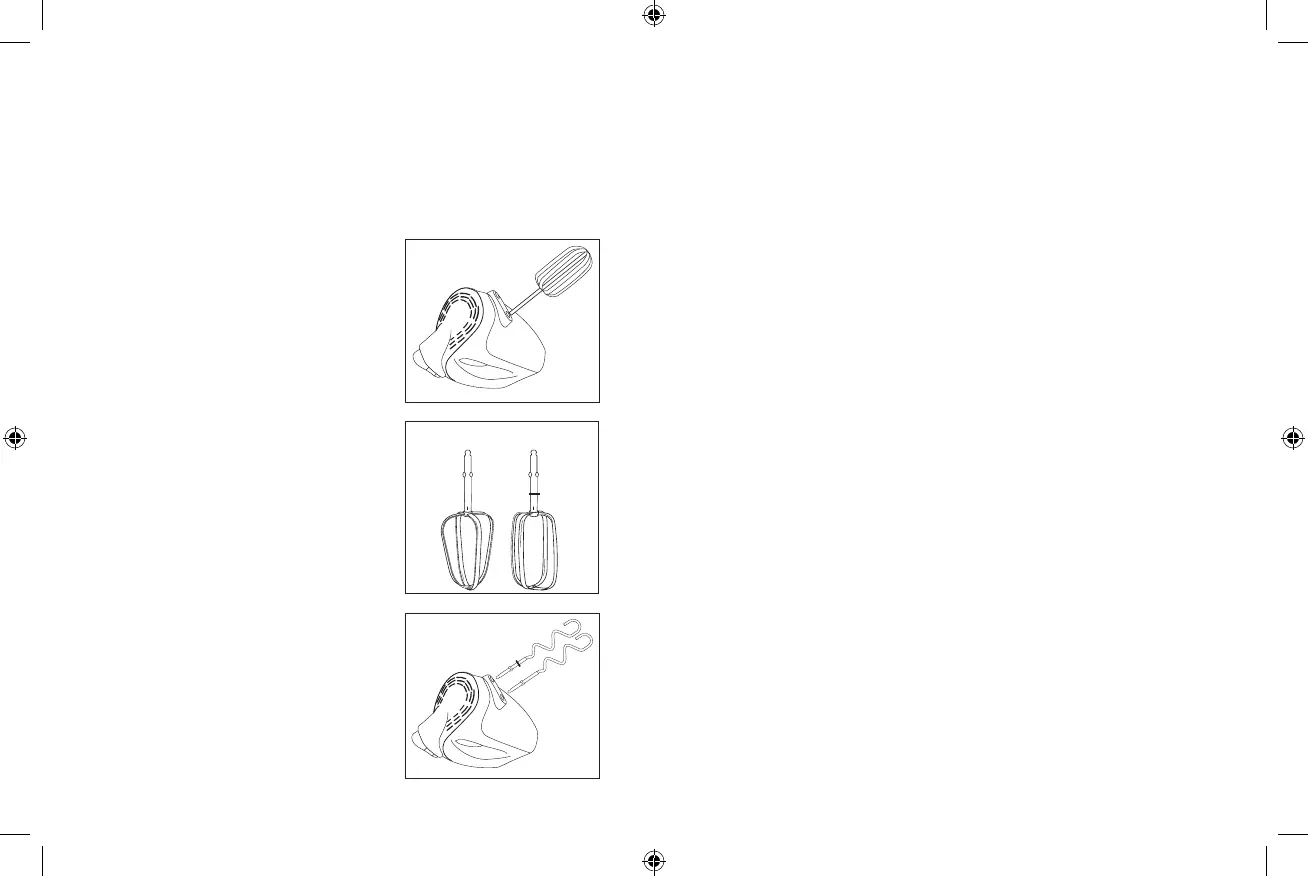
electrical outlet. Insert attachments one
at a time by placing stem end into the
opening on the bottom of the mixer. Turn
attachment slightly and push in until it
clicks into position. (See Figure A) Plug into
the appropriate outlet. Turn mixer on and
adjust speed setting using the control on the
top of the unit.
– The beater design allows for
thorough, fast mixing results for all types
of batters.
s – Use these hooks to knead
light dough or other heavy batters. Use
at lower speeds for best results. (on select
models only)
sTainless sTeel Wire Whisks
– For
whisking cream, egg whites, light batters
and cake mixes. (on select models only)
NOTE: The dough hook with the collar
tsintotheleftdriveholeandtheother
one goes into the right. (See Figure B) If dough hooks do not click into the
drive holes, reverse and try again.
When building up a recipe that requires the addition of dry ingredients,
such as flour, slow the speed down while these ingredients are being added
toavoidasnowstormeffect.Oncetheextraingredientsbegincombining,
slowly increase to the appropriate speed for the particular mixing task.
Slowly guide mixer around the sides and through the center of the
bowl, going in the same direction. Be careful not to over beat the
mixture.Overbeatingtendstomakesomemixturestough.
Whenever scraping of the bowl is required, stop the mixer and scrape
sides and bottom of bowl with a rubber spatula as needed. Turn speed
control to “0” and rest mixer on its heel rest while adding ingredients.
Make sure to position beaters over mixing bowl so any drippings will
fall back into the mixing bowl.
When mixing is complete, set speed control to “1” and raise beaters
slowly from batter to clean off clinging food. Make sure to turn unit to
“0” before raising beaters completely out of mixing bowl.
– The hand mixer features a 5 or 6 speed control
switch.Movetheswitchwithyourngerfrom(OfftoHigh)fordesired
speed. Gradually move to higher speeds to reduce splattering of contents.
®
– During especially heavy mixing tasks, press
thebuttontodrivethroughthemixturewithease.Oncethebuttonis
released, the mixer will return to the original speed setting.
– Is a large separate button located at the top
of the Hand Mixer portion. With the unit on “0”, push with thumb
to release the beaters. There will be a noticeable “click” when ejecting
beaters.
Figure A
Figure B
Left Right
FPSBHS0404, 0403, 0302, 0301_12ESM1.indd 9-10 5/25/12 8:18 PM




 To Next Page