4
Features of your Pro Glide
®
Steam Generator continued
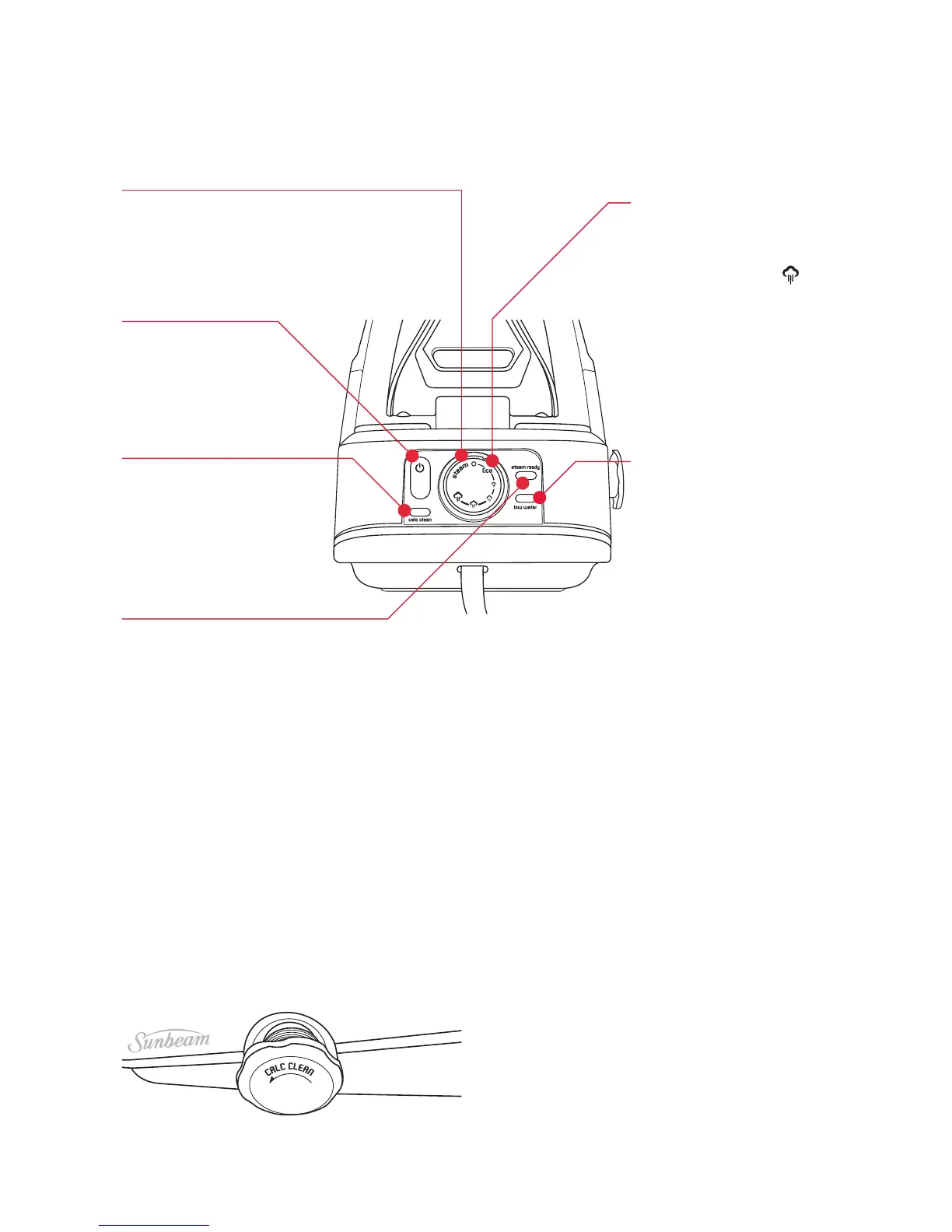
Power On Button
Thepoweronbutton
willbeilluminatedWHITE
whentheunitisturnedon.
Calc Clean Indicator
TheCalcCleanindicator
illuminatesWHITEwhen
itsistimetoflushthe
boiler.
Steam Ready Indicator
Thesteamreadyindicator
illuminatesGREEN
whenthesteamcanbe
activated.
Steam Rate Dial
Thesteamratecanbe
selectedbyturningthe
steamratedialto
the
preferredlevelofsteam.
Onceselectedthesteam
readyindicatorchanges
fromredtogreenwhen
thelevelhasbeen
reached.
Low Water Indicator
Thelowwaterindicator
illuminatesREDwhenit
istimetorefillthewater
tank.
Calc Clean Boiler Cap
Thecalccleanindicatoronthecontrol
panelilluminateswhenitsistimetoflush
theboiler.Thecalccleanboilercapallows
youtoflushtheboiler.Turnthecalcclean
boilercapanticlockwisetoremoveit.
Followtheinstructionsonpages9-10to
decalcifytheboiler.
Note:Thesteamgeneratormustbe
completelycooledbeforethecalcclean
boilercapisremoved.Wait2hoursafter
usefortheappliancetocooldown.
Eco Steam Mode (SR8710)
Thesteamgeneratorwilluse20%less
energywhenEcosteamisselected.”
andarrowpointingtothesteamdial.





 To Next Page