16
CHAPTER 2
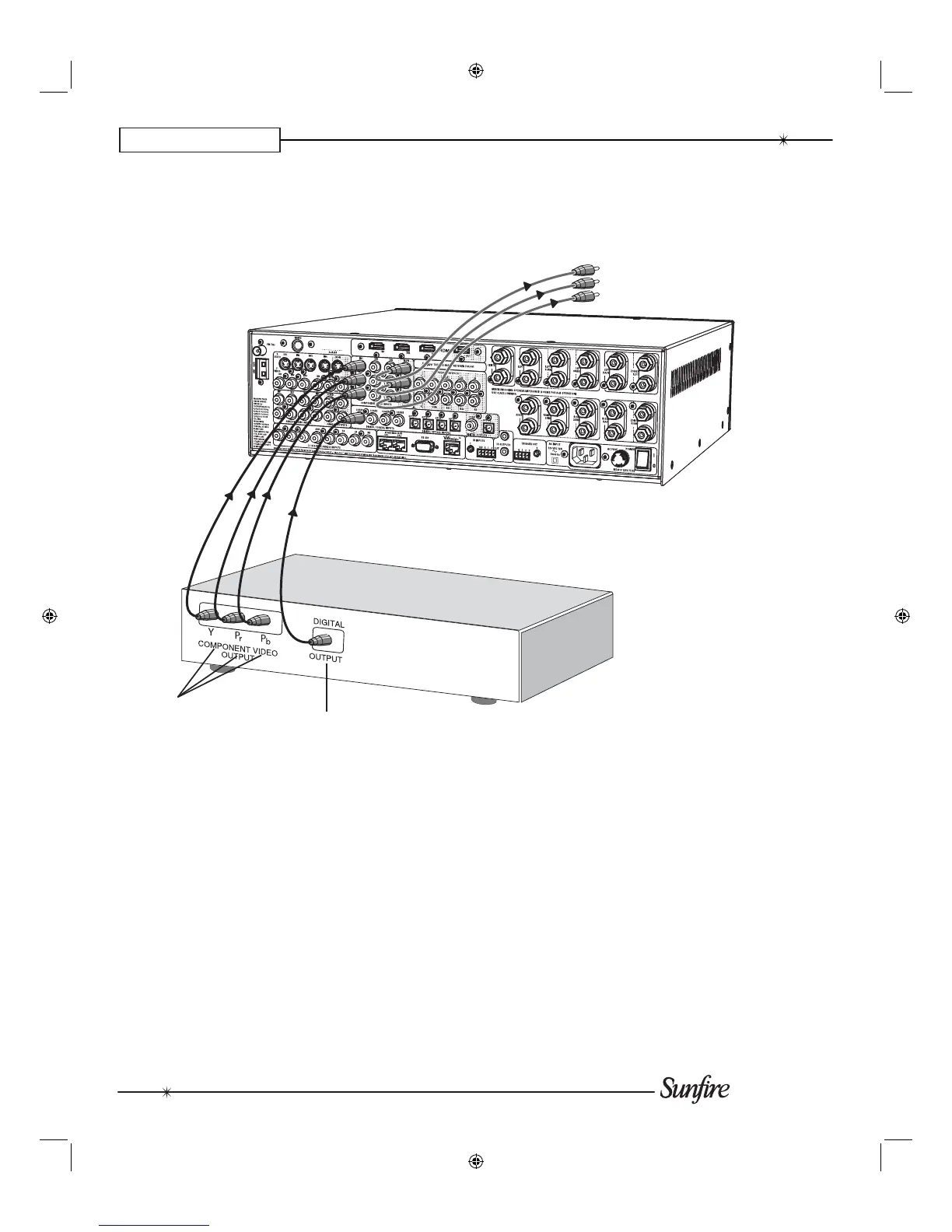
Digital Audio and Component Video Connections (DVD)
If your DVD and TV Monitor both
have com po nent video, they can be
connected as shown, giving a superior
picture.
The digital output from the DVD
player must be con nect ed to the
digital inputs of the TGR-401. This is
the only way the TGR-401 can receive
and decode Dolby Digital or DTS sig-
nals. You must use a coaxial or optical
digital cable to make the connection to
the TGR-401, rather than a standard
audio cable.
Digital audio signals
From: DVD Player coaxial
digital audio outputs
To: TGR-401 coaxial
digital audio inputs
Component video signals
From: DVD Player component
video outputs
To: TGR-401 IN1 component
video inputs
Component video signals
from TGR-401 Component video outputs
to TV Monitor's Component video inputs
Note: you must also connect the
player's two-channel audio outputs if
you want it to play it in Zone 2 when
the Main Zone is playing a different
source.
DVD Player


 To Next Page