2 of 4
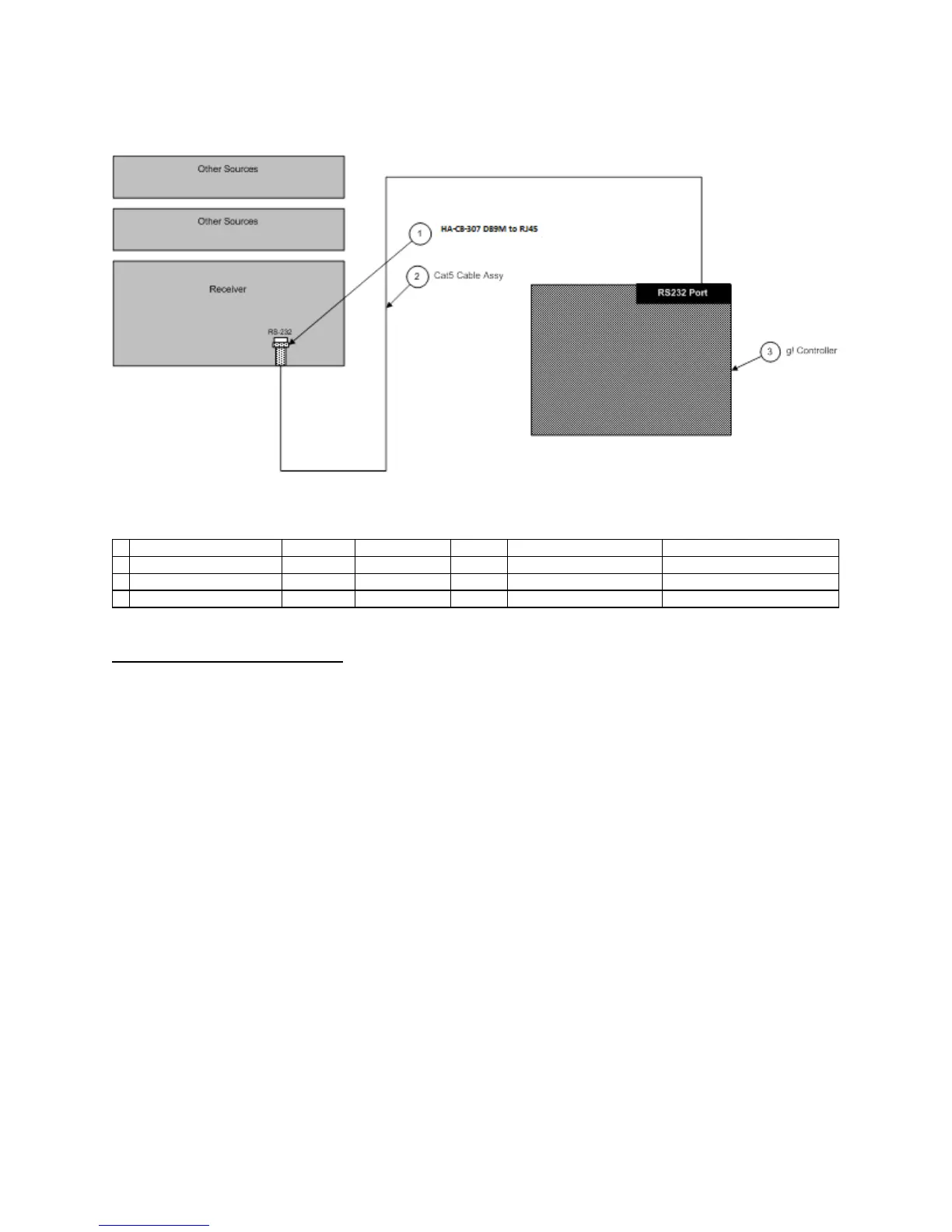
CONNECTION DIAGRAMS (RS-232)
BILL OF MATERIALS
# Device M anufacturer P art N umber P rotoco l Connecto r T ype Notes
1 DB9M to RJ45 Adapter ELAN HA-CB-307 RS-232 DB-9 Male X RJ-45 Female
2 Cat5 Cable Assy. Installer N/A RS-232 RJ-45 Male X RJ-45 Male
3 g! Controller ELAN Various (e.g. HC12) RS-232 RJ-45 Female
SUNFIRE CONFIGURATION DETAILS:
Using the IR Remote supplied with the TGR-401, make sure that the RS-232 control is enabled by
following the steps below:
1. Press the MENU button once to access the Main Menu.
2. Press DOWN on the hat switch 4 times or until SETUP> is shown on the display.
3. Press RIGHT on the hat switch to enter the SETUP menu.
4. Press DOWN on the hat switch 5 times or until the display reads CONTROL>.
5. Press RIGHT on the hat switch to access the CONTROL menu.
6. Make Sure RS-232 BROADCAST is set to “Y”.
7. Press EXIT to return to the main screen.



 To Next Page