6
Discharging Operations
Only AC devices that are under 200W and DC devices under
120W can be powered or charged using this power station.
These include many small electronics and appliances. Check
the table below for some common devices and their power
requirements.
NOTE:
• Average power consumption as measured on loads tested
under regular operating conditions. Rated power may be
dierent from average power consumption.
• Runtime measured on tested loads.
• If a high powered device is plugged in (e.g. a large
refrigerator), the charge level will deplete more rapidly
leading to shorter run times. If devices that draw lower
power are plugged in, you will get closer to the rated run
times.
IMPORTANT! The power station is not suitable for use with
certain products and loads. The continuous output wattage
of this product is limited to 307 W total when supplying
backup power from its battery. This limit applies to the total
devices plugged into this power station.
The power station is not sucient to run devices designed to
produce large amount of heat, like a space heater or a pellet
stove igniter.
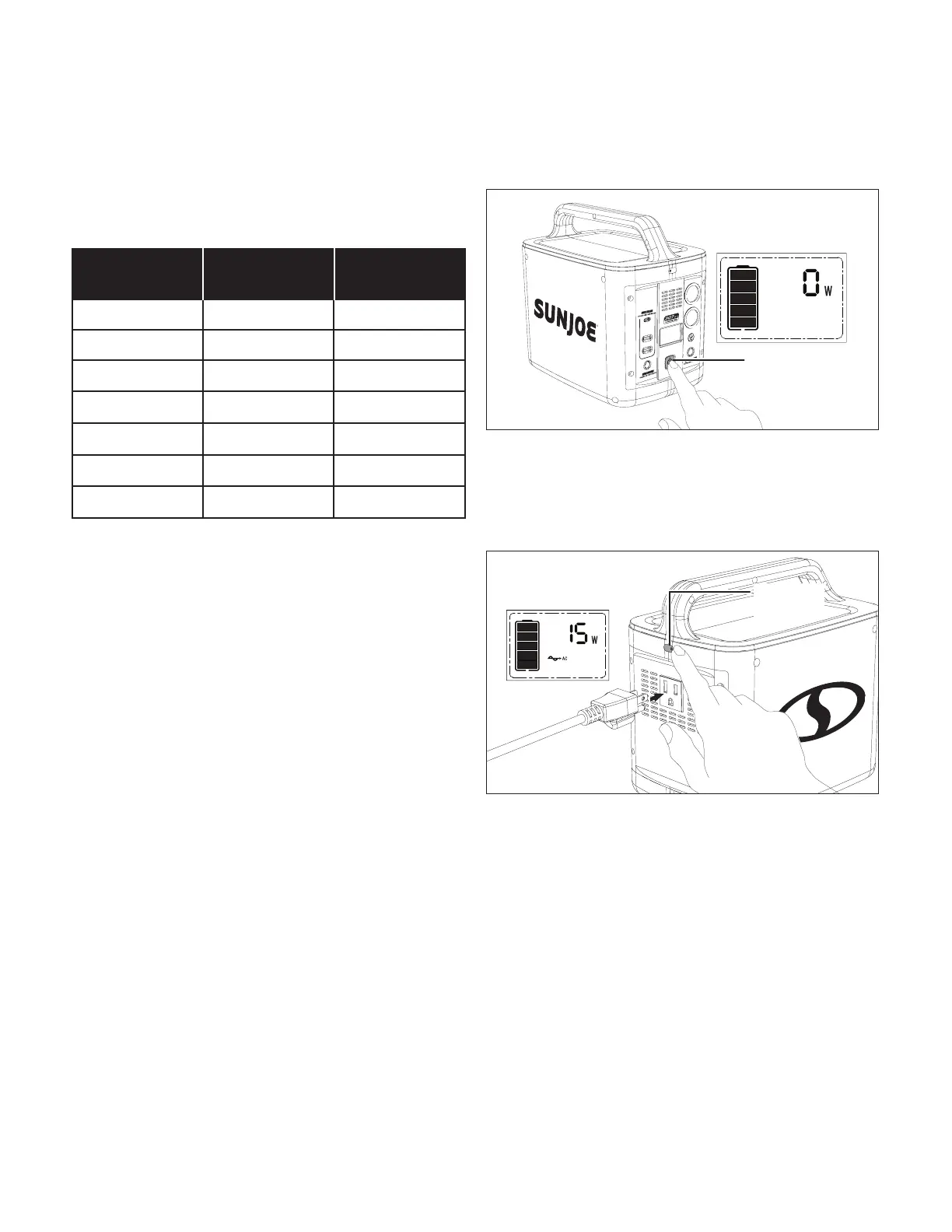
POWERING ON THE POWER STATION
Turn on the power station by pressing and holding the
power switch until the LCD screen illuminates to show the
standby mode (Fig. 6).
mWARNING! Do not insert a nail, wire, etc. into any ports
or receptacles. Otherwise a circuit short may cause smoke or
re.
PRODUCTS PORT
RUN TIME (h)/
RECHARGES (X)
Smart phone USB port 12X
Laptop AC jack 2X
Tablet USB port 7X
Drone DC barrel jack 4X
Light bulb AC jack 15h
32 inch TV AC jack 4h
Mini fridge DC barrel jack 24h
NOTE: Before plugging in, verify the device is suitable for use
with the power station. All of the power station output ports
have their own max power capacity. Refer to the Technical
Data section to ensure your device is compatible.
POWERING AC DEVICES
To use the power station to power an AC device, rst press
the AC output switch, and connect the plug of the device's
power cord to the AC outlet of the power station. The LCD
screen will light up and show the output (Fig. 7).
AC OUTPUT PROTECTION: If the AC output has a
short circuit or the output is overloaded, the unit will turn
o the AC circuit for protection. If this happens, please
troubleshoot and re-activate the AC output according
to the table below. Some electrical equipment, such as
refrigerators, ice makers, laser printers may require a
peak power to start-up. This peak power may exceed the
power station's output wattage, which will activate the
unit’s overload protection mode. Such devices are not
compatible with the unit.
R
Fig. 6
LCD Screen
(standby mode)
Power switch
LCD Screen (AC
discharging mode)
AC output
switch
Fig. 7


 To Next Page