EasyManua.ls Logo

Sunkko 737G - Panel Operation and Controls; Operating the Welder

Sunkko 737G
8 pages
Print Icon
To Next Page IconTo Next Page
To Previous Page IconTo Previous Page
Loading...
c.
Panel
introduction
i\7
Operation
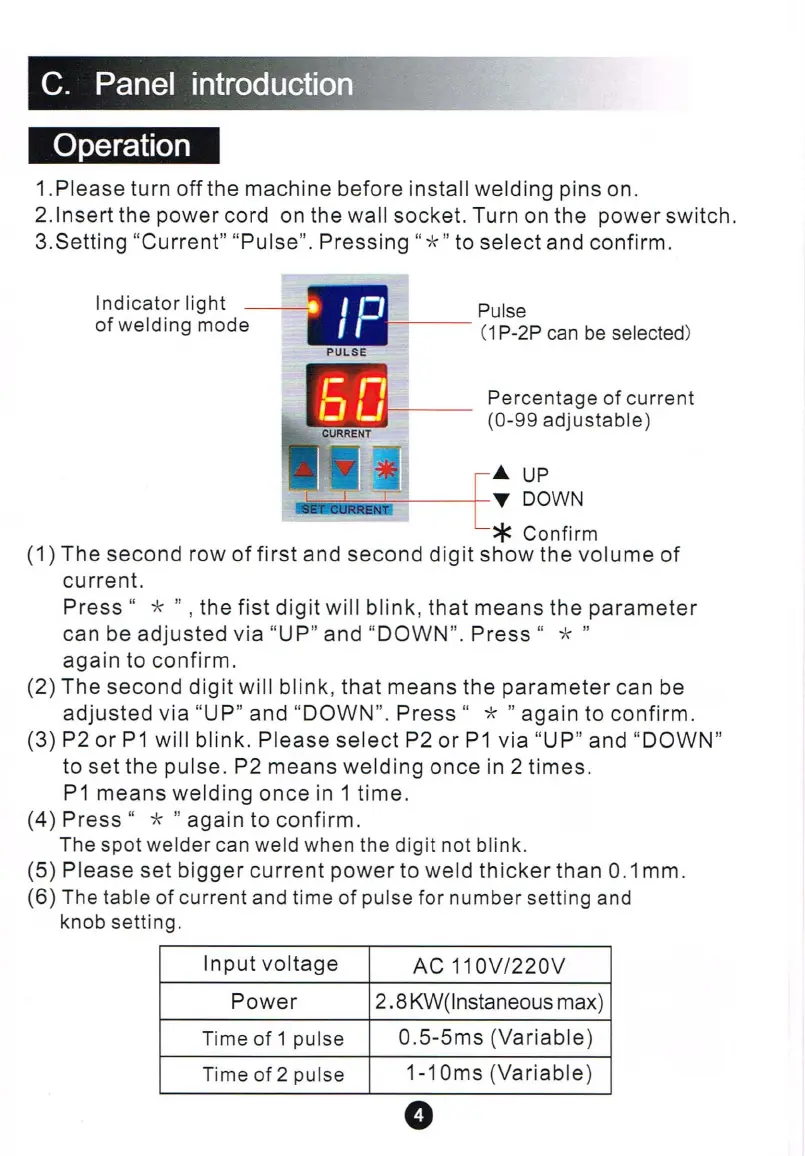
1.
Please
turn
off
the
machine
before
install
welding
pins on.
2.lnsert
the
power
cord on the wall
socket.
Turn on
the
power
switch.
3.Setting
"
Current"
"
Pulse
".
Pressing
"
*"
to
select
and
confirm
.
Ind
icator light
of weld i
ng
mode
Pulse
---
(1
P-2P
can
be
selec
t
ed
)
Percentage of current
(0-99
ad
justable)
...
UP
..!!!!!!!
!!iI
i - i
T
DOWN
* Confirm
(1)
The
second
row
of
first
and
second
digit
show
the
volume
of
current.
Press
" * " ,
the
fi
st
di
git
will
blink
,
that
means
the
parameter
can be
adjusted
via
"UP"
and
"
DOWN
".
Press
" * "
again
to confirm.
(2)
The
second
digit
will
bl
ink
,
that
means
the
parameter
can be
adjusted
via
"UP"
and
"
DOWN
".
Press
" * "
again
to
confirm.
(3)
P2 or
P1
will
blink.
Please
select
P2
or
P1
via
"UP"
and
"
DOWN
"
to
set
the
pulse
. P2
means
welding
once
in 2
times.
P1
means
welding
once
in 1
time.
(4)
Press
" * "
again
to
confirm
.
The spot
we
lder can weld when the dig it not blink.
(S)
Please
set
bi
gger
current
power
to
weld
thicker
than
0.1 mm.
(6) The
t
ab
le of current and time of pulse for number setting and
knob setti
ng
.
Input
voltage
AC
11
OV
1220V
Power
2.8
KW(lnstaneous max)
Ti
me
of 1 pulse
O.S-Sms
(Variable)
Time of 2
pu
l
se
1-1 Oms
(Variab
le)
o

Other manuals for Sunkko 737G

Related product manuals