
 Need help?
Do you have a question about the Sunmi NT310 and is the answer not in the manual?
Warnings related to electrical safety, potential explosive gases, and non-professional disassembly.
Guidance on safe installation and operation, especially during lightning, and handling abnormal conditions.
Advice for optimal printer use in various environmental conditions to prevent damage or malfunction.
Company's liability limitations and disclaimer regarding product updates and guide amendments.
Outlines the primary commercial applications and target customers for the printer.
User advisory regarding FCC compliance and potential modifications that could void operating authority.
Equipment compliance with FCC radiation limits and installation guidelines for uncontrolled environments.
Identification and function of key printer components like door cover, buttons, and indicators.
Details on connecting external devices via USB, Cash Box Port, and LAN Network Port.
Step-by-step guide on how to open the printer and correctly load the printing roll paper.
Guidance for diagnosing and resolving common printer issues like power, paper, or print head problems.
Technical details of the printer including print method, speed, connectivity, power, and environment.
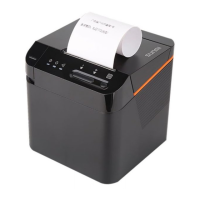
This document describes a direct thermal kitchen cloud printer, designed primarily for commercial scenarios such as food delivery, scan-to-order, and order broadcasting. It is suitable for restaurants, bakeries, and retail stores, offering order printing and payment information broadcasting functionalities.
The printer operates via direct thermal printing, with a maximum print speed of 250 mm/s and an effective print width of 72 mm (±0.1 mm) on 80 mm wide thermal receipt paper. It supports automatic paper cutting (full or half cut mode) and features an easy-loading structure for paper rolls.
Key components include:
The printer features a 64 MB Flash Memory and 256 MB of standard memory. It supports Unicode character sets including UTF-8, GB18030, KSC5601, JIS0208, and other multi-country codes, as well as custom characters.
Connectivity options include:
The integrated speaker has a power of 3W and a volume of ≥105 dB. Sensors include:
The printer operates on a DC 24V/2.5A input power supply. Its dimensions are 130×130×130 mm. It adheres to the ESC/POS print instruction set and has an IP52 protection level. The working environment temperature range is 0°C to 45°C with 30% to 85% humidity. For storage, the temperature range is -20°C to 60°C with 10% to 90% humidity. Supported barcodes include UPC-A, UPC-E, EAN-13, EAN-8, Code 11, Code 39, Code 39 Extended, Code 2 of 5 Matrix, Code 2 of 5 Interleaved, Code 2 of 5 Industrial, Code 2 of 5 IATA, PDF417 Truncated, PDF417, Code 2 of 5 Datalogic, CODABAR, Code 93, Code 128, GS1 DataBar, GS1 DataBar Expanded, and MSI Plessey.
The printer provides visual indicators for various states:
For paper loading, simply press the door cover button, place the paper roll in the direction shown in the figure, and then close the flip cover.
The manual provides troubleshooting steps for common issues:
For cleaning, it is recommended to clean the print head and rubber stick monthly using cotton swabs dipped in anhydrous alcohol. Avoid scratching the print head and rubber stick with hard objects. The product is a Class B device, meaning it may cause radio interference in a living environment, requiring users to take practical measures. It is strictly prohibited to use the printer in the presence of potentially explosive gas or in humid, dusty, or inflammable/explosive environments. The paper tearing knife is sharp and should not be touched. Non-professionals should not disassemble the printer. Products that have reached or exceeded their environmental protection service life should be recycled and reused according to regulations and not discarded randomly.

 To Next Page
 General