Set Preferred Position
Check that both upper and lower limits are set.
Operate the screen to the desired preferred
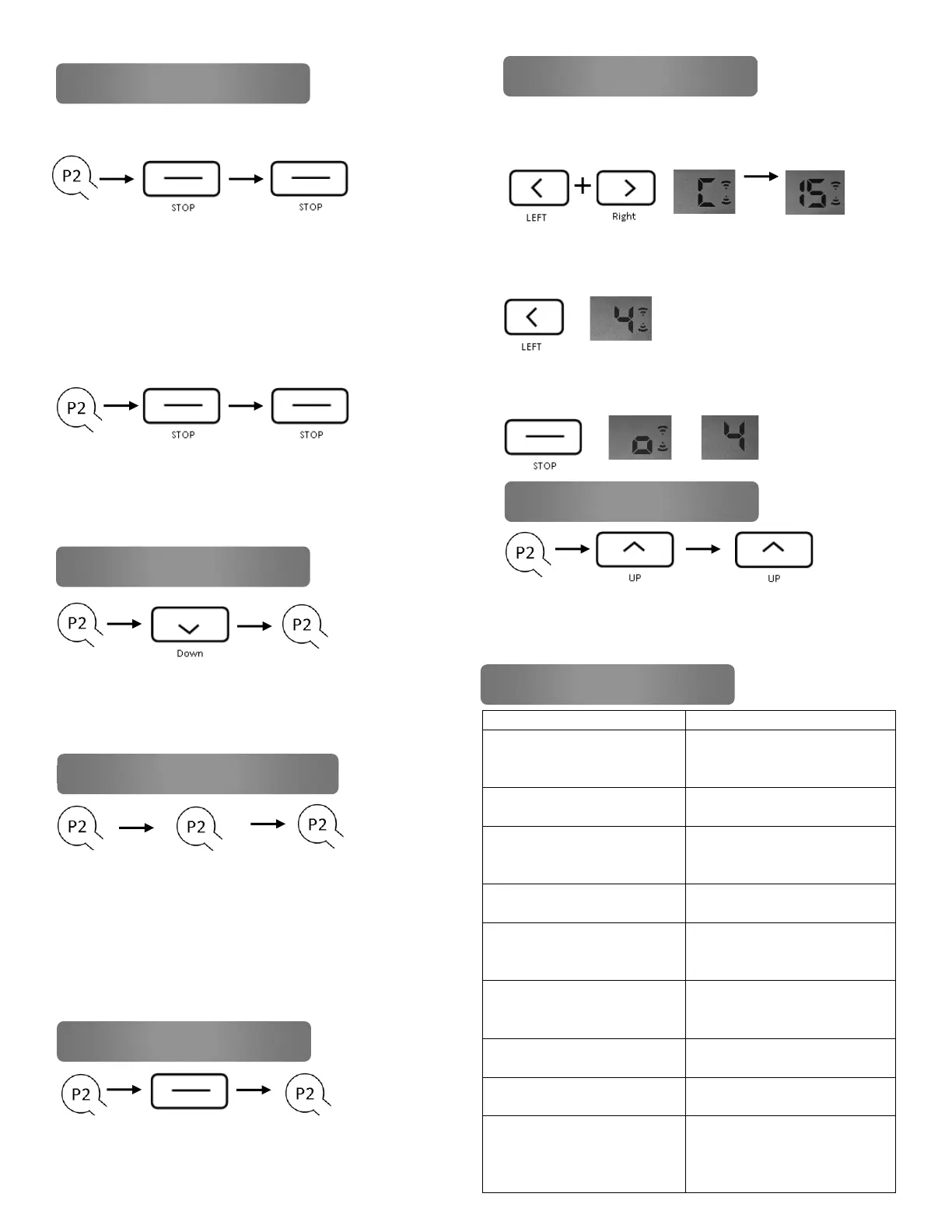
position. Press P2 (1 jog and 1 beep), press STOP (1
jog and 1 beep), press STOP again (2 jogs and 3
beeps), preferred position is now set
Remove Preferred
Press P2 (1 jog and 1 beep), press STOP (1 jog and 1
beep), press STOP again (1 jog and 1 Long beep),
preferred position is now deleted
Press P2 (1 jog and 1 beep), Down and 1 beep), P2
(2 jogs and 3 beeps), all limits are now removed
On existing remote, Press P2 (1 jog and 1 beep)
Press P2 again (1 jog and 1 beep), then on new
remote, press P2 (2 jogs and 3 beeps). New remote
is now linked. Repeat for any additional remotes
1. Press the LEFT and RIGHT buttons
simultaneously, a “C” will appear followed by “15”
2. Press the LEFT arrow to display the desired
number of channels to be displayed on the remote
3. Press the Stop Button, a square will appear on
the screen, number of channels has been saved
Motor has no response - No
Power or poor wire
connection
Check power and connections
Motor has no response -
Remote battery low
Motor has no response - RF
Interference
Check motor antenna, check
for other RF source
interference
Motor has no response - Out
of remote control range
Move remote closer to unit
Remote can’t control single
motor - Multiple motors
paired to the same channel
Use multi-channel remote to
control multiple screens or
single channel per screen
Motor starts slow or makes
loud noise - Incorrect
installation or overload
Verify installation is correct
and level
Motor stops during travel -
Motor has reached limit
Motor stops during travel -
Run time exceeds 4 minutes
Allow motor to cool to reset
the internal thermal fuse
Screen does not reach lower
limit or goes too far into the
housing – Screen has re-
wrapped itself
Remove hood and check for
re-wrap, break limits if
needed to relieve re-wrap
Remote A → Remote A → Remote B
7 Pair / Unpair Additional Remotes
9 Setting Number of Channels
Press P2 (1 jog and 1 beep), STOP (1 jog
and one beep), P2 (2 jogs and 3 beeps)
Press P2 (1 jog and 1 beep), UP (1 jog and
one beep), UP (1 jog and 1 long beep)


 To Previous Page
 Loading...