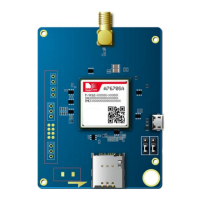
This document is the user guide for the SIMCom A7670E_TE KIT, a product designed to facilitate the development and testing of SIMCom modules. The kit includes an EVB (Evaluation Board) and a TE (Test Equipment) module, which are used together to provide a comprehensive platform for integrating SIMCom solutions.
Function Description
The A7670E_TE KIT serves as a development and testing tool for SIMCom modules. The TE module, which is the core component, is a cellular module designed for various applications. It integrates a SIM card holder, multiple USB connectors (Micro USB and Main Antenna Connector), and UART switches for communication. The TE module is designed to be installed on the SIMCom EVB, which provides the necessary interfaces and power for the module to operate.
The kit allows users to:
- Test SIMCom modules: The EVB provides a stable environment for testing the functionality of SIMCom modules, including cellular communication, data transfer, and other features.
- Develop applications: Developers can use the kit to integrate SIMCom modules into their own applications, leveraging the provided interfaces and tools.
- Install USB drivers: The guide provides detailed instructions on how to install the necessary USB drivers for the SIMCom module, enabling communication between the module and a PC. This involves identifying the module in Device Manager and manually updating the drivers.
- Utilize serial port tools: SIMCom provides a serial port tool that allows users to send AT commands to the module, facilitating configuration, testing, and debugging. This tool provides a comprehensive interface for interacting with the module at a low level.
Important Technical Specifications
While specific detailed technical specifications for the A7670E_TE module itself are not explicitly listed in the provided excerpts, the document highlights several key interfaces and components:
- Module (T1): This refers to the A7670E module, which is the core cellular component.
- Main Antenna Connector (T2): Used for connecting an external antenna to the module for cellular communication.
- Micro USB Connector (T4, T5): Two Micro USB connectors are available, likely for power, data communication, and debugging purposes.
- UART Switch (T6): This switch controls the UART (Universal Asynchronous Receiver-Transmitter) communication, allowing users to select between different UART configurations (e.g., UART3 or debug UART).
- SIM Card Holder (T7): A slot for inserting a SIM card, essential for cellular network connectivity.
- Test Point (T8): A designated point for testing or debugging.
- Connectors (B1, B2): These connectors are used to connect the TE module to the SIMCom-EVB.
The document also mentions that the kit supports various drivers, including:
- SIMTech HS-USB AT Port 9011 (for AT command communication)
- SIMTech HS-USB Diagnostics 9011 (for software debug and FW update)
- SIMTech HS-USB Modem 9011 (for PPP modem functionality)
Usage Features
The A7670E_TE KIT is designed for ease of use in a development and testing environment:
- Modular Design: The TE module is designed to be installed on the SIMCom EVB, providing a flexible and expandable platform.
- Clear Identification of Components: The document uses labeled diagrams (Figure 1 and Figure 2) to clearly identify all major components and connectors on the TE module, making it easy for users to understand the hardware layout.
- Driver Installation Guidance: Comprehensive instructions are provided for installing the necessary USB drivers, including visual aids (Figure 4 and Figure 5) to guide users through the Device Manager process. This is crucial for establishing communication between the module and a host PC.
- Serial Port Tool for AT Commands: The SIMCom serial port tool (Figure 7) offers a user-friendly interface for sending AT commands, which are fundamental for configuring and controlling cellular modules. This tool allows for various settings and operations, including port selection, baud rate configuration, and sending/receiving data.
- UART Switch Functionality: The UART switch (T6) allows users to select between different UART configurations, which is important for debugging and specific communication scenarios. The document notes that connecting the UART switch to different pins (above two pins or below two pins) will enable debug UART or UART3, respectively.
Maintenance Features
While the document doesn't explicitly detail "maintenance features" in the traditional sense (like cleaning or repair), it provides information relevant to maintaining the functionality and usability of the kit:
- Driver Updates: The process of installing and updating drivers is a key aspect of maintaining the kit's functionality. The guide ensures users can properly install the necessary software components.
- Troubleshooting (Implicit): The detailed instructions for driver installation and serial port tool usage implicitly help users troubleshoot common connectivity and communication issues. For example, if the module is not recognized, the driver installation steps provide a clear path to resolution.
- Documentation: The user guide itself is a crucial maintenance tool, providing all the necessary information for proper setup, usage, and understanding of the kit. It ensures that users have access to the information needed to operate the device correctly and address common problems.
- Support Information: The document provides contact information for SIMCom Wireless Solutions Limited, including an email address for support, which is vital for users encountering issues beyond the scope of the guide. This ensures that users can get assistance from the manufacturer when needed.
- Version Control: The "Version History" section (page 3) indicates that the document itself is maintained and updated, ensuring that users always have access to the most current and accurate information regarding the A7670E_TE KIT. This helps prevent issues arising from outdated instructions or specifications.

 Need help?
 General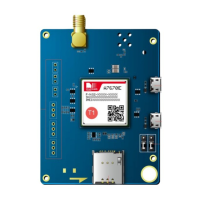

 To Next Page