3
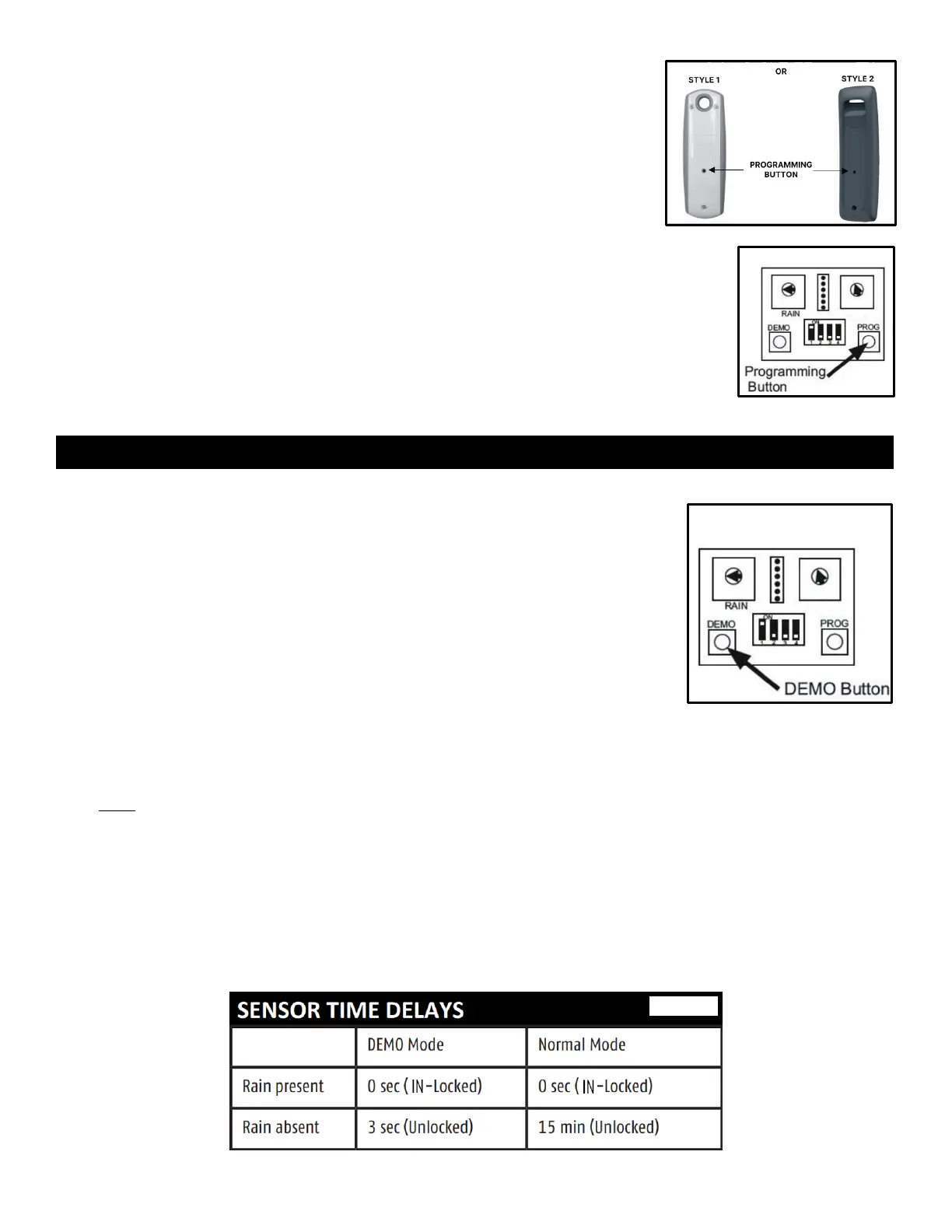
5. Program Sensor to the awning motor:
a. Using something small, such as a paper clip, press & hold
programming button on back of remote until awning jogs.
b. Open hatch on back of Sensor and hold programming button
(see Figure 8) until awning motor jogs again.
Demo mode is used to test rain sensing without standard wait times.
6. Press and release Demo button.
• Awning will jog, and Sensor's LED status lights will alternate blinks.
7. Close hatch to protect interior of Sensor during testing.
8. Simulate desired amount of rainfall by applying water to face of Sensor.
• Awning will automatically close – allow awning to stop on its own at
closed position.
9. Once awning has fully closed, simulate end of rainfall by drying Sensor.
• Awning will unlock and re-open after 3 seconds.
When Demo mode has timed out, Sensor will resume Normal operation mode.
If rain is detected in Normal mode, Sensor will immediately close awning.
When rain stops, Sensor will wait approximately 15 minutes before unlocking and re-opening awning.
The time delay feature confirms that weather conditions have truly changed before re-opening awning.
Note: Demo mode will time out after 2 minutes. To exit Demo mode before the 2-minute time-out,
press Demo button again. Status lights will blink once together to confirm Demo has ended.


 To Next Page
 Loading...