EN-3
EN-4
1
1
2
3
4
5
6
7
8
9
10
11
12
13
14
15
16
17
18
19
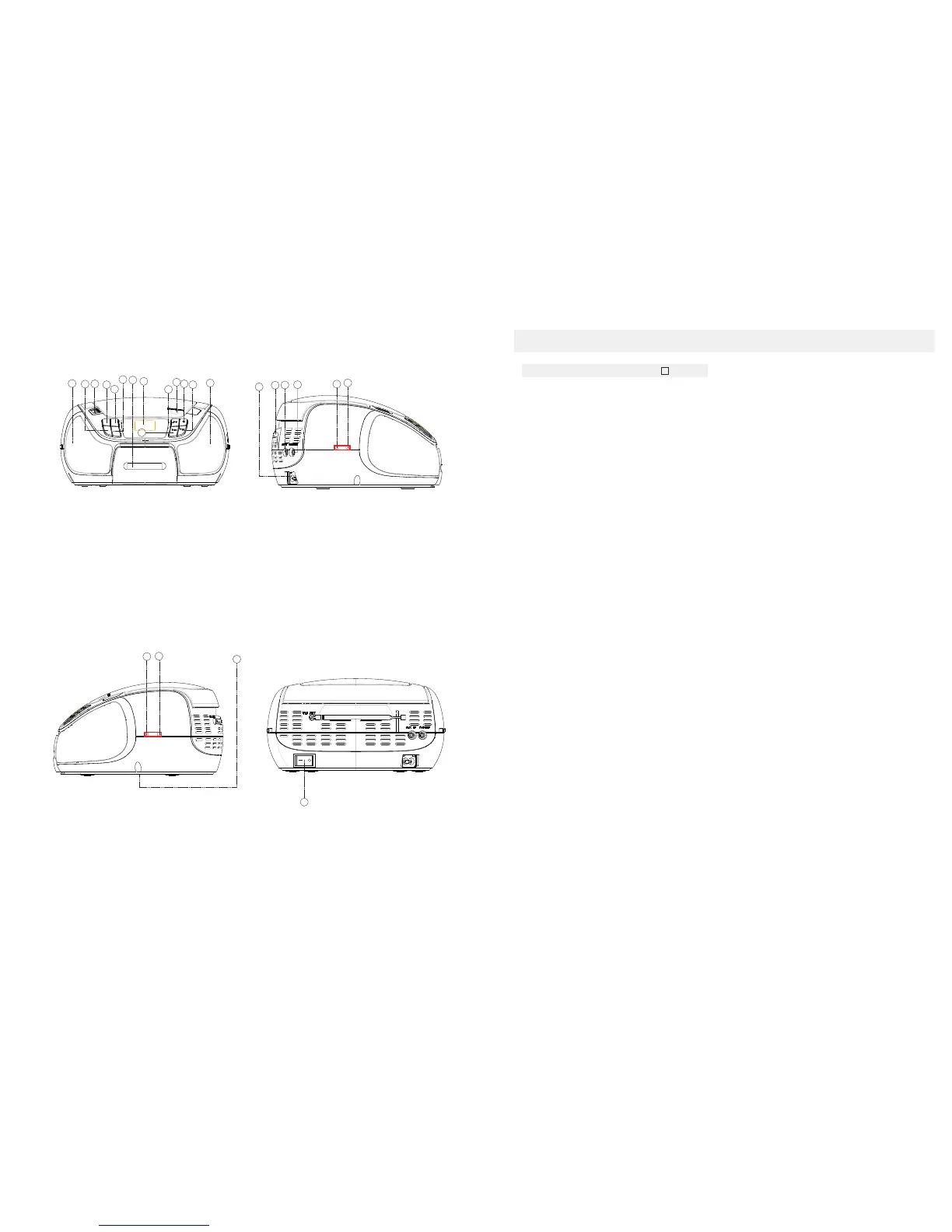
1. LEFT&RIGHT SPEAKER
2. REPEAT BUTTON
3. USB JACK
4. EQ BUTTON
5.FUNCTION SELECT
6.PROGRAM BUTTON
7. IPOD JACK
8.LCD DISPLAY
9.PLAY/ PAUSE BUTTON
10. CD DOOR OPEN/CLOSE BUTTON
11. STOP BUTTON
12. NEXT BUTTON
13. BACK BUTTON
14. AC SOCKET
15. FM ANTENNA
16. AUX JACK
17. PHONES JACK
18. VOLUME+ BUTTON
19. VOLUME- BUTTON
1. LEFT&RIGHT SPEAKER
2. REPEAT BUTTON
- Repeat a track CD/MP3/USB/IPOD program.
- Repeat mode : normal->repeat 1->repeat all->
repeat album ->normal
3. USB JACK
-To listen to your USB flash memory stick with
Mp3 music files.
4. EQ BUTTON
-Press the button to change EQ CD/MP3/USB/IPOD
/RADIO's music style.
-When playing the music, press this button
is in the classica-rock-popular-jazz-FLR.
5. FUNCTION SELECT
-Select source of sound CD/USB/
IPOD(AUX)/RADIO.
6.PROGRAM BUTTON
-Program and review programmed track numbers.
-In the working status, push down this button can on
CD/MP3/USB/RADIO for programming.
7.IPOD JACK
-To listen to your IPOD with Mp3 music files.
8. LCD DISPLAY
- Show the FM dial frequency.
- Show the number of tracks.
9.PLAY/PAUSE BUTTON
- Start or pause MP3/CD/USB/IPOD play.
-In the radio mode, press the play/pause button enter
the automatic channel scan mode.
10. CD DOOR OPEN/CLOSE BUTTON
- Press here to open/close the CD door.
11. STOP BUTTON
- Stop CD/MP3/USB/IPOD playback;
erase a CD program.
12.NEXT BUTTON
- Select NEXT track .
- Press and hold more than 1. 5 sec forward search
intra track.
- In the radio mode, press NEXT will enter the
high-end manual channel scan mode.
13.BACK BUTTON
- Select BACK track.
- Press and hold more than 1.5 sec BACK
search intra track.
-In the radio mode, press BACK will enter
the low end of the manual channel scan mode.
14.AC SOCKET
- Inlet for power cord.
15.FM ANTENNA
- To improve FM reception.
16.AUX JACK
-Press FUNCTION button , select AUX station.
play MP3、DISCMAN、 WALKMAN AUX
insert.
insert when no disc.
NOTE:Please take out the CD disc.
17.PHONES JACK
- 3.5 mm stereo headphone jack.
18.VOLUME+ BUTTON
19.VOLUME- BUTTON
20.PRE- DN BUTTON
-In the radio mode, press PRE-DN button to
choose the back channel.
-In the mp3 mode, press PRE-DN button to
enter the back folder.
21.PRE- UP BUTTON
-In the radio mode, press PRE-UP button to
choose the next channel.
-In the mp3 mode, press PRE-UP button
enter into the next folder.
22.BATTERY DOOR
-To open battery compartment.
23.POWER SWITCH
-To control the unit electrical
source on/off.
1
20
21
22
23
20.PRE- DN BUTTON
21.PRE- UP BUTTON
22.BATTERY DOOR
23.POWER SWITCH
ON
OFF
Top and front panels(See )
CONTROLS
POWER SUPPLY
English



 To Next Page