1 2
3
4
5
6
7
8
9 0
10+
VOL -
VOL+
REPEAT
SEAR CH
TITLE
ENTER
MENU
ST EP
SU BT IT LE
A N G L E
AU DIO PB C
SE TU P
AB
DI SP LAY
MUTE
SOUR CE
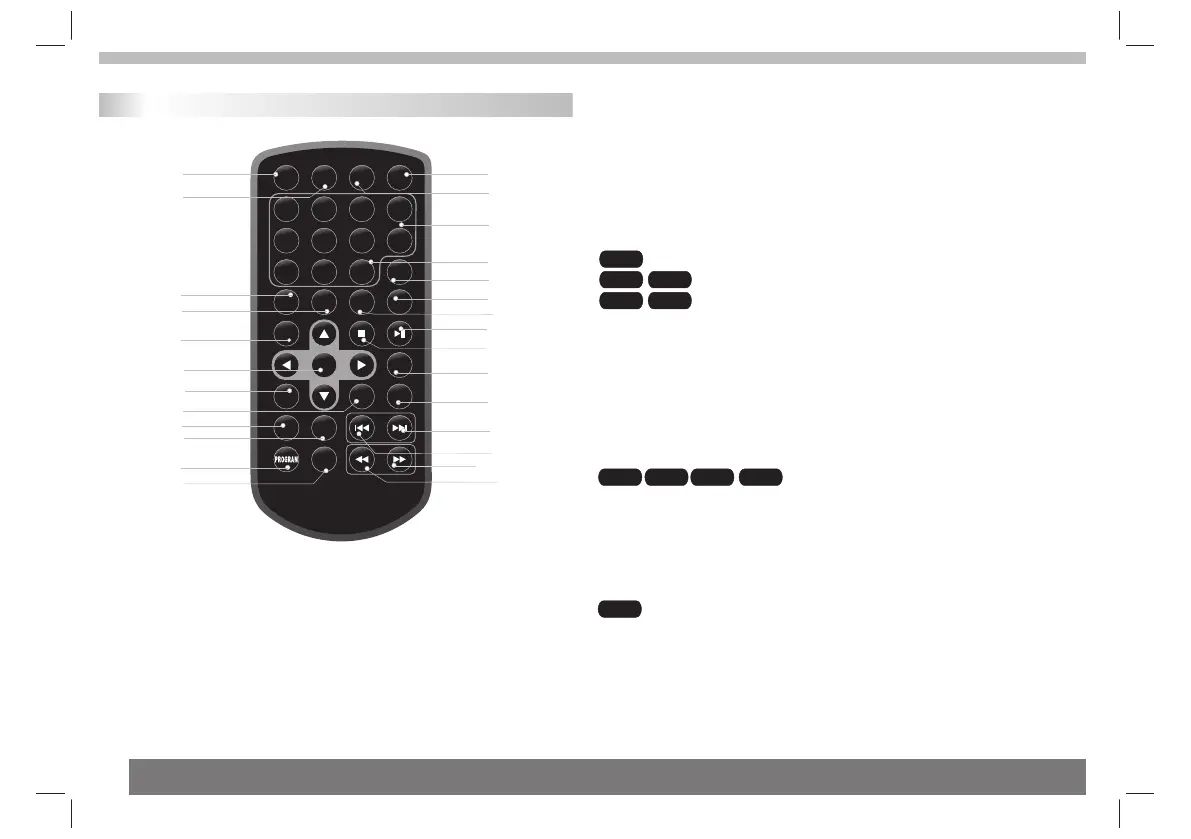
Remote control unit
11
9
16
5
18
8
14
21
1
2
6
7
22
23
12
20
19
13
4
3
24
15
17
10
25
26
27
Identification of Controls
1.PLAY/PAUSE
Press PLAY/PAUSE once to pause playback, pressing PLAY/
PAUSE second time will resume the playback.
2.STOP
When this buttom is pressed once, the unit records the stopped
point,from where playback will resume if ENTER is pressed after
wards. But if STOP button is pressd again instead of ENTER
button, there will be no resume function.
3.Reverse Skip
Go to previous chapter/ track to the beginning.
4.Forward Skip
Go to next chapter/ track.
5.VOL -
Adjust VOLUME.
VCD CD
DVD
7.A B
To repeat a segment: press AB once to set the starting point for
repeat segment, press it again to set an end point, and the player
will repeat the segment from the start to the end point.
8.PROGRAM
:The program function enables you to
store your favourite tracks from the disc. Press PROGRAM button ,
then PROGRAM MENU will appear on screen, now you can use the
number key to direct input the titles,chapters or tracks number and
select PLAY option. TO resume normal playback, press PROGRAM
and select CLEAR option on the program menu.
:You can press PROGRAM repeatly to select the slide show
mode, the are 16 types slide show.
Mp3 WMA
DVD VCD
CD
Mp3
5
JPEG
OSD
6. REPEAT:
: you can select CHAPTER/TITLE/ALL/RANDOM/OFF play mode on a disc.
: you can select REP 1/REP ALL/RANDOM/OFF play mode on a disc.
: you can select REP 1/REP DIR/REP ALL/RANDOM/OFF play mode
on a disc.



 To Next Page