RPBT450 Instruction manual
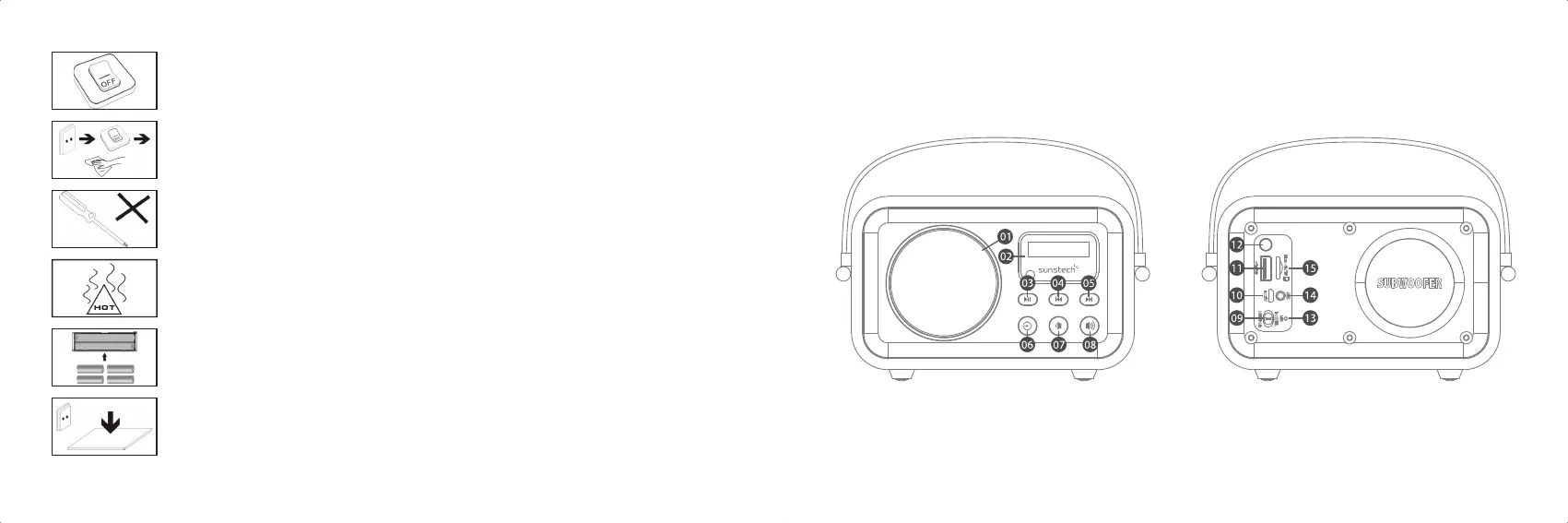
Front Panel Back Panel
13. Always power o the device to install or remove external devices that do not
support hot-plug.
14. Disconnect the device from an electrical outlet and power o before cleaning
the device.
15. DO NOT disassemble the device. Only a certied service technician should
perform repair.
16. The device has apertures to disperse heat. DO NOT block the device
ventilation, the device may become hot and malfunction as a result.
17. Risk of explosion if battery replaced by an incorrect type. Dispose of used
batteries according to the instruction.
18. PLUGGABLE EQUIPMENT: the socket-outlet shall be installed near the
equipment and shall be easily accessible.
13. Indicator
14. Auxilary Port
15. Micro SD Port
10. Micro USB Port
11. USB Port
12. Bass Boost
07. Volume Down
08. Volume Up
09. Power Switch
04. Last Track
05. Next Track
06. Input
01. Speaker
02. Display
03. Pause/play
03 04



 To Next Page