15
Underthehomescreen,longpresstheapplicationicononthehomescreen,thenyoucanmovetheselected
iconaftertheiconisselected.
6.
6.
6.
6.Delete
Delete
Delete
Deletethe
the
the
thedesktop
desktop
desktop
desktopicon
icon
icon
icon
Underthehomescreen,longpresstheapplicationicononthehomescreen,movetheselectedicontothe
deleteicon
“×”
,thenstoppressing,thedesktopiconcanbedeleted.
Install
Install
Install
Installthe
the
the
theAPK
APK
APK
APKapplication
application
application
application
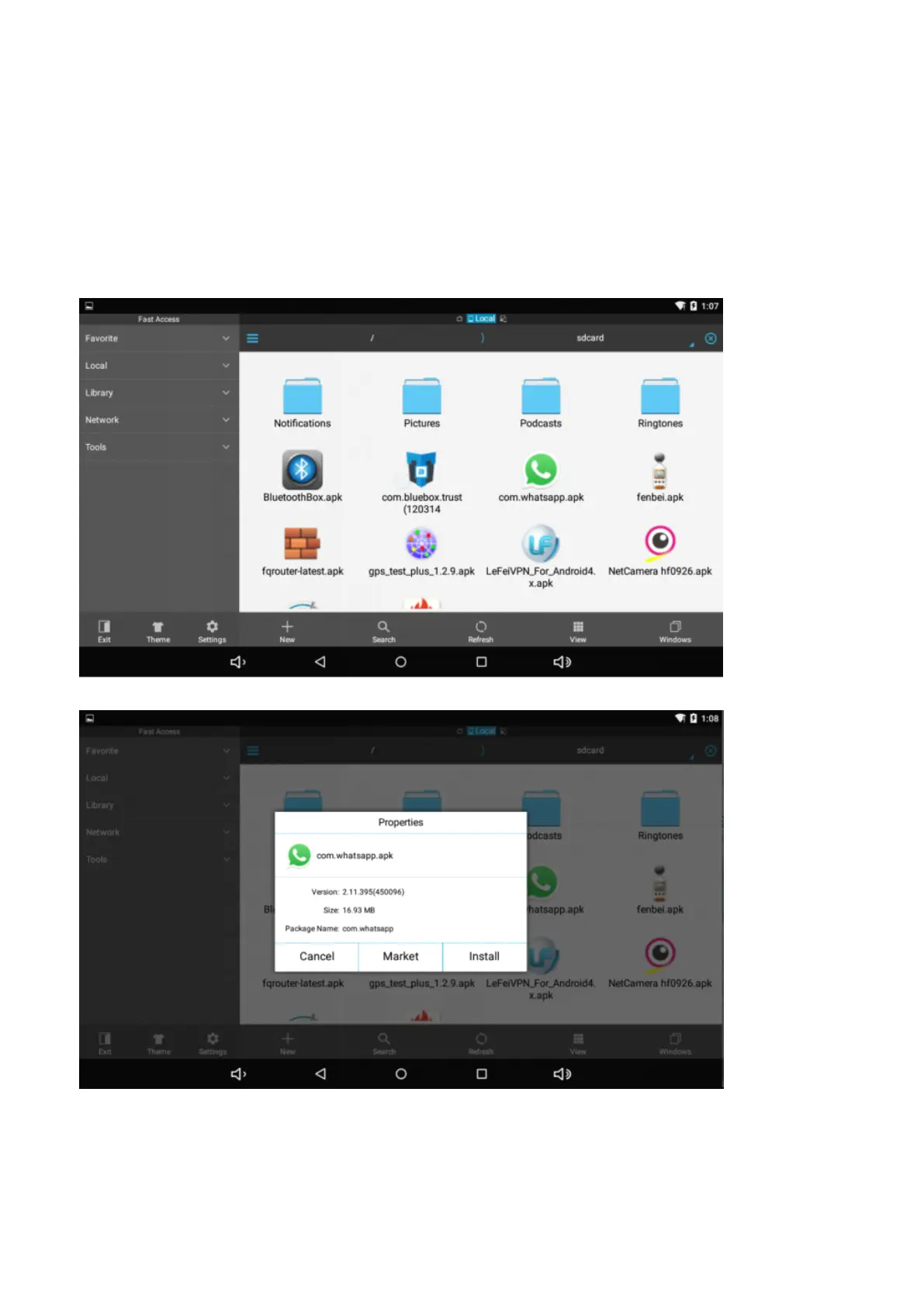
1.CopytheneededAPKformatapplicationintothedeviceorTFcard.
2.Tap"FileManager"tofindtheAPKformatapplicationyouwanttoinstall.
3.TaptheAPKformatapplicationyouwanttoinstallthenappear"Doyouwanttoinstallthisapplication?"
4.Tap"Install"tobegintheinstallationofAPKapplication
Uninstall
U
ninstall
Uninstall
UninstallAPK
APK
APK
APKapplication
application
application
application


 To Next Page