SUNVIC SELECT 107
USER INSTRUCTIONS
INTRODUCTION
The SELECT electronic time switch can automatically switch ON and OFF twice a day at whatever times you
choose.
During installation the installer selects either 24hour or 5day/2day or 7day programming options via 3 position
switch on back of unit (see installation instructions).
24 hour programmer option runs same programme every day.
5 day / 2 day programmer option allows different ON / OFF times at weekend.
7 day programmer option allows different ON / OFF times for each day of week.
The unit is designed to eliminate possibility of accidental changes to your programme. Buttons normally
visible only affect your set programme temporarily. All buttons which can permanently change your
programme are located behind the flip-down fascia panel.
BUILT IN PROGRAMME
For convenience, the programmer has a built in programme which for many people is perfectly satisfactory
but it can be changed quite easily (see section CHANGING PROGRAMME TIMES).
Built in programme is loaded by pressing RESET button (H) (use a non-metallic pointed tool for this) and is
as follows:-
Weekdays (Mon-Fri) 1-ON > 1-OFF 2-ON > 2-OFF
6.00am > 8.30am 4.30pm > 10.30pm
Weekends (Sat&Sun) 1-ON > 1-OFF 2-ON > 2-OFF
7.00am > 9.00am 4.30pm > 11.00pm
If unit is installed as a 24hour programmer the built in programme will be the same for each day (as Mon-Fri
above).
SELECTING OPERATING MODE
MODE button (A) selects the operating mode. There are 4 modes as described:-
CONT Switch will be on all the time.
(continuous)
2 (on twice) Switch will be switched on or off exactly as stored programme, twice per day.
1 (on once) Switch will be switched on only once each day.
It will switch on at 1st ON time and off at 2nd OFF time.
OFF Switch will be off all the time.
SETTING TIME AND DAY
Press SET button (B) once.
The display indicator will move to position above clock symbol and will be flashing.
Press +/- buttons (D&E) to adjust time. Time will change quicker if pressed continually.
Press DAY button (F) to move indicator to current day of week.
Press SET button (B) three times if you wish to return to normal run state. Indicator on
display will be above RUN symbol.
If you wish to change programme on/off times (see next section).
Note
The unit has a built in timer which will cause the programmer to return to normal run state automatically if a
period of 5 minutes passes without any buttons being pressed.
Select 107_7/98 P.1 (User Instr)

 Need help?
 General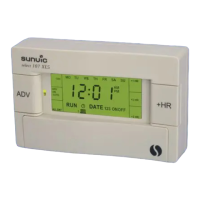

 To Next Page