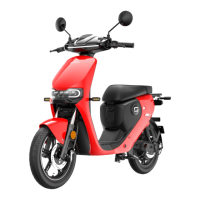
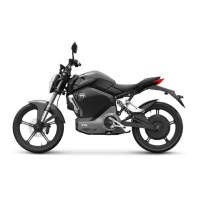
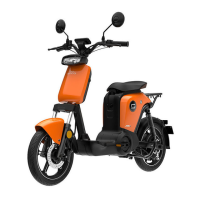
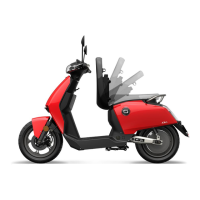
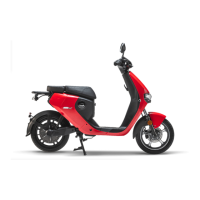
The SUPER SOCO CU is a smart electric motorcycle designed for urban commuting, offering a blend of modern technology, safety features, and user-friendly operation. This manual provides comprehensive instructions for its use, maintenance, and troubleshooting.
Function Description:
The SUPER SOCO CU is an electric two-wheeled vehicle primarily intended for personal transportation. It operates on an electric motor powered by a removable battery pack. The motorcycle features a digital instrument panel that displays essential information such as speed, time, battery status, and error codes. It incorporates various control switches for lights, horn, turning signals, and riding modes (ECO, NORMAL, SPORT). A keyless intelligent remote control system allows for locking, unlocking, and automatic saddle opening. The vehicle also includes a kill switch for safety, which automatically disconnects power in case of circuit abnormalities or excessive current.
Important Technical Specifications:
- Battery: The battery pack is removable and requires specific charging procedures. Charging temperature should be between 10-30°C, and discharging temperature between 0-40°C.
- Motor: The motorcycle is equipped with an FOC vector rear brake controller lever.
- Tire Pressure: Suggested tire pressure is 175Kpa for both front and rear wheels.
- Maximum Load Weight: The maximum load capacity is 150KG.
- Kill Switch: Automatically disconnects power if the circuit is abnormal or current exceeds 50A.
- Instrument Panel: Displays speed, time, total range/current trip range, battery capacity (SOC in % and bars), riding mode, high beam indicator, turning indicator, battery error indicator, cruise indicator, data connect condition, and charge condition. It also shows error codes for various system malfunctions.
Usage Features:
- Quick Start:
- Checklist: Includes remote controls (x2), keys (x2), mirrors (x1), user manual (x1), spanner for mirrors (x1), and charger (x1).
- Battery Installation: Open saddle and battery box, insert battery pack, connect power, turn on kill switch, and close saddle.
- Turning On: Unlock via remote control, put on helmet, kick out side stand, turn key to "ON" (if using key start), press "start" button, remove parking condition (READY light on), and turn throttle to move.
- Controls:
- Left Switch: Horn button, turning light button (left/right/off), high/low beam switch, and cruise button (maintains constant speed).
- Right Switch: SET button (changes instrument display mode, resets trip mileage, switches unit between km/mile), gear change button (increases/decreases gear), hazard flasher button, and parking button (engages/disengages parking state).
- Remote Control: Allows unlocking, locking, and automatic saddle opening (press unlock for 3 seconds).
- Key Start: Turn key to "ON" to power on, "OFF" to power off.
- Handlebar Lock: Lock by turning handlebar to extreme left, inserting key, turning left, and removing key. Unlock by inserting key and turning right.
- Storage/Battery Box: Opened by inserting key and turning left.
- Riding Notice:
- Accelerate slowly to avoid excessive current and energy consumption.
- Maintain constant speed, reduce frequent starts/stops, and avoid sudden acceleration for safety and energy efficiency.
- Do not overload the motorcycle (max 150KG).
- Press the "PARKING" button when pushing the vehicle to prevent accidental starts.
- Turn off power and remove key when parking.
- Safety Instructions:
- Read the manual thoroughly before riding.
- Understand all instructions, precautions, and warnings.
- Be familiar with the operation and contingency measures.
- Be aware of warning labels.
- Do not disassemble; contact dealer for replacements.
- Do not ride under the influence of medication or alcohol, or when unwell.
- Observe traffic regulations, signs, and road conditions.
- Riders under 16 are prohibited. Do not lend to inexperienced riders.
- Wear safety equipment (helmet, protective clothing, gloves, boots).
- Perform pre-ride checks (lights, brakes, tires, loose parts, abnormal noise).
- Regularly service at SOCO Service Center.
- Do not use high beam in good lighting conditions to avoid dazzling others.
- Avoid making/answering calls while riding.
Maintenance Features:
- Regular Inspection and Maintenance:
- First inspection: 300 km or two months (whichever comes first) at SUPER SOCO Service Center.
- Regular inspection: Every 2,500 km or six months at SUPER SOCO Service Center.
- Daily Cleaning: Use clean water and neutral detergent with soft cloths/sponges. Avoid metal brushes or sandpaper. Dry with soft cloths.
- Storage:
- Store in a dry, ventilated indoor space away from direct sun, rain, corrosive substances, power sources, fire, and heat.
- For long-term storage, charge the battery to half-saturated status (3 hours charging from 0%), disconnect from vehicle, and charge once a month.
- Battery pack storage conditions: 0-30°C ambient temperature, ≤65%RH ambient humidity.
- Battery Use:
- Keep away from water.
- Charge after use; remove battery pack for long-term storage.
- Forbidden to connect battery pack input and output.
- Do not charge or store in residential buildings or near combustibles.
- Avoid strong impact or pressure on the battery pack.
- Use only the appointed charger.
- Do not open the battery pack.
- Warning:
- Turn off kill switch before cleaning.
- Avoid cleaning with strong water to prevent damage.
- For long-term non-use, turn off kill switch, disconnect power, and charge once a month.
- Fully charge battery before use after long-term storage.
Troubleshooting:
The manual provides a detailed table of common problems, their causes, and solutions, categorized by general issues and battery-specific issues.
- General Problems:
- No power, "Start" not on: Poor battery connection, kill switch off. Solution: Connect power cable, turn on kill switch.
- Power on, turning handlebar, motor not work: Low battery, side stand on, parking mode, brake handle not in right position, throttle error, loose controller plug, controller breakdown. Solution: Charge battery, kick out side stand, press parking button, place brake handle correctly, change throttle, re-plug controller, replace controller.
- Speed slow or mileage short: Low battery, flat tire, heavily overloaded, worn brake pads, battery aging. Solution: Charge battery, inflate tires, maintain appropriate load, replace brake pads, replace battery.
- Battery cannot be charged: Poor charger plug contact, wrong charger used, battery aging. Solution: Check plug, use SOCO charger, replace battery.
- Instrument Error Codes (e.g., Error 99-86): Indicate various issues like controller communication error, controller stops (over current/voltage/temperature), controller power tube error, Hall sensor error, throttle error, battery communication error, charging over current/voltage, battery high/low temperature, discharge over current/voltage, internet connection error, GPS connection error. Solutions typically involve contacting after-sales service or dealer, parking for a while, checking connections, or adjusting charging/storage conditions.
- Battery Status Errors:
- Battery no power, "Start" not on (before use): Low battery. Solution: Charge battery.
- Power off with low battery (in use): Low battery, under voltage protection. Solution: Charge battery.
- Discharge, low temperature (Error 88): Store battery and motorcycle in a warm indoor place.
- Discharge, over current (Error 90): Stop riding, wait for a moment.
- Battery at high temperature (Error 91): Stop charging/riding, let battery cool.
- Battery communication error (Error 94): Check battery connector, contact service.
- Capacity drops after night/day: CPU, controller, warning devices consume battery (normal). Solution: Use normally.
- Mileage different from official: Due to road conditions, weather, temperature, wind drag, load. Solution: Contact service for questions.
- "Power" not on (storage): Battery stored too long, low battery. Solution: Charge battery, contact service if unable to charge.
- Charging, low temperature (Error 89): Take out battery, charge in warm indoor place.
- Charging, over voltage (Error 92): Stop charging, check charger.
- Charger hot during charging: Normal due to large current and heat emission. Solution: Use normally in dry, ventilated place.
- Battery flooding: Water spray/immersion. Solution: Stop using, contact service.
- Battery case break down: Impact/fall damage. Solution: Stop using, contact service.

 Need help?
 General

 To Next Page