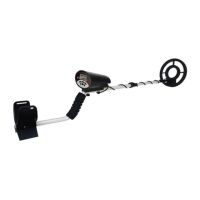
The MD6026 is an underwater metal detector designed for finding lost coins, gold/silver jewelry, and other metal objects. It offers high sensitivity and the ability to distinguish between different metal types, enhancing the user's experience during operation.
Function Description
The MD6026 operates on the principle of motion detection, meaning it responds only when the search coil is moving. It features adjustable sensitivity ("SENS") to adapt to various environments and a discrimination ("DISC") function to eliminate unwanted metal signals. The detector is waterproof, including its headset, allowing for underwater detection. When a target is detected, an LED flashes red, and the headset emits a 400Hz tone. The intensity of the LED flashes and the sound indicate the proximity to the target. The LED also serves as a low battery indicator.
Important Technical Specifications
- Power Source: One 9 Volt 6F22 battery.
- Audio Output: 400Hz tone through the headset upon target detection or low battery.
- Visual Indicator: Red LED flash for target detection and low battery.
- Waterproof: Detector and headset are waterproof for underwater use.
Usage Features
Assembly:
- Remove the stem and search coil assemblies.
- Unscrew the knob on top of stem 1, remove the knob connector.
- Insert stem 1 into the search coil bracket, align holes, push the connector through, and tighten the knob.
- Remove the control box fixed on upper stem 2 with arm support.
- Insert stem 1 into upper stem 2 by snapping two spring locks into the proper holes.
- Adjust stem length by pushing in the spring lock, pulling out the lower stem, and letting the spring lock snap into another hole.
- Wind the search coil cable around the stem, ensuring some slack, then tighten the locknut.
Battery Installation:
- Set the "SENS" control to "POWER OFF".
- Use the provided accessory to screw off the battery cover.
- Place a 9V battery into the compartment, matching polarity symbols (+ and -) on the connector.
- Reinstall the battery cover and tighten with the accessory.
- Caution: Remove batteries if the unit won't be used for a week or more to prevent chemical leaks and damage to electronic parts.
Control Panel:
- Power Switch and "SENS" Control: This knob serves as both the power switch and sensitivity adjustment. Rotate counter-clockwise to turn off power. Rotate clockwise, away from "OFF," to turn on power and adjust sensitivity. Higher sensitivity is generally recommended for most detections.
- "DISC" Control: Rotate counter-clockwise to detect all types of metal. Rotate clockwise to eliminate most junk metal. The degree of discrimination can be chosen based on specific needs.
Operation:
- Power On: Rotate the "SENS" control clockwise.
- "DISC" Function:
- Scatter sample targets (coins, pull tabs, foil) 1-2 feet apart on the ground.
- Set Sensitivity Control to maximum.
- Turn Discrimination control counter-clockwise.
- Put on the headset and turn on power.
- Hold the search coil about 2 inches above and parallel to the ground. Move it slowly over samples, noting LED and Audio response. Remember, it's a motion detector.
- Gradually turn the Discrimination Control clockwise through the white, yellow, and red regions, passing over targets each time. Observe how MD6000 rejects some targets while responding to others. This helps determine discrimination points for various metals (e.g., small nails in the yellow region, pull-tabs in the red region).
- Some objects like shallow bottle caps or bent pull tabs might be difficult to reject, producing a broken signal that disappears when the coil is slightly raised. Strong signals from good targets will only weaken when the coil is raised.
- While MD6000 remains silent for rejected objects, others might produce "snap, crackle, and pop" sounds, indicating the discrimination circuitry is working.
- Large pieces of trash (beer cans, jar lids) may sound like good targets. Practice helps differentiate large trash from small, coin-sized objects.
- "SENS" Function:
- Rotate clockwise to turn on power and to the full position for highest sensitivity. High sensitivity is recommended for most detections.
- Rotate counter-clockwise to decrease sensitivity or to turn off power.
Notes on Environmental Impact:
- Mutual Disturbance: If two detectors operate close to each other, decrease SENS or increase distance between them.
- Electrical Interference: Lower sensitivity or move away from areas with electrical cables or TV/Radio stations.
- Proper SENS Setting: In complex environments, excessively high SENS can lead to non-ideal results due to soil mineralization and junk metals affecting the signal. Adjust SENS repeatedly to find the best condition. Full SENS is only ideal in the most favorable environments.
- Bulk Metal: Detection is difficult if bulk metal is near the target, as its signal may overpower the target's. Remove bulk metal or avoid detection in such areas.
Testing (also applicable underwater):
- Turn on power.
- Set "SENS" and "DISC" controls to proper positions.
- Find a metal-free area.
- Place the desired metal object on the ground as a sample.
- Keep the search coil 1-2 inches from the ground, moving it back and forth over the sample to observe the reaction.
- Note: Mark the object's location to prevent loss.
Correct Use of the Search Coil:
- Do not sway the search coil like a pendulum, as this can cause false readings.
- Sweep the search coil in an arc line, moving right and left.
- Maintain a distance of 1-2 inches from the ground (closer for smaller targets).
- Keep the distance between two neighboring arcs about 15-20cm.
- Move slowly and keep the arc lines parallel to avoid missing objects.
Maintenance Features
- Handling: Handle the detector gently and carefully. Dropping it can damage circuit boards and cases, leading to improper operation.
- Temperature: Use the detector only in normal temperature environments. Extreme temperatures can shorten the life of electronic devices and damage the detector's cases.
- Cleanliness: Keep the detector away from dust and dirt, which can cause premature wear of parts.
- Cleaning: Wipe the detector with a damp cloth occasionally to keep it looking new. Do not use harsh chemicals, cleaning solvents, or strong detergents.

 Need help?
 General

 To Next Page