GET THE BEST FROM THE BEST
Your SureFire illumination tool has been designed and manufactured to
provide years of reliable service. Please review this manual to
ensure optimal performance.
LOCKOUT TAILCAP (US PAT. RE40125)
Most SureFire illumination tools feature a lockout tailcap, which prevents
accidental activation during storage or transport. The tailcap may need
to be enabled prior to light operation.
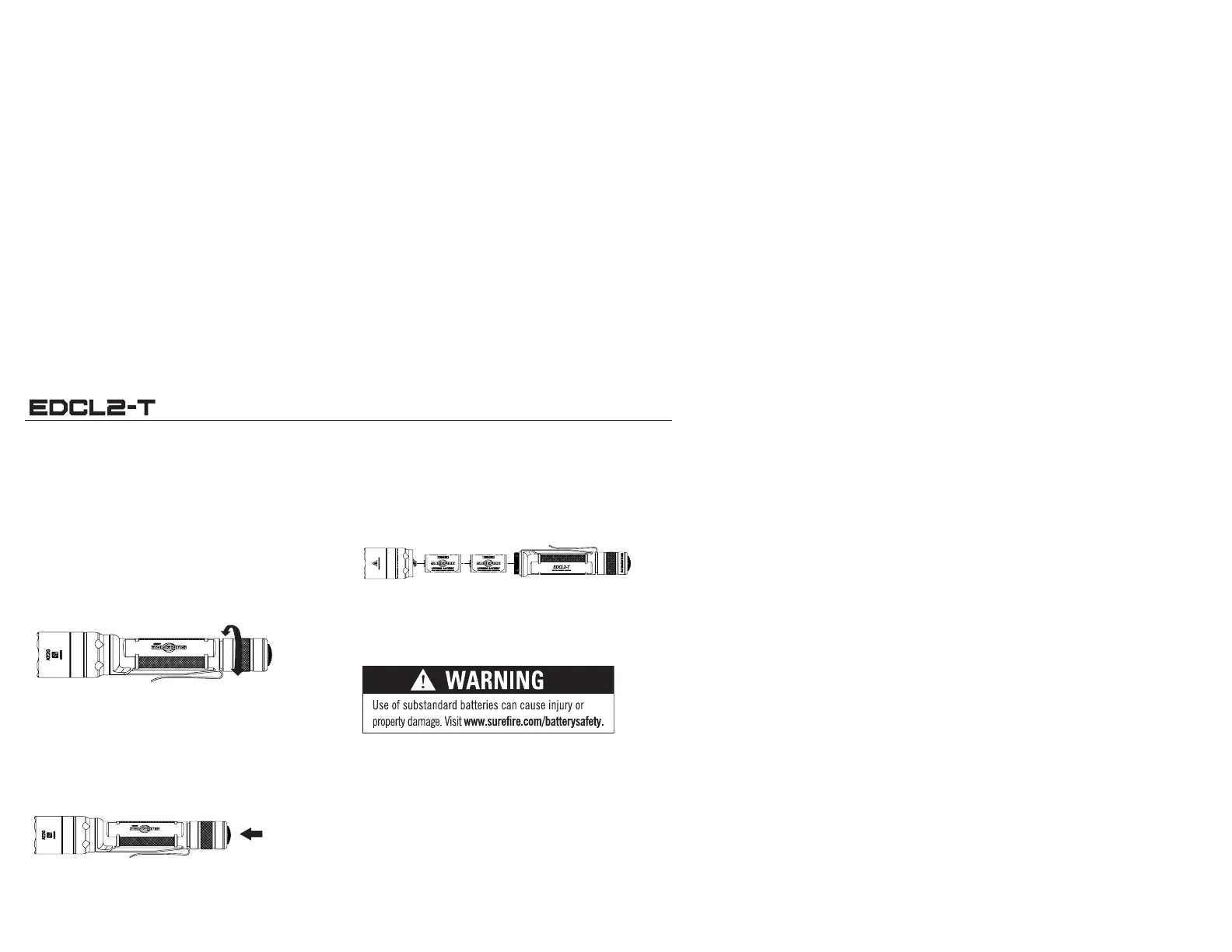
To enable, rotate tailcap clockwise until light activates when tailcap
pushbutton is pressed.
To lock out tailcap, rotate counterclockwise until light will not
activate when pushbutton is pressed.
LIGHT OPERATION
Press lightly for the low output or press fully for the high-output. Twist
clockwise for constant on activation.
BATTERY REPLACEMENT
Most SureFire illumination tools ship preloaded with
batteries. To load or replace batteries:
1. Unscrew head counterclockwise and remove.
2. Remove old batteries and dispose of properly.
3. Insert two new 123A lithium batteries with their positive (+)
terminals oriented forward.
4. Replace head by screwing on clockwise. Press pushbutton
(with tailcap enabled) to test.
BATTERY INFORMATION & WARNINGS
For complete battery information and warnings, reference the enclosed
BATTERY INFORMATION / WARNING insert in your illumination tool’s
original packaging or visit www.surefire.com/batteries.
MAINTENANCE
Wipe with a clean, dry cloth. For tips on maintaining your SureFire illumina-
tion tool, visit www.surefire.com/faqs-maintenance.
ACCESSORIES
SureFire makes a full line of accessories for most of its illumination tools.
For a complete listing, visit www.surefire.com/parts-accessories.
ENABLE
DISABLE
PRESS FOR
MOMENTARY
OR TWIST FOR
CONSTANT ON.


 To Previous Page