INTRODUCTION
The ultra-compact, dual-output, dual-spectrum V1 Vampire allows selection between white light and infrared illumination,
generated by a single all-LED head, with no IR filter required. A self-locking bezel selector ring sets the spectrum, white
light or IR, and the light is activated by pressing or clicking the tailcap switch. The V1 Vampire runs on a single 123A
lithium battery and is constructed of aerospace aluminum that’s Mil-Spec hard anodized for extreme durability.
LOCKOUT TAILCAP
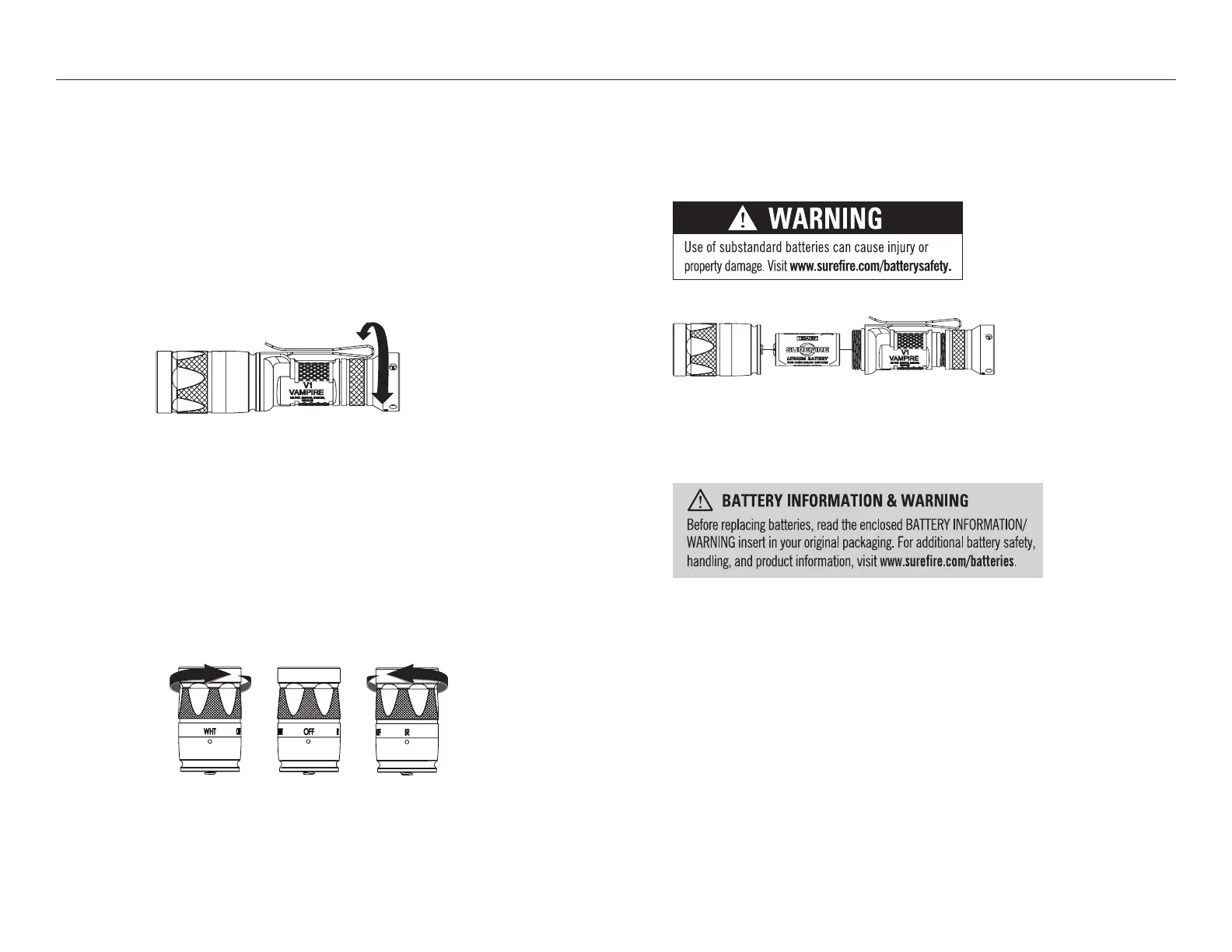
The V1 Vampire features a lockout tailcap, which prevents accidental activation during storage or transport. The tailcap
may need to be enabled prior to light operation.
To enable, rotate tailcap clockwise until light activates when tailcap pushbutton is pressed, providing momentary-on light
output.
To lock out tailcap, rotate counterclockwise until light will not activate when pressed.
LIGHT OPERATION
NOTE: Unit is shipped in the “OFF” position to prevent activation of the light.
1. To select white (WH) light LED, rotate knurled portion of the bezel clockwise (with bezel pointed away from you)
until indicator dot aligns with WH and the head clicks in to position (Fig. 1).
2. To select IR LED, rotate knurled portion of the bezel counter clockwise (with bezel pointed away from you)
until indicator dot aligns with IR and the head clicks in to position (Fig. 2).
V1-B VAMPIRE
®
LIGHT ACTIVATION
Press or click pushbutton tailcap switch once for high output. Return to off and press or click on again, within two seconds,
for low output.
BATTERY REPLACEMENT
Most SureFire illumination tools ship preloaded with batteries. To load or replace batteries:
1. Unscrew head and remove.
2. Remove old batteries and dispose of properly.
3. Insert new battery with positive (+) terminals oriented forward.
4. Replace head and screw on until hand tight.
MAINTENANCE
Use a clean, dry cloth to wipe off body and window. Periodically clean and lubricate threads. Apply a thin coat of non-migrating,
silicon-based lubricant to O-rings (do not use petroleum-based lubricants which can harm O-rings). For additional tips on
maintaining your SureFire illumination tool, visit www.surefire.com/faqs-maintenance.
ACCESSORIES
SureFire makes a full line of accessories for most of its illumination tools. For a complete listing,
visit www.surefire.com/partsaccessories.
ENABLE
DISABLE
FIGURE 2
FIGURE 1



 To Previous Page
 Loading...