6
Wait until the current time is displayed (the feeding is stored) or continue to set the next feeding.
Press UP to set the next feeding: the display shows 02oF
0 2 n_ F
Press SET and set the second feeding time and food quantity as previously described
Press SETtoconrmthesecondfeeding
02 n_ �
Wait until the current time is displayed (the feeding is stored) or continue to set the next feeding.
You can set up to 24 automatic feedings.
Reset
Press simultaneously DOWN and UP during 3 seconds to disable all set feedings.
On the display --:--willappearbrieyandthecurrenttimewillbedisplayed.
The Fish feeder is back in default settings 01oN (one feeding at 10:00 h), next automatic feedings
areo(02oF, previously set feeding times and quantities remain stored).
The settings will be saved (temporarily) if there is a power failure/interruption. In the event of a long
power cut, the clock will no longer indicate the current time, in which case you will have to set the time
and feedings again.
Quantity of food
Youcansettheamountoftheshfoodin10steps.Thequantityperstepdepends,amongother
things,onthespecicweightofthefoodusedandpelletsize.Theindicatedamountsoffoodin
the table below are average and based on the use of Hikari Staple. (We accept no liability for any
dierences).
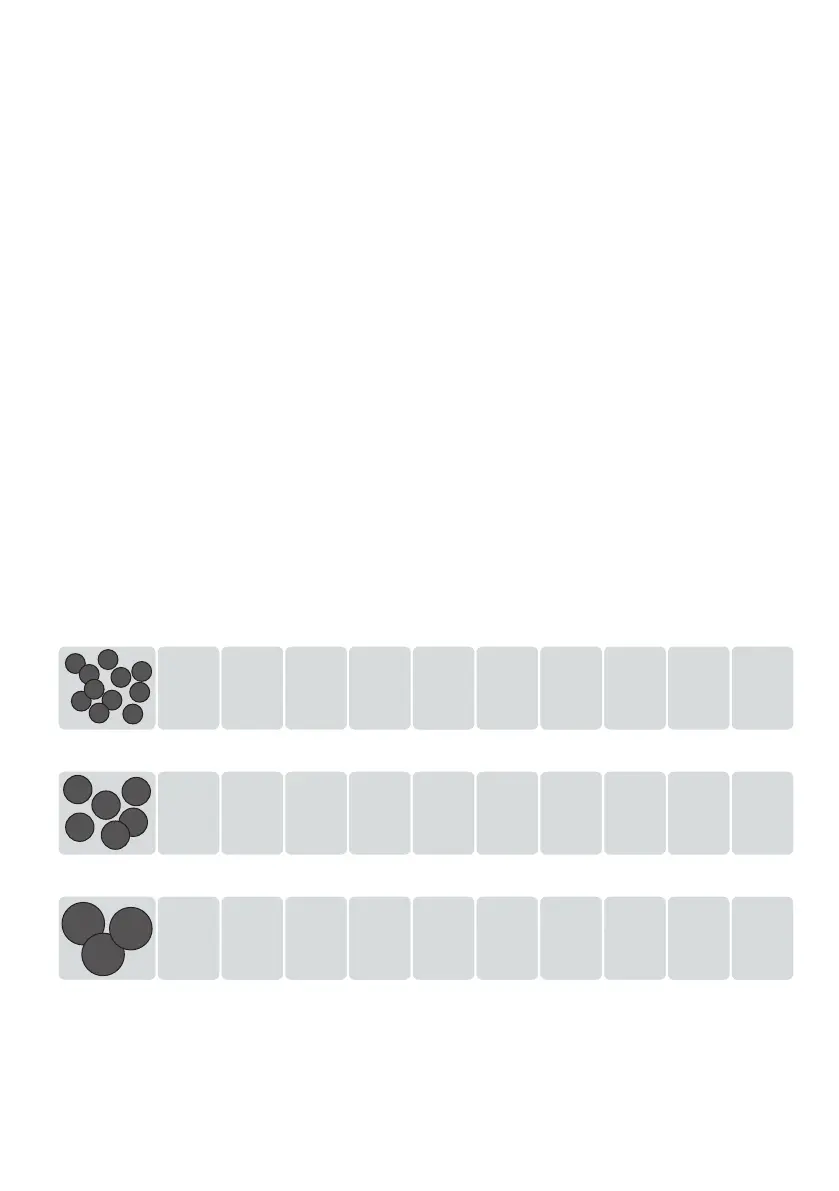
± 330 g ± 300 g ± 270 g ± 230 g ± 200 g ± 170 g ± 135 g ± 100 g ± 65 g ± 30 g
1009080706050402 0301
± 550 g ± 500 g ± 450 g ± 375 g ± 300 g ± 250 g ± 200 g ± 150 g ± 90 g ± 45 g
1009080706050402 0301
± 450 g ± 400 g ± 350 g ± 300 g ± 250 g ± 200 g ± 160 g ± 130 g ± 100 g ± 50 g
Large
Medium
* The reducer (insert ring) must be used with the Small granules.



 To Next Page