3
EN
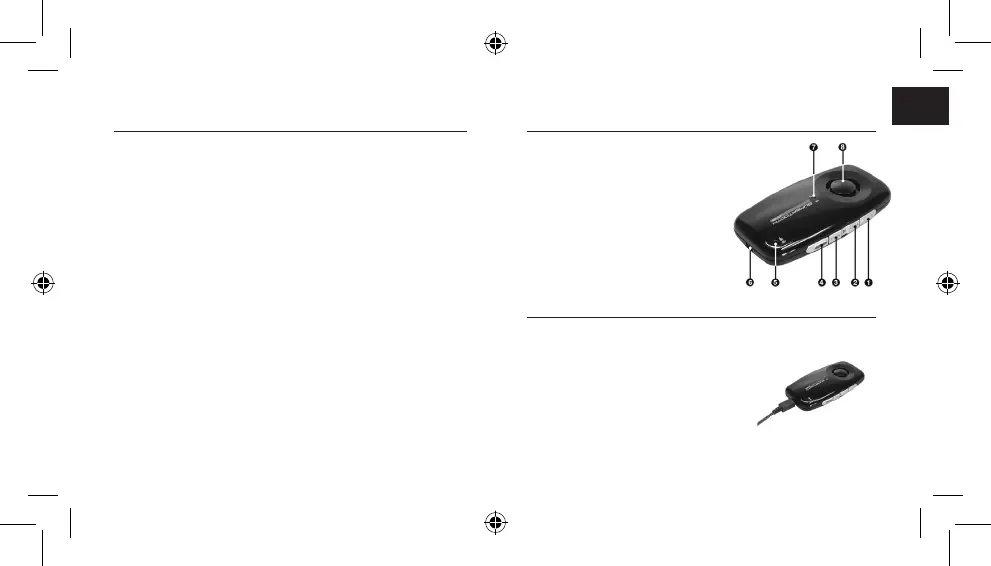
B. Product Overview
1 MFB or Multi-function Button
(power on & off / pairing / answer /
voice dial / redial / audio transfer)
2 Volume Down
3 Volume Up
4 End / Reject Button
5 Microphone
6 Charger Port
7 Bluetooth Indicator / Charge Indicator
8 Speaker
C. Charging
1. Connect the charger’s plug to the Charger Port (6) of the
SUPERTOOTH ONE. Connect the charger to an external power
source.
Charge Indicator (7) Status:
Steady Red: Battery Low
Steady Orange: Charging
Steady Green: Battery Full
2. When fully charged, disconnect the charger.
A. Product Description
SUPERTOOTH ONE is a Bluetooth
®
handsfree kit that supports
headset and handsfree profile phones. This handsfree kit
is equipped with hi-tech features such as: Voice Answer
Technology, Multi-point Connection and Full DSP Noise
Cancellation/Echo Cancellation. It can also be used as speaker
to stream music from your phone over A2DP (Advance Audio
Distribution Profile). It is designed for easy handsfree operation
and superior performance.
Don’t forget: Drive safely and within the law.
Check if the national or local legislation in force in your country
does not limit the use of mobile phones while driving. It is up to
the user of this product to respect the said legislation in the area
where he/she lives.



 To Next Page