SYNCING THE REMOTE CONTROL:
Remote Control Instructions:
1. For the first time use of remote control press both the “forward”
and “backward” buttons for about 3 seconds to connect the
remote to the car. The LED light will flash quickly.
2. Then turn on the power switch, the LED light will be lighting up and
the car will pair with the remote. The car should now be
synced and ready for normal use.
3. Press the “S” button to adjust the speed. One light is for low speed,
two lights for medium and three lights means high speed.
Press the “P” button to stop the car and all the lights will
light up.
Note: The remote should be used by an adult.
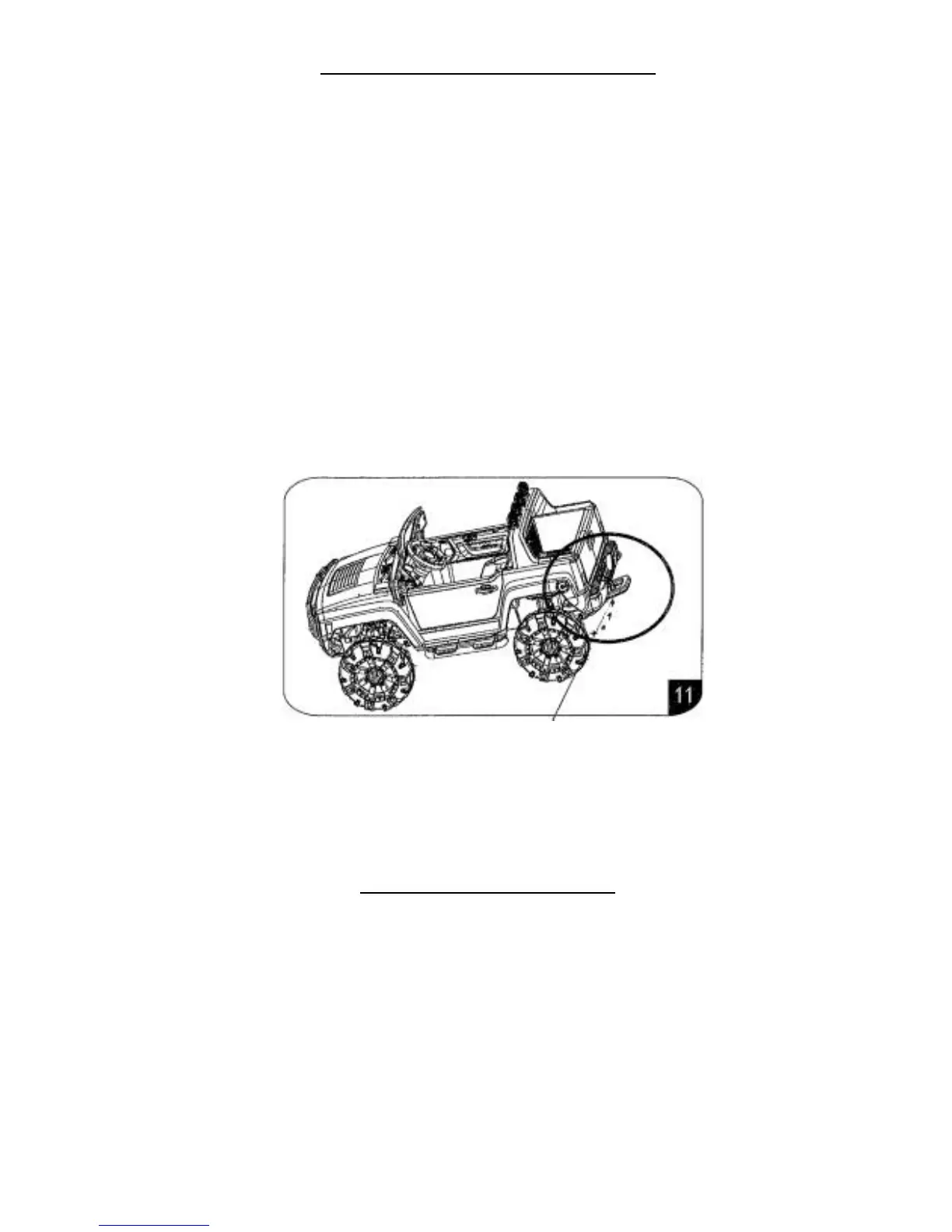
11. The car is equipped with a pull handle. When the car has low
battery power there is a handle under the rear bumper of
the truck that can be used to pull the vehicle.
CHARGING THE BATTERY:
The charging port is located under the seat of the vehicle.
Plug the charger into the charging port first, and then plug
the charger into a wall outlet.
Please Note: As a safety precaution and to avoid damage
to the charger, the car will not power up while charger
port is plugged into the car.
THE BATTERY MUST BE CHARGED FOR A MINIMUM OF 8-
12 HOURS BEFORE INITIAL USE AND DURING EVERY
CHARGING OCCURRENCE TO AVOID DAMAGE TO THE


 To Next Page