+
Adjust brightness level (5 levels, default level 5)
Customising Backlight Effect:
You may customise the backlight for each key.
• Press Fn + End repeatedly to select the customised backlight mode.
Keys WASD will light up for the rst time.
• Press and hold Fn + End to enter backlight setting mode.
LED indicator will start ashing.
• Press the key(s) repeatedly to choose the colour you prefer (8 colours + light off).
• Press and hold Fn + End when done. LED indicator will stop ashing.
To reset customised backlight effect to default setting, press and hold Fn + End until all
backlights start lighting in succession.
Shortcut Keys:
Software (Only for Windows as Download):
1. Please download the software from www.surere-gaming.com/support.
2. Start the installation by executing the downloaded le from your download place.
3. Follow the installation process.
4. Plug the keyboard into the USB Port of your computer.
5. Start the Software via the shortcut on your desktop and congure your keyboard with
your preferred setup.
6. For further details please see below and opposite.
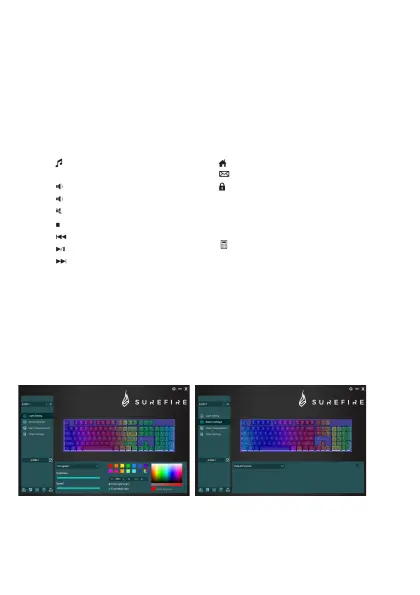
Light Setting: Key Setup:
Fn+F1
Fn+F2
Fn+F3
Fn+F4
Fn+F5
Fn+F6
Fn+F7
Fn+F8
You can select different lighting modes
or turn off the lighting on your keyboard.
Please transfer your selection to the
keyboard by pressing “Save”.
By selecting the desired key, you can now
select a function for every key, always conrm
a selection by pressing “Save” to transfer your
selection to the keyboard. You can save or load
congurations by pressing the buttons “Export”
and “Import”. To reset your keyboard to factory
default press “Reset”.
To access these functions, press the Fn Key and the desired key together.
Open Standard Web Application
Open Standard Mail Application
Lock Keyboard, 3rd LED indicator
will turn on which indicates all
keys are locked, press it once
again to cancel lock, then
indicator will turn off.
Fn+F9
Fn+F10
Fn+F11
Fn+F12
Open Standard
Media Application
Volume –
Volume +
Mute
Stop Media
Previous Track
Play/Pause
Next Track
Open Standard Calculator
Application


 To Next Page
 Loading...