Safety Warnings
• Read all the instructions carefully before using the unit and keep them for future reference.
• Retain the manual. If you pass the unit onto a third party, make sure to include this manual.
• Do not disassemble the keyboard or remove any parts.
• Do not immerse the keyboard in water or any liquid.
• Do not use the keyboard close to heat sources or expose to high temperatures.
• Do not use the keyboard where strong electromagnetic waves are present.
Strong electromagnetic waves will cause damage to the keyboard.
• Keep the keyboard away from direct sunlight, moisture, dirt or abrasive chemical products
(cleaning products etc).
How it works
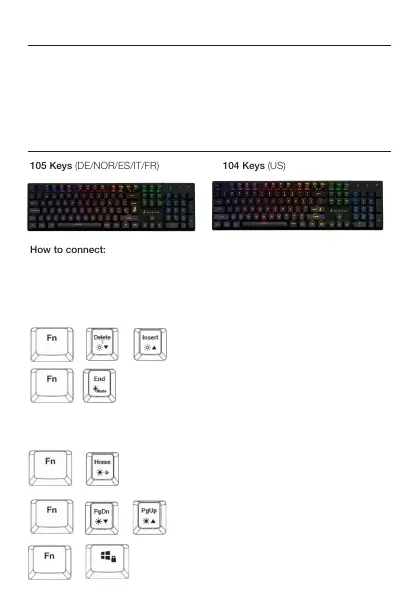
105 Keys (DE/NOR/ES/IT/FR) 104 Keys (US)
How to connect:
Connect the USB Cable to the USB Port of your device.
Backlight Effect:
To access these functions, press the Fn Key and the required key together:
+
or
+
Adjust the backlight ashing level (5 levels,
default level 3)
Select different backlight effects: 6 modes
(5 RGB modes + 1 customisable mode)
Flowing (default); Colourful breathing; One click;
Ripple; Single colour breathing (press Fn +
Space to adjust the colour, 8 colours + light off);
Customised
or
+
Lock the Win Key, press again to cancel lock
+
Adjust brightness level (5 levels, default level 5)
Switch backlight on/off
+


 To Next Page