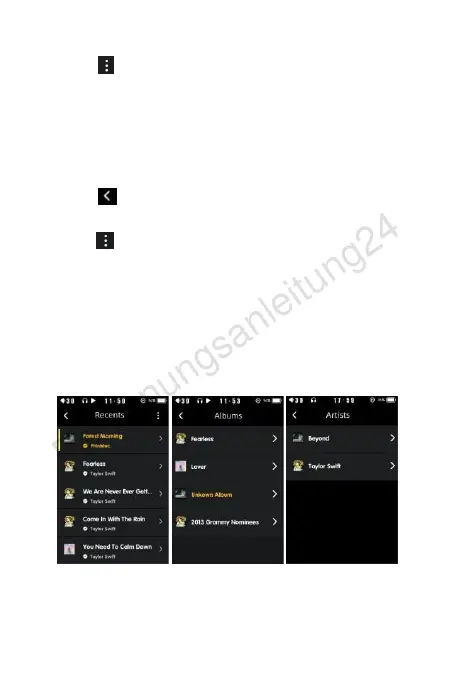
Click “ " behind the song name, you can add the song to the
playlist,delete, view songs and other information. Slide your finger
up and down on the right side of the screen,there will be a quick
search bar for English alphabet songs, select the first
letter of the song name, you can find quickly the song you're
l
o
o
k
i
n
g
f
o
r
.
C
l
i
c
k
“
"
o
n
t
h
e
l
e
f
t
,
t
o
r
e
t
u
r
n
t
o
t
h
e
m
a
i
n
i
n
t
e
r
f
a
c
e
;
y
o
u
c
a
n
a
l
s
o
u
s
e
f
i
n
g
e
r
d
i
r
e
c
t
l
y
t
o
t
h
e
r
i
g
h
t
t
o
r
e
t
u
r
n
t
o
t
h
e
m
a
i
n
i
n
t
e
r
f
a
c
e
;
c
l
i
c
k
“
"
o
n
t
h
e
r
i
g
h
t
s
i
d
e
o
f
t
h
e
a
l
l
m
e
n
u
,
y
o
u
c
a
n
e
d
i
t
a
l
l
t
h
e
song files in batch; also you can add songs to the song list by single
or multiple selection, delete songs, etc.
A
d
d
t
o
p
l
a
y
l
i
s
t
:
W
h
e
n
a
d
d
i
n
g
a
s
o
n
g
t
o
t
h
e
p
l
a
y
l
i
s
t
,
y
o
u
c
a
n
a
d
d
t
h
e
s
o
n
g
t
o
t
h
e
n
e
w
p
l
a
y
l
i
s
t
o
r
m
y
f
a
v
o
r
i
t
e
f
o
l
d
e
r
.
Create new playlist, please enter the name by keyboard input , for
English only.
D
e
l
e
t
e
s
o
n
g
s
:
D
e
l
e
t
e
s
o
n
g
s
,
r
e
m
o
v
e
o
r
u
n
d
e
l
e
t
e
.
You can edit songs to add playlists, delete and view song


 To Next Page
 Loading...