23
PANEL CONTROLS
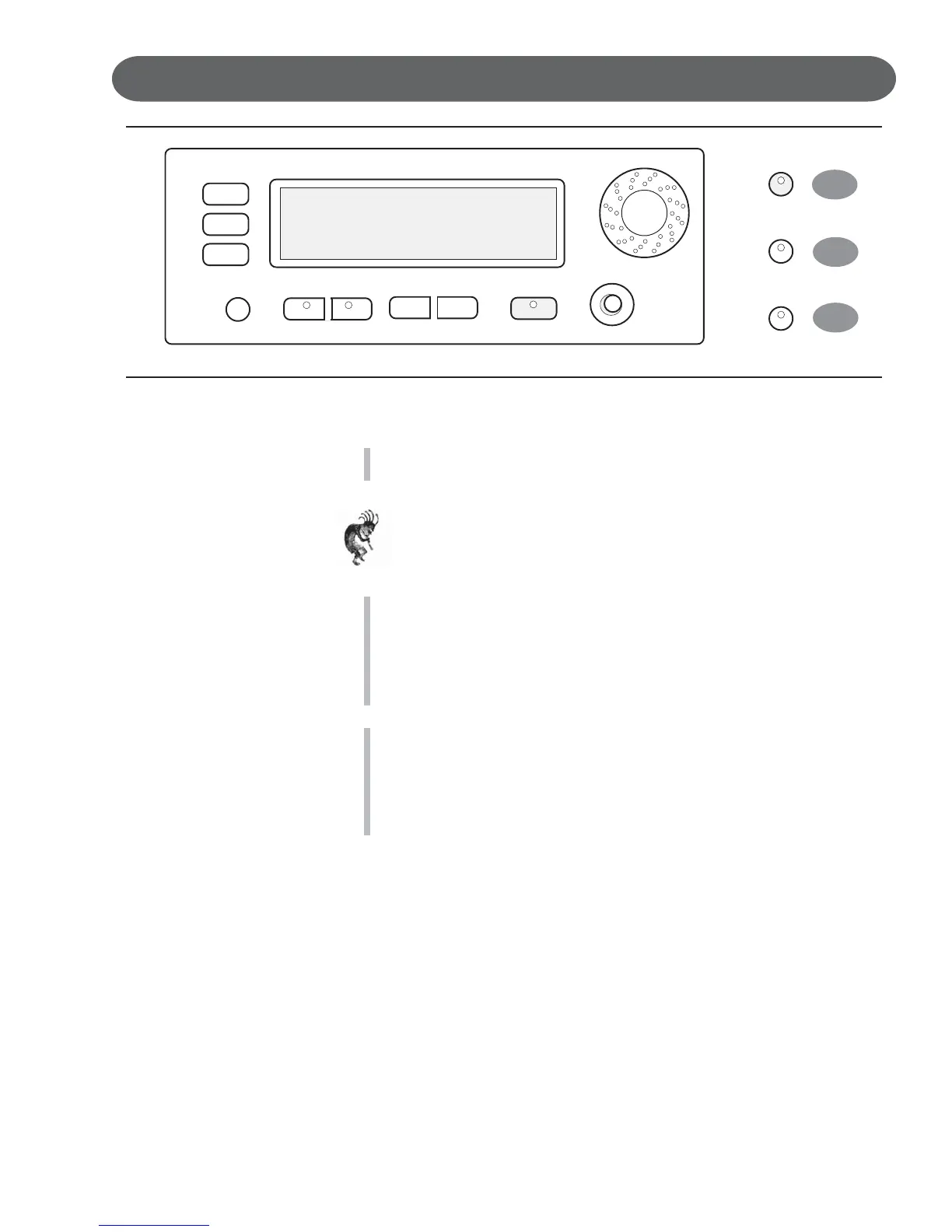
28. GRAND PIANO - This button will reset the piano to its default (power up)
settings while engaging the Grand Piano voice for all 88 piano keys.
Note: The Grand Piano Button is very useful to quickly escape from any
feature and/or functions modes that are currently engaged.
Use this button when you want to leave a current setting or to restart a
feature or function that didn’t seem to engage properly.
29. REVERB - The reverb effect is engaged automatically when the power is
turned on. Reverb simulates the effect of playing in a big room or hall
where the sound reverberates off the walls and ceiling.
Function: Press the REVERB button once to select or deselect the
function. When the Reverb feature is engaged the Reverb Type & depth
(amount of Reverb) is displayed on the LCD Screen.
30. EFFECTS - The EFFECTS button will add chorus, flanger or delay
effects to the selected Instrument Voice.
There are eight DSP (Digital Signal Processing) effects available.
Function: Press the Effect button once to select or deselect the function.
When the Effect feature is engaged the Effect Type & depth (amount of
Effect) is displayed on the LCD Screen.
28
30
29
REVERB
EFFECTS
GRAND PIANO
VALUE
–+
CONTRAST
LEFT RIGHT
SCREEN
DATA WHEEL
ESCAPE
ENTER
CURSER



 To Next Page