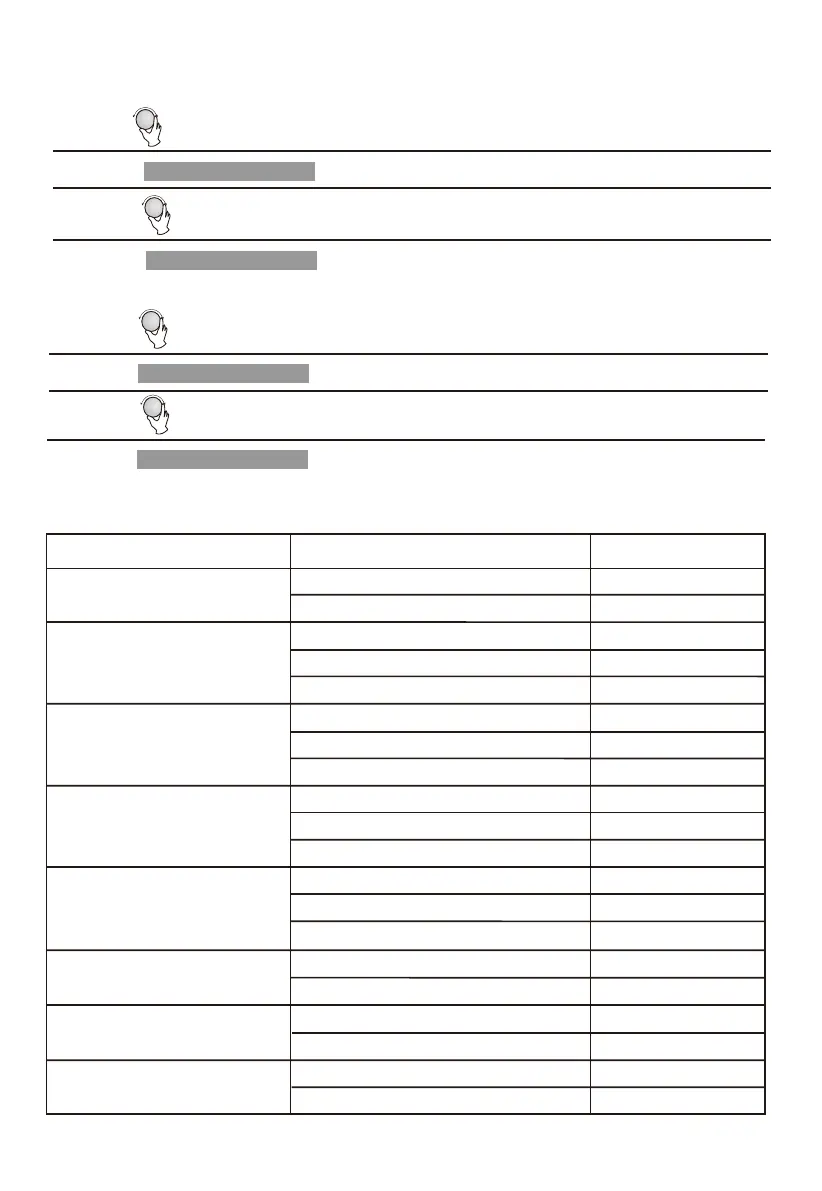
1) In waiting state, Press " " to start cooking with 100% power,
3) Turn " " to select the weight of fish till "350" display.
4) Press " " to start cooking.
The menu chart:
Menu
Weight
Display
A-2
Potato
A-3
Meat
A-4
Vegetable
A-5
Fish
A-6
Pasta
A-7
Soup
A-8
Porridge
200 g
400 g
200 g
400 g
600 g
250 g
350 g
450 g
200 g
300 g
400 g
250 g
350g
450 g
50g(with 450
g
cold water)
100g(with 800g cold water)
200ml
400ml
550g
1100g
A-1
Pizza
200 g
400 g
200 g
400 g
600 g
250 g
350 g
450 g
200 g
300 g
400 g
250 g
350g
450 g
50g
100g
200ml
400ml
550g
1100g
Start/+30Sec./Confirm
1) Turn " " clockwise till "A-5" display.
Example: If you want to use "Auto Menu" to cook fish for 350g.
2) Press " " to confirm.
Start/+30Sec./Confirm
1) Turn " " right to choose the menu, and "A-1" to "A-8" will display.
2) Press " " to confirm.
3) Turn " " to choose the default weight as the menu chart.
4) Press " " to start cooking.
8. Auto Menu
Start/+30Sec./Confirm
Start/+30Sec./Confirm


 To Next Page