ENG
5
AP-B545MV
User’s Manual
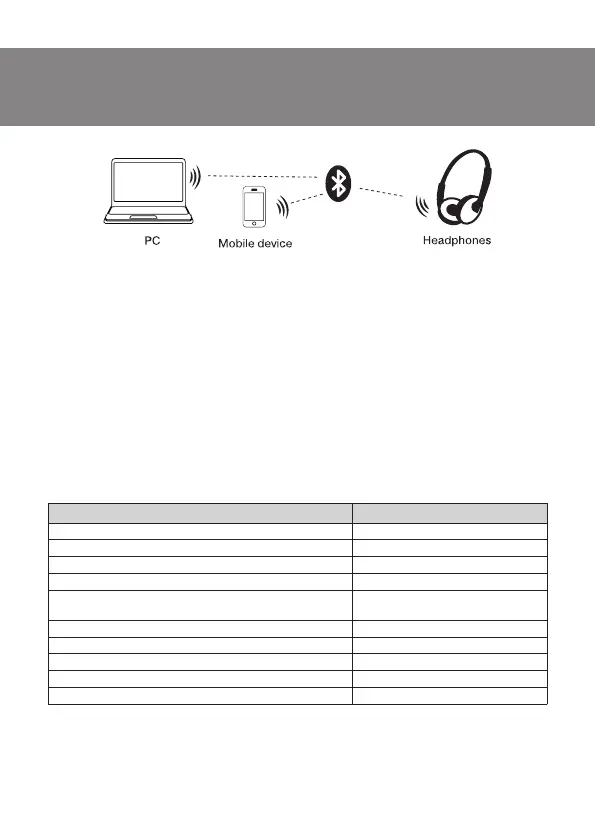
Fig. 2. Connection diagram
Headset to a telephone interfacing:
Outgoing calls
• Mobile phone dialing: use your mobile phone to dial normally. After dialing the headset
rings, and the voice will be automatically switched to the Bluetooth headset after connecting.
(Some smartphones have a choice of voice output device.)
• Redial last number: press the button b twice, to dial the last dialed number. (Some mobile
phones may require a short keystroke only once.)
Answer calls
• In order to receive an incoming call press the button b
• In order to reset the call, press the button b twice
• While playing music, when dialing a number or an incoming call, playback will be paused
automatically. Music will continue to play after its completion.
7. TECHNICAL SPECIFICATIONS
Parameter, measurement unit Value
Membrane, mm 40
Battery mA/h 400
Sensitivity, dB 110±3
Impedance, Ω 32
Connection type Bluetooth, Micro SD, 3.5mm
stereo jack, micro USB
Bluetooth supported profiles HSP, HFP, A2DP, AVRCP
Radius of operation, m 10
Operation time, h up to 10
Dimensions, mm 221 x 185 x 83
Weight, g 185
Notes. Technical specifications given in this table are supplemental information and
cannot give occasion to claims. Technical specifications and package contents are
subject to change without notice due to the improvement of SVEN production.


 To Next Page