ENG
5
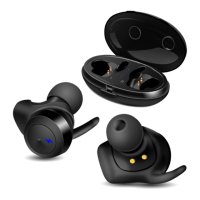
E-700B
User Manual
Device switching on
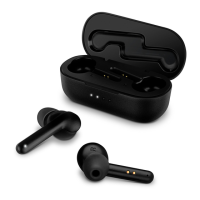
•Remove the headphones from the charging case and they will automatically turn on.
Make sure the headphones are charged.
Device switching off
•Put the headphones to the charging case. They will automatically turn o, or long touch
of button
c on either headphone disconnects both headphones.
Headphone control
When connected to a telephone:
•In order to receive an incoming call press multifunction button c. Press button c again
to nish the call.
•In order to reset the call, press and hold button c (~2 seconds)*.
•Рlay/pause: while listening music press button c on the right earphone.
•Previous/next track: while listening music press button c twice on the right earphone to
go to the next track, press button
c twice on the left earphone to go to the previous track.
•Long press button c for about 2-3 seconds starts the voice assistant of the phone*.
* Depending on telephone/smartphone conguration.
TECHNICAL SPECIFICATIONS
Parameter, measurement unit Value
Sensitivity, dB headphones: 102 ± 3
microphone: -58 ± 3
Frequency range, Hz headphones: 20 – 20 000
microphone: 30 – 16 000
Impedance, Ohm 16
Membrane, mm Ø 7
Connection type Bluetooth
Bluetooth supported proles HSP, HFP, A2DP, AVRCP
Radius of operation, m up to 10
Operation time, h up to 4
Operation time using a charging case, h up to 15
Weight, g 45
Notes:
• Technical specications given in this table are supplemental information and cannot
give occasion to claims.
• Technical specications and package contents are subject to change without notice
due to the improvement of SVEN production.


 To Next Page