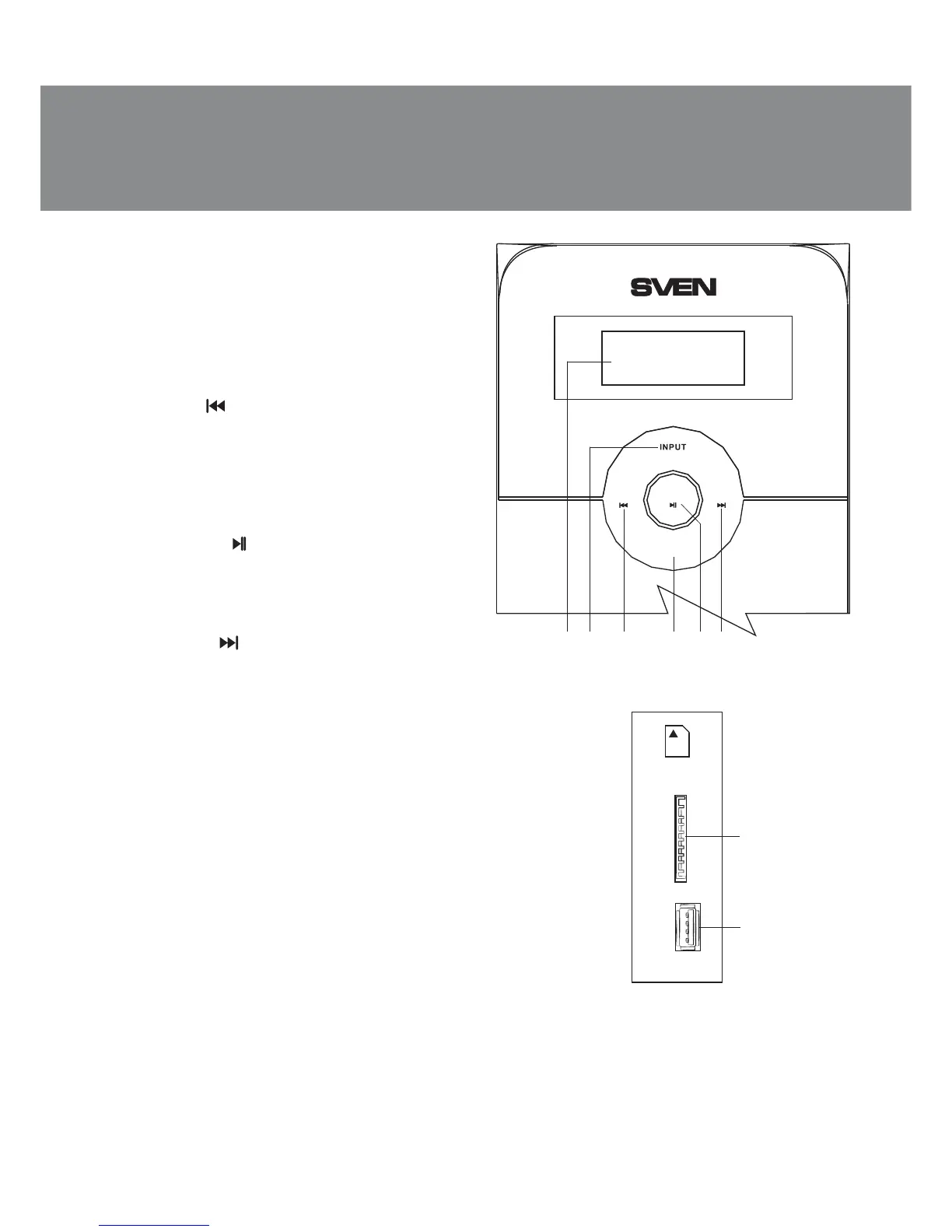
Fig. 2. Subwoofer side panel
• Remote control
• StandBy, Mute and Sleep modes
• Adjustable display brightness
Subwoofer control panels
a LED display
b INPUT: input switch, PC/AUX/FM/MP3 mode
switch (pressed short)
c VOL-/СН-/ : previous track (pressed short in
the Player mode);
previous station* (pressed short in the Tuner
mode);
volume/timbre down (pressed long)
d TIMBRE: bass/treble selection (pressed
short in any mode)
e ST-BY/AUTO/ : play/pause (pressed short in
the Player mode);
start/stop auto scan (pressed short in the Tuner
mode);
Standby mode (pressed long in any mode)
f VOL+/СН+/ : next track (pressed short in
the Player mode);
next station* (pressed short in the Tuner mode);
volume/timbre up (pressed long)
g SD/MMC CARD: slot for SD/MMC cards**
containing МР3 audio files
h U DISK: slot for a USB flash device** con-
taining МР3 audio files
i ON/OFF: power switch (see Fig. 3)
j Power cord
k RADIO ANT: radio antenna input jack
l PC AUDIO INPUT: PC input jack
m AUX AUDIO INPUT: line input jack
n AUDIO OUTPUT: satellite output terminals
Remote control (see Fig. 4)
a SD: MP3 player mode switch-on button
(playing MP3 files from an SD card**)
b USB: MP3 player mode switch-on button
(playing MP3 files from a USB flash device**)
c AUTO: start auto scanning and memorizing
stations in FM band (in the Tuner mode)
d TUNE+/-: manual band scanning (in the Tuner
mode)
Fig. 1. Subwoofer control panel
TRE
BASS
SLEEP
PC
MP3 FM AUX IR
++VOL- CH VOL CH-
TIMBRE
ST.BY///AUTO
bacdef
g
h
SD/MMC
CARD
U DISK
ENG
3
Operation Manual
MS-2000


 To Next Page