ENG
5
PS-235
User Manual
The use in the wired mode (AUX)
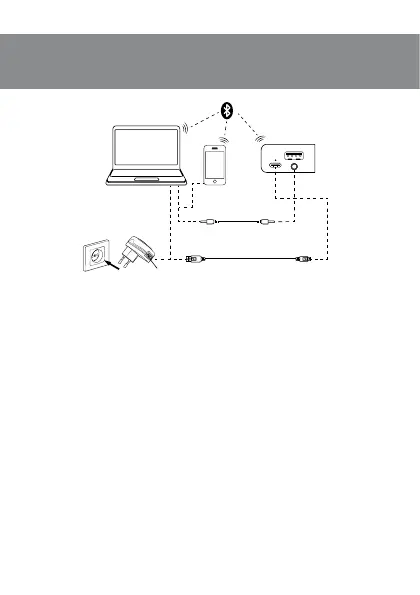
• Speaker system can be used as an external device for amplifying any audio source witha3.5mm
output mini-jack. To do this, connect a cable 3.5 mini-jack — 3.5 mini-jack totheaudio output AUX l.
Connecting an additional speaker
For model “SVEN PS-235” you can connect an additional speaker (Bluetooth mode only):
• Turn on both speakers (long press button f) and use button c (short press) to select Blue-
tooth mode.
• On one of the speakers, press and hold button c for 2 seconds. The speakers will connect
with each other.
• Then connect the speaker to the signal source (see speaker connection via Bluetooth).
Note. At the subsequent inclusion of both speakers, they will be connected automatically.
Fig. 2. Connection diagram
Mini-jack to mini-jack
signal cable
PC Mobile
device
USB to USB type-C
DC 5V
USB
AUX



 To Next Page