ENG
3
PS-420
User Manual
PACKAGE CONTENTS
• Speaker system — 1 pc
• 3.5 mm mini-jack to 3.5 mm mini-jack signal cable — 1 pc
• USB to micro USB power cable — 1 pc
• User Manual — 1 pc
• Warranty card — 1 pc
SPECIAL FEATURES
• Wireless signal transmission via Bluetooth
• Wireless connection of two speakers to one source (TWS)*
• Soft-touch coating
• USB-flash and microSD card playback support
• LED display
• FM radio
• Passive speakers for deep and powerful bass
• AUX input for connecting to an audio source
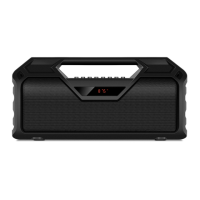
Speaker system description
a MODE: switching modes button: Bluetooth/Radio/Player/LINE IN (short pressing);
ON/OFF the service signals (long pressing)
b EQ: EQ mode switch button;
Return to default settings (long pressing)
c Vol-: volume decrease button
d Vol+: volume increase button
e REP/CH: button for switching between stations or frequency (in Radio mode);
Storing a frequency in Radio (FR) mode (long pressing);
Disconnect from device (long pressing in Bluetooth mode);
Repeat mode selection button (in the Player mode):
ONE — repeats the current track;
RAND — play tracks in the random order;
ALL — plays all tracks in the sequential order
f Previous track (short pressing in Player and Bluetooth mode);
Navigation on the track (long pressing in Player mode);
Search of previous station (long pressing in Radio(FR) mode);
Previous track/station (in Radio mode)
g Play/Pause button (in Player and Bluetooth mode);
Start/Stop auto scan (long pressing in Radio mode);
Mute (short pressing in Radio mode)
h Next track (short pressing in Player and Bluetooth mode);
Navigation on the track (long pressing in Player mode);
Search of next station (long pressing in Radio(FR) mode);
Next track/station (in Radio mode);
Connecting an additional speaker (long pressing in Bluetooth mode)
i Display
j Microphone
k DC 5V: micro USB jack for charger connecting, the USB port of laptop/PC
l Indicator
* only for models with production date from 04.2021



 To Next Page