ENG
5
PS-420
User Manual
CONNECTION AND OPERATION
Attention! The built-in battery must be charged completely prior to the application.
Speaker system battery charging
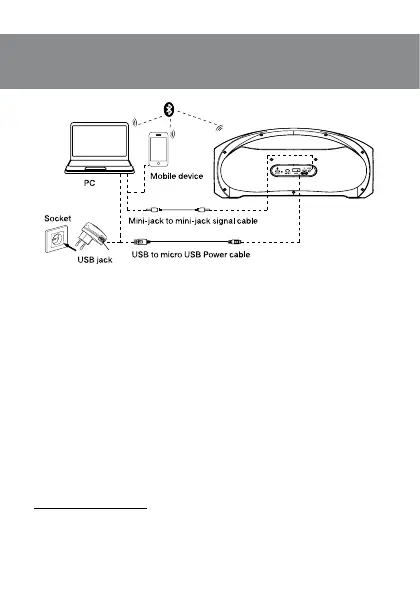
• Connect speaker system to a USB port of PC or USB charger using micro USB to USB cable
(included). During battery charging the indicator l is red. Indicator l goes out when the battery
is charged.
• The battery is used in the speaker system as an integral part of the device, therefore do not try
to extract or replace it, because this can result in the warranty cancellation or the device damage.
OPERATION MODES
Bluetooth mode
• Wireless data transfer via the Bluetooth protocol enables to connect speaker system to com-
patible devises. Maximum radius of action of data transfer is 10 m. Such obstacles as walls
or other electronic devices can interfere with the signal transfer.
• Turn on the speaker system Bluetooth mode — press button МODE a several times until
display shows «bt» inscription.
• It is necessary to select the search mode of devices with Bluetooth on a signal source (tele-
phone, notebook, smartphone, etc.). «SVEN PS-420» massage will be displayed on the screen
which is to be connected to*.
• When connection is successful, there will be a short beep and the indication of the search
mode on speaker system is over**.
* You might have to enter «0000» code to connect some models of devices via Bluetooth.
** If the item has been already registered in the device list of a source, then the second search
mode activation is not obligatory. Choose the item name «SVEN PS-420» and the «connect»
command on the source.
Fig. 2. Connection diagram



 To Next Page