
 Need help?
Do you have a question about the Swann Retro SRA43010 and is the answer not in the manual?
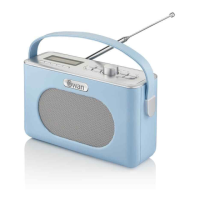
Diagram illustrating all buttons, ports, and the LCD display of the radio.
Instructions on turning the radio on/off, using buttons, and the dual-action dial.
Guide for initial setup, connecting power, and the automatic DAB station scan.
How to navigate and select DAB stations, and refresh available stations using the scan function.
Accessing DAB menu options, performing a full scan, and understanding scan results.
Manually tuning DAB stations for better reception and adjusting Dynamic Range Compression (DRC).
Using the prune function to remove stations from the DAB station list.
Switching to FM mode and performing auto or manual tuning for FM stations.
Configuring the FM auto-tune search to find all or only strong stations.
Adjusting audio output between stereo and mono for FM broadcasts.
Steps to select Bluetooth mode and pair a device for audio streaming.
Controlling music playback (play/pause, skip) via the radio while connected via Bluetooth.
How to enter the system menu and cycle through available settings like Sleep, Alarm, EQ.
Details on setting up and managing the dual alarm functions of the radio.
Customizing sound profiles (EQ) and manually setting the radio's time and date.
Adjusting display backlight duration (Time Out) and brightness levels (On Level, Dim).
Setting auto-standby duration and selecting the menu display language.
Performing a factory reset and checking the current software version.
Saving favourite stations to quick access buttons or preset slots.
How to recall stations from quick access buttons and preset slots.
Using the Info button to view details like station name, music genre, and signal strength.
Detailed steps for setting up two alarms, including time, duration, source, and repeat options.
Instructions on how to turn the set alarms on or off from standby mode.
List of technical specifications including DAB/FM receiver ranges, storage, connectivity, and audio output.
Information on how to order the AC mains adaptor and the relevant part number.
Details on the 2-year guarantee, return conditions, and usage limitations.
Guidelines for responsible disposal of the unit and safe battery handling.
This document serves as an instruction manual for the Swan Retro DAB Radio, model SRA43010. It provides comprehensive guidance on the radio's functions, operation, and maintenance, ensuring users can fully utilize its features.
The Swan Retro DAB Radio is a versatile audio device designed for both digital (DAB) and analog (FM) radio reception, as well as Bluetooth connectivity for streaming audio from external devices. Its primary function is to provide high-quality audio entertainment through various sources.
In DAB Mode, the radio allows access to a wide range of digital radio stations. It automatically scans for available channels upon first use, displaying the number of channels found. Users can then cycle through these stations alphabetically and select their preferred one. The radio also offers advanced DAB options, including a "Full Scan" to erase and retune all available stations, and a "Manual Tune" feature for fine-tuning reception in areas with poor signal strength. Dynamic Range Compression (DRC) is another key feature in DAB mode, which helps to even out audio levels by raising quieter sounds and lowering louder ones, providing a more consistent listening experience. The "Prune" function allows users to remove unwanted DAB stations from the list.
For FM Mode, the radio provides access to traditional analog radio broadcasts. It supports both "Auto Tune" for quickly finding the next available station and "Manually Tune" for precise frequency selection, which is particularly useful in areas with weak signals. Similar to DAB, FM mode also offers scan settings to choose between searching for "all stations" or "strong stations" only. An "Audio Settings" option allows users to switch the sound output between stereo and forced mono, depending on their preference and signal quality.
The Bluetooth Mode enables wireless audio streaming. The radio automatically enters pairing mode when selected, displaying "Disconnected" until a device is successfully paired. Once connected, users can play, pause, skip tracks forward or backward, and control the volume directly from the radio, offering a convenient way to enjoy music from smartphones, tablets, or other Bluetooth-enabled devices.
Beyond audio playback, the radio includes System Options that enhance its usability. The Sleep function allows users to set a timer for the radio to automatically turn off, ranging from 15 to 90 minutes, or to disable the function entirely. The Alarm feature is a significant addition, allowing users to set two independent alarms. These alarms can be configured with specific times, durations (15 to 120 minutes), and alert types (Buzz, DAB, or FM). If DAB or FM is selected, users can choose to wake up to the last listened station or a specific preset. The alarm also allows for repeat settings (Daily, Once, Weekend, Weekday) and volume level adjustment.
The EQ (Equalizer) function allows users to customize the sound output to their preference, with preset options like Normal, Classic, Jazz, Pop, Rock, and Speech. A "My EQ" sub-menu provides further customization for Loudness, Treble, and Bass levels.
Time settings are comprehensive, allowing for manual adjustment of time and date, auto-update options, 12/24-hour format selection, and various date formats. The Backlight feature offers control over the display's brightness and duration, with "Time Out" settings for dimming, and "On Level" and "Dim" settings for active and inactive display light levels, respectively.
The Inactive Standby feature allows the radio to automatically enter standby mode after a preselected period (2, 4, 5, or 6 hours), conserving power. Language options enable users to select their preferred menu display language from English, French, German, Italian, and Spanish. A Reset function is available to restore the radio to its factory settings and clear all saved presets, which can be useful for troubleshooting or when moving the radio to a new location. Finally, the SWVer. option displays the current software version of the device.
The Swan Retro DAB Radio is designed for intuitive operation, primarily through a combination of buttons and a dual-action dial.
On/Off/Standby: A single press of the power button turns the radio on. Pressing it again enters standby mode, while holding it down turns the radio off completely.
Buttons: Most button actions require a quick press. These include:
The Dial: The dial is a central control element with dual functionality:
First Time Use: After unpacking, users should connect the radio to mains power using the provided adapter or insert 4 x 'AA' batteries. The aerial should be fully extended for optimal reception. Upon powering on, the radio will display "Welcome to Digital Radio" and automatically scan for DAB stations, setting the date and time from the received signal.
Storing and Recalling Presets: The radio offers 20 preset slots (10 for DAB, 10 for FM). To save a station, tune to it and then press and hold a quick access preset button (1-5) for 3 seconds. For presets 6-10, press and hold the 'Preset*' button, then use the Tune+/- buttons to select the desired slot, and finally press the dial to save. To recall a preset, simply press the corresponding quick access button (1-5) or press the 'Preset*' button and use Tune+/- to navigate to presets 6-10, then press the dial. If a slot is empty, "Preset Empty" will be displayed.
Information Display: In DAB or FM mode, pressing the 'Info' button cycles through various broadcast information, such as "Now Playing," "Signal Strength," "Music genre," "Frequency," "Time," and "Date." In Bluetooth/AUX mode, it displays "Power," "Type," "Time," and "Date."
Alarm Management: The alarm setup is a step-by-step process guided by the display. Users select the alarm number, time, duration, alert type, repeat settings, and volume. Once set, "Alarm Saved" confirms the configuration. Alarms can be turned on or off from standby mode using the 'Alarm' button and Tune+/- controls.
The manual provides essential information regarding the radio's maintenance and disposal, ensuring its longevity and environmental responsibility.
Warranty: The product comes with a 2-year guarantee from the date of original purchase, covering defects due to faulty materials or workmanship. For claims, the faulty product must be returned to the retailer with proof of purchase. The warranty is valid under specific conditions: the product must be installed and used according to the instructions, used only for domestic purposes, and does not cover wear and tear, damage, misuse, or consumable parts. Swan Products Ltd has limited liability for incidental or consequential loss. This guarantee is valid in the UK and Eire Only.
Disposal of Unit: The radio should not be disposed of with domestic rubbish. It must be recycled separately as old electrical and electronic appliances. Users are directed to visit www.recycle-more.co.uk or www.recyclenow.co.uk (or www.weeeireland.ie for Ireland) for information on electrical item recycling. The WEEE directive mandates recycling of electrical items rather than landfill disposal. Users should take the appliance to their local Civic Amenity site for recycling at the end of its life.
Spares: The manual lists specific spare parts available for the SRA43010, such as the SRA43010NO1 AC mains adaptor. Users can visit www.swan-brand.co.uk to order these spares.
By following these guidelines, users can ensure the proper functioning, extended lifespan, and responsible disposal of their Swan Retro DAB Radio.
 General
| Brand | Swann |
|---|---|
| Model | Retro SRA43010 |
| Category | Radio |
| Power Source | Battery |
| Battery Type | AA |
| Battery Quantity | 4 |
| Speaker Output | 1W |
| Headphone Jack | Yes |
| Weight | 0.5 kg |
| Frequency Range | FM/AM |

 To Next Page