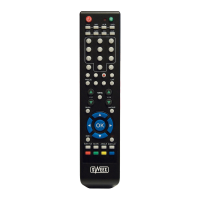
Power Searching
With Power Searching you can automatically have the Sweex Universal Remote Control
search and set the settings of the device to be operated.
1. Switch on the device you wish to operate and aim the Sweex Universal Remote Control
at the same.
2. Push the (TV, SAT, VCR, DVD) button on the Sweex Universal Remote Control which
corresponds with the device you wish to operate. The red light on the Sweex Universal
Remote Control will light up once.
3. Keep the [SET] button pushed until the red light switches on.
4. Push the On/Off button on the Sweex Universal Remote Control. The red light will
switch off and will flicker every three seconds. The Sweex Universal Remote Control is
now looking for the correct settings of your device. During the search you can determine
the direction of the search with the [Up] and [Down] buttons.
5. If your device switches off then push [OK] to save the settings.
6. Switch on your device to check whether the other buttons also function.
Quick searching (Only for TV)
1. Switch on the TV and set the volume at the centre.
2. Push the [TV] button on the Sweex Universal Remote Control.
3. Keep the [Search] button pushed. The red light will flicker. If the MUTE sign appears on
the TV you can release the [Search] button. The red light will flicker every three seconds.
4. Aim at the TV when MUTE appears on the TV, then push a random button to save the
settings on the Remote Control. The red light will switch off.
5. Switch on your device to check whether the buttons function correctly.
Warranty
All products under the Sweex brand are warranted for a period of three years. We do not
grant support or warranties for any software and/or (rechargeable) batteries included.
Settlement of guarantee only takes place via the dealer where you have purchased the
product in question.
The rightful owner has and retains title to all brand names and related rights mentioned in
this manual.


 To Next Page
 Loading...