English version
2
SC016 Sweex 7.1 external USB sound card
Introduction
• Do not expose the Sweex 7.1 external USB sound card to extreme temperatures. Do not place the device in direct
sunlight or in the direct vicinity of heating elements.
• Do not use Sweex 7.1 external USB sound card in extremely moist or dusty surroundings.
• Protect the device against powerful shocks and falls – they may damage the internal electronics.
• Never attempt to open the device yourself, there are no serviceable parts inside. Opening the device will cause the
warranty to lapse.
Package contents
In this package you will find:
• 7.1 USB Sound Card
• USB A – B cable (100 cm)
• CD with software, drivers and this manual
If you find that any of the package contents are missing, please return the package to the sales point where it was bought.
Connections
On the sound card you will find the following connections:
Front:
Headphones Connect your headphones to this output
Line-IN This input is for recording from stereo line-level sources
Front Connect your 2.0 or 2.1 speaker set to this output. In surround sound configurations, connect the
front speakers to this output.
Surround In 5.1 speaker configurations, connect the rear speakers to this output. For 7.1, connect the side
speakers to this output.
FRONT SURROUND CENTER / BASS BACK
S P E A K E R S
5.1
7.1
2.1
HEADPHONES LINE-IN
ENglISH VErSIoN
2

 Need help?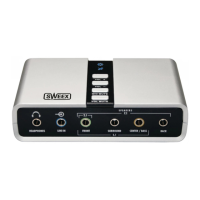

 To Next Page
 General