
 Need help?
Do you have a question about the Swiss 200 Series and is the answer not in the manual?
General notes regarding the operation of the safe door, including warnings about crushing risks.
Procedure for programming a new access code for the electronic keypad lock.
Instructions for changing the battery when it is empty, including how to open the safe.
Guidelines and tips for creating secure passwords and managing access.
This document outlines the operating instructions for the WALDIS Furniture Safe, Series 200 and 300, which features an electronic keypad lock. Manufactured by WALDIS Tresore AG, a Swiss company, these safes are tested according to EN1143-1 and boast VdS-tested security. The manual emphasizes the importance of reading and understanding the instructions thoroughly before commissioning the safe to ensure proper operation and safety.
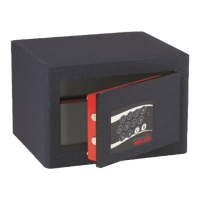
The WALDIS Furniture Safe is designed to secure valuables using an electronic keypad lock. The core function involves opening and closing the safe using a programmable code. The lock system includes a keypad with numerical and alphabetical keys (0-9, C, R, +), along with visual indicators (green and red diodes) and acoustic signals to confirm actions and provide feedback on code entry. The safe's primary purpose is to provide secure storage, with the electronic lock offering a convenient and robust method of access control.
To open the safe, the user must first press the 'R' key on the keypad. Following this, the programmed code needs to be entered. During initial setup, the default code is '00000'. If the entered code is correct, a green diode will illuminate for approximately 8 seconds and then flash for 20 seconds, indicating that the door can be opened. This visual feedback ensures the user knows when access is granted.
After closing the safe door, the user needs to press the 'R' key, followed by the 'C' key. A red diode will light up for a few seconds and then flash for approximately 20 seconds, confirming that the safe is securely closed and the bolts are engaged. This two-step closing process adds an extra layer of confirmation for security.
The safe allows for user-defined code programming, enhancing security by enabling personalization. It is crucial to perform code programming only when the safe door is open. The process involves pressing the 'R' key, entering the existing code (or '00000' for initial setup), and then pressing the 'C' key. A green diode will confirm correct entry. Subsequently, the new code, which can be 6 to 10 numbers or letters long, is entered, followed by the 'C' key. The new code must be entered a second time, again followed by the 'C' key, for confirmation. If the new code is entered correctly, two short acoustic signals will sound, and the green diode will flash twice briefly. Incorrect entry will result in a one-second acoustic signal and a red diode illumination for one second, indicating that the new code has not been saved, and the old code remains active. After programming, it is recommended to press the 'R' key and then the 'C' key without closing the door to push the bolts forward and test the new code multiple times with the door open before closing it. This ensures the code has been correctly accepted and prevents accidental lockout.
The electronic lock is powered by a 9V block battery. The manual provides instructions for both opening the safe when the battery is empty and for routine battery replacement.
If the battery is depleted, the safe can still be opened. A new 9V block battery needs to be pressed onto the two contact points on the keypad. While the new battery is held in place, the user can then enter the code to open the safe. This feature is critical for maintaining access even in power failure situations.
For routine battery replacement, the user needs to open the battery compartment cover, which is typically located on the inside of the safe door. Once the cover is removed, the old battery can be replaced with a new one. This ensures continuous operation of the electronic lock.
The manual provides comprehensive guidelines for creating and managing secure passwords to maximize the safe's security.
Users are strongly advised against using trivial values such as '000000', '0815', or '123456'. Personal information like birthdays, car license plates, phone numbers, or names (e.g., owner, spouse, children, pets, company, place of residence) should also be avoided. Standard passwords like "password" or "safe" are explicitly discouraged. The manual also notes that writing passwords backward is not a secure practice. Furthermore, users should not reuse passwords that are already in use for other accounts or devices. Important passwords should lack a logical structure to prevent easy guessing.
The golden rule for password security is that a password is only secure if it remains secret. Users are reminded not to write down passwords anywhere. To prevent wear marks on specific keys from betraying parts of the code over time, it is recommended to use all keys on the keypad if possible when creating a password.
For long-term security and to address unforeseen circumstances, such as the owner being unable to disclose the password (e.g., in the event of death), the manual suggests leaving a sealed envelope containing the password with a notary. This ensures that authorized individuals can still access the safe when necessary, providing peace of mind and continuity.
The WALDIS Furniture Safe is designed with user-friendliness and robust security in mind, offering clear instructions for operation, programming, and maintenance to ensure reliable protection of valuables.
 General
| Material | Steel |
|---|---|
| Fire Rating | 1 Hour |
| Lock Type | Electronic |
| Mounting Options | Floor or wall mounting |
| Warranty | 1 Year Limited |

 To Next Page